
CMP-330 · Lesson 4 of 12 · 35 min
The application layer II: DNS, email, streaming and content delivery
Lesson 3 followed HTTP. This lesson looks at the other application-layer systems the web depends on and the applications that carry most of the internet's bytes. The Domain Name System translates names into addresses and is consulted before almost every connection. Email is one of the oldest internet applications and shows how store-and-forward messaging works across independent organizations. Video streaming carries the majority of internet traffic, and it relies on content delivery networks and adaptive bitrate algorithms to work at all. Peer-to-peer file distribution shows a different way to scale. Throughout, notice how each system is built from the same transport services, and how much of its cleverness lies in caching, replication and adapting to the network.
The Domain Name System
Hosts are identified by IP addresses, which are convenient for routers and terrible for people. DNS, defined originally in RFCs 1034 and 1035, is a distributed, hierarchical database that maps names such as www.ualberta.ca to addresses, along with other information. It is also an application-layer protocol that hosts use to query that database, usually over UDP port 53 because queries and answers are small and a lost query can simply be retried. A host's operating system contacts a local DNS server, also called a recursive resolver, run by the ISP, an organization or a public provider. The resolver does the work of finding the answer and caches it.
No single server could answer every query on the internet: it would be a single point of failure, a traffic hot spot and too far from most users. DNS therefore divides the namespace into a hierarchy. At the top are the root servers: 13 named root server identities, operated by 12 organizations from more than 1,900 anycast sites around the world. Below them are the top-level domain (TLD) servers for .com, .org, .ca, .us and every other TLD; the Canadian Internet Registration Authority (CIRA) operates .ca. Below those are authoritative servers, run by organizations or their providers, which hold the actual records for names such as ualberta.ca.
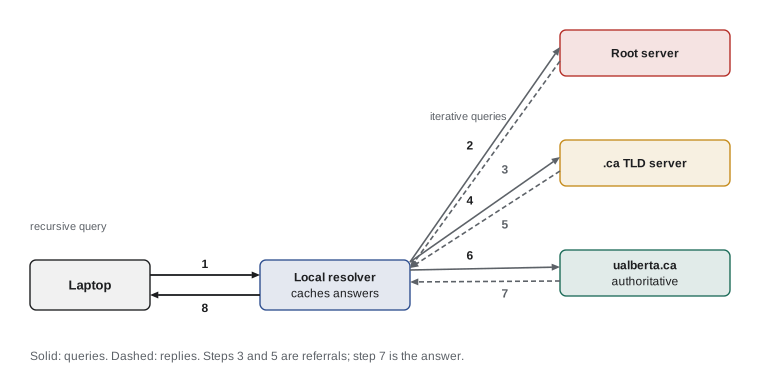
When the resolver has nothing cached, resolution proceeds iteratively: the resolver asks a root server, which refers it to the .ca TLD servers; it asks a .ca server, which refers it to the ualberta.ca authoritative servers; and it asks one of those, which returns the answer. The host's own query to the resolver is recursive: it asks for the final answer and lets the resolver do the legwork. Caching makes this fast in practice. TLD server addresses are cached for days, so root servers are rarely consulted, and popular names are usually cached by the resolver. Each record carries a time-to-live (TTL) in seconds that says how long it may be cached.
| Record type | Maps | Example |
|---|---|---|
| A | Name to IPv4 address | www.example.org. 300 IN A 93.184.216.34 |
| AAAA | Name to IPv6 address | www.example.org. 300 IN AAAA 2606:2800:220:1:: |
| CNAME | Alias to canonical name | shop.example.org. CNAME shops.cdnprovider.net. |
| MX | Domain to its mail servers, with preference | example.org. MX 10 mail1.example.org. |
| NS | Domain to its authoritative name servers | example.org. NS ns1.example.net. |
| TXT | Name to text, used for SPF, DKIM and domain verification | example.org. TXT "v=spf1 mx -all" |
| HTTPS | Name to connection hints, such as HTTP/3 support | example.org. HTTPS 1 . alpn="h3,h2" |
Inside a DNS message
DNS queries and replies share one binary format: a 12-byte header with an identifier, flags and four counts, followed by sections for questions, answers, authority records and additional records. Names are encoded as a sequence of labels, each preceded by its length, ending with a zero byte. To save space, a name can end with a two-byte pointer to an earlier occurrence in the same message, marked by the top two bits being 11. The program below builds a real query for www.ualberta.ca, then parses a reply that uses such a pointer. (The address in the hand-built reply is illustrative.) You could send this exact query to a resolver with a UDP socket, as lesson 5 shows.
import struct
def build_query(name, qtype=1, ident=0x1d3a):
    header = struct.pack("!HHHHHH", ident, 0x0100, 1, 0, 0, 0)   # RD flag set, one question
    qname = b"".join(bytes([len(p)]) + p.encode() for p in name.split(".")) + b"\x00"
    return header + qname + struct.pack("!HH", qtype, 1)        # type A, class IN
q = build_query("www.ualberta.ca")
print(len(q), "bytes:", q.hex(" "))

# A response the resolver might send back (built by hand, using a compression pointer to offset 12)
answer = struct.pack("!HHHLH4s", 0xC00C, 1, 1, 300, 4, bytes([129, 128, 5, 233]))
resp = struct.pack("!HHHHHH", 0x1d3a, 0x8180, 1, 1, 0, 0) + q[12:] + answer

def read_name(msg, off):
    labels = []
    while True:
        n = msg[off]
        if n & 0xC0 == 0xC0:                       # pointer: two bytes, 14-bit offset
            ptr = struct.unpack("!H", msg[off:off + 2])[0] & 0x3FFF
            return ".".join(labels + [read_name(msg, ptr)[0]]).strip("."), off + 2
        if n == 0:
            return ".".join(labels), off + 1
        labels.append(msg[off + 1: off + 1 + n].decode()); off += 1 + n

ident, flags, qd, an, ns, ar = struct.unpack("!HHHHHH", resp[:12])
print(f"id 0x{ident:04x} response={flags >> 15} rcode={flags & 0xF} questions={qd} answers={an}")
name, off = read_name(resp, 12); off += 4
rname, off = read_name(resp, off)
rtype, rclass, ttl, rdlen = struct.unpack("!HHLH", resp[off:off + 10])
addr = ".".join(map(str, resp[off + 10: off + 10 + rdlen]))
print(f"{rname} TTL {ttl} s type A {addr}")33 bytes: 1d 3a 01 00 00 01 00 00 00 00 00 00 03 77 77 77 08 75 61 6c 62 65 72 74 61 02 63 61 00 00 01 00 01 id 0x1d3a response=1 rcode=0 questions=1 answers=1 www.ualberta.ca TTL 300 s type A 129.128.5.233
The identifier lets the client match replies to queries. In 2008 Dan Kaminsky showed that an attacker who could guess the identifier and race the real reply could poison a resolver's cache for an entire domain; resolvers now also randomize the source port to make guessing much harder. DNSSEC, which adds digital signatures to records, provides real protection, and encrypted transports such as DNS over HTTPS (DoH) and DNS over TLS (DoT) hide queries from eavesdroppers. CISSP-113 lesson 3 discusses these from the security side.
# Average DNS lookup time with a caching local resolver
import random
random.seed(4)
rtt_local, rtt_auth = 2, 40            # ms to the local resolver; ms per query it makes outward
names = [f"site{i}.example" for i in range(200)]
weights = [1 / (i + 1) for i in range(200)]       # a few names are very popular (Zipf-like)
cache, now, total, misses = {}, 0.0, 0.0, 0
for _ in range(20_000):
    now += 0.05                                   # a lookup every 50 ms
    name = random.choices(names, weights)[0]
    if cache.get(name, -1) > now:
        total += rtt_local
    else:
        misses += 1
        total += rtt_local + 2 * rtt_auth          # TLD and authoritative servers (root cached)
        cache[name] = now + 300                    # TTL of 300 seconds
print(f"hit rate {1 - misses/20_000:.1%}, mean lookup {total/20_000:.1f} ms")hit rate 96.5%, mean lookup 4.8 ms
The simulation shows why caching matters: most lookups are answered from the cache in a couple of milliseconds, and only a few incur the full cost of asking TLD and authoritative servers. Shorter TTLs let operators move a service quickly to new addresses, which content delivery networks and failover systems rely on, but they reduce the hit rate and increase load on authoritative servers.
Worked problem
How many queries does a cold lookup need?
A laptop looks up mail.cs.example.ca. Its resolver has an empty cache except for the root servers' addresses. The authoritative servers for example.ca delegate the subdomain cs.example.ca to separate servers. How many queries does the resolver send, and what is the total lookup time if each round trip from the resolver to any DNS server is 30 ms and the laptop is 2 ms from its resolver?
Show solution
- The resolver asks a root server and is referred to the .ca TLD servers (query 1).
- It asks a .ca server and is referred to the example.ca authoritative servers (query 2).
- It asks an example.ca server and is referred to the cs.example.ca servers (query 3).
- It asks a cs.example.ca server and gets the address (query 4).
- Total: \(2 + 4 \times 30 = 122\) ms. The next lookup of any name under example.ca skips the first two queries.
Answer: Four queries and about 122 ms; caching of the TLD and delegation records makes later lookups much faster.
Email: SMTP and store-and-forward delivery
Internet email has three main parts: user agents (mail clients such as a phone's mail app or a web interface), mail servers that hold mailboxes and queue outgoing messages, and the Simple Mail Transfer Protocol (SMTP, RFC 5321) that moves messages between servers. When Ana sends a message to a food bank's address, her mail client submits it to her provider's mail server (usually on port 587, with authentication and TLS). That server looks up the MX records for the recipient's domain in DNS and opens a TCP connection to the recipient's mail server on port 25, where SMTP transfers the message. If the recipient's server is unreachable, the sender's server keeps the message in a queue and retries for days. The recipient later reads the message with IMAP (RFC 9051) or a web interface; POP3 is an older protocol that downloads and usually deletes messages.
SMTP is a text protocol with three-digit reply codes, like HTTP's but older. The program below runs a toy SMTP server and has a client send one message, printing the client's lines as C: and the server's as S:.
import socket, socketserver, threading
class Mini(socketserver.StreamRequestHandler):        # a toy SMTP server that accepts one message
    def handle(self):
        say = lambda line: self.wfile.write((line + "\r\n").encode())
        say("220 mail.foodbank.example ESMTP ready")
        while True:
            line = self.rfile.readline().decode().rstrip("\r\n")
            cmd = line.split(" ")[0].upper()
            if cmd == "EHLO": say("250-mail.foodbank.example"); say("250 SIZE 10485760")
            elif cmd in ("MAIL", "RCPT"): say("250 OK")
            elif cmd == "DATA":
                say("354 End data with <CR><LF>.<CR><LF>")
                while self.rfile.readline() not in (b".\r\n", b""): pass
                say("250 OK queued as 7F3A2")
            elif cmd == "QUIT": say("221 Bye"); return
srv = socketserver.TCPServer(("127.0.0.1", 0), Mini)
threading.Thread(target=srv.serve_forever, daemon=True).start()
with socket.create_connection(srv.server_address) as s:
    f = s.makefile("rwb")
    def read_reply():
        while True:
            line = f.readline().decode().rstrip(); print("S:", line)
            if line[3] == " ": return
    def send(line):
        print("C:", line); f.write((line + "\r\n").encode()); f.flush()
    read_reply()
    for cmd in ("EHLO laptop.example", "MAIL FROM:<ana@example.org>", "RCPT TO:<shifts@foodbank.example>", "DATA"):
        send(cmd); read_reply()
    for line in ("Subject: Saturday shift", "", "I can cover the 9 am shift.", "."):
        send(line)
    read_reply(); send("QUIT"); read_reply()
srv.shutdown()S: 220 mail.foodbank.example ESMTP ready C: EHLO laptop.example S: 250-mail.foodbank.example S: 250 SIZE 10485760 C: MAIL FROM:<ana@example.org> S: 250 OK C: RCPT TO:<shifts@foodbank.example> S: 250 OK C: DATA S: 354 End data with <CR><LF>.<CR><LF> C: Subject: Saturday shift C: C: I can cover the 9 am shift. C: . S: 250 OK queued as 7F3A2 C: QUIT S: 221 Bye
SMTP was designed in an era of trust, and any server can claim to be sending mail from any domain. Three DNS-published mechanisms now fight forgery: SPF lists the servers allowed to send for a domain, DKIM signs messages with a key published in DNS, and DMARC tells receivers what to do when checks fail and where to send reports. Since 2024 Google and Yahoo have required bulk senders to use all three, and anti-spam law adds obligations for commercial messages, a topic BUS-120 covered. CISSP-113 lesson 7 discusses email authentication in more depth.
Video streaming
Video dominates internet traffic: industry reports such as Sandvine's have put streaming video at well over half of downstream bytes. A video is a sequence of images compressed by exploiting redundancy within each image (spatial) and between successive images (temporal); codecs such as H.264, H.265 and AV1 trade compression efficiency against processing cost. A 1080p stream might need about 5 Mbit/s and a 4K stream 15 to 25 Mbit/s, depending on the codec and the content.
Early streaming used UDP and custom protocols. Today nearly all streaming uses HTTP: the server stores each video encoded at several bitrates, a ladder of qualities, cut into segments a few seconds long, and publishes a manifest file listing them. The player downloads segments over HTTP and chooses, segment by segment, which quality to request. This is Dynamic Adaptive Streaming over HTTP (DASH, an ISO standard) or Apple's similar HTTP Live Streaming (HLS). Because it uses ordinary HTTP, streaming works through firewalls and benefits from HTTP caches and CDNs.
The player's adaptive bitrate (ABR) algorithm is the clever part. It keeps a buffer of downloaded video ahead of playback. If the buffer empties, playback stalls with a spinning wheel, which users hate more than lower quality. Throughput-based algorithms estimate recent bandwidth and pick the highest bitrate below it; buffer-based algorithms such as BBA, studied at Netflix, pick quality from the buffer level; and hybrids such as the model-predictive approach combine both. The simulation below runs a simple buffer-based player over a network whose throughput wanders randomly.
# A simple buffer-based adaptive bitrate (ABR) player
import random
random.seed(11)
ladder = [0.75, 1.75, 3.0, 5.8]          # Mbit/s for 360p, 540p, 720p, 1080p
seg = 4.0                                # seconds of video per segment
buffer, t, stalls, chosen = 0.0, 0.0, 0.0, []
bw = 6.0
for i in range(60):
    bw = max(0.8, min(12, bw * random.uniform(0.7, 1.35)))    # network throughput wanders
    # choose by buffer level: safer quality when the buffer is low
    level = 0 if buffer < 8 else 1 if buffer < 14 else 2 if buffer < 20 else 3
    rate = ladder[level]
    download = rate * seg / bw            # seconds to fetch this segment
    if download > buffer:
        stalls += download - buffer; buffer = 0.0
    else:
        buffer -= download
    buffer = min(buffer + seg, 30)
    chosen.append(level)
counts = [chosen.count(k) for k in range(4)]
print("segments at 360p/540p/720p/1080p:", counts)
print(f"average bitrate {sum(ladder[k] for k in chosen)/len(chosen):.2f} Mbit/s, total stall time {stalls:.1f} s")segments at 360p/540p/720p/1080p: [3, 1, 11, 45] average bitrate 4.97 Mbit/s, total stall time 0.5 s
Live streaming and interactive video tighten the constraints. A live sports stream may accept a few seconds of delay; a video call cannot accept more than a fraction of a second, so calls use WebRTC, which runs RTP media over UDP with its own congestion control and uses servers mainly to help peers find each other and traverse NATs.
Content delivery networks
Serving a popular video to millions of viewers from one data centre would overload its links, send the same bytes across the same paths millions of times and put viewers far from the server at the mercy of long, congested paths. A content delivery network (CDN) stores copies of content in many locations close to users. Some CDNs, such as Akamai's, enter deep into access networks with thousands of small server clusters inside ISPs; others bring home a smaller number of large clusters at IXPs. Large content providers run their own CDNs: Netflix's Open Connect places caching appliances inside ISP networks and at IXPs at no charge to the ISP.
CDNs steer each client to a good server, most often using DNS. When a browser looks up a name such as video.example.com, the authoritative server returns a CNAME pointing into the CDN's namespace, and the CDN's own DNS servers return the address of a nearby, lightly loaded cluster. Because the CDN sees the address of the client's resolver rather than the client, an extension called EDNS Client Subnet lets resolvers pass part of the client's address along. Other CDNs use anycast, announcing the same IP address from many sites and letting internet routing (lesson 9) carry each client to the nearest one. Cluster selection weighs geographic closeness, measured delay and loss, and load.
Worked problem
Origin load with and without a CDN
A new episode is watched by 2 million viewers in its first hour, each streaming 2.5 GB. With no CDN, how much data leaves the origin in that hour, and at what average rate? With a CDN whose caches hold the episode after the first request in each of 400 locations, how much leaves the origin?
Show solution
- Without a CDN: \(2 \times 10^6 \times 2.5\) GB = 5 PB in one hour, an average of \(5 \times 10^{15} \times 8 / 3600 \approx 11\) Tbit/s.
- With a CDN: roughly one copy per location, \(400 \times 2.5\) GB = 1 TB from the origin, plus refetches when caches evict content.
- The CDN reduces origin traffic by a factor of about 5,000 and moves most bytes over short paths inside or near access networks.
Answer: About 5 PB at about 11 Tbit/s without a CDN, versus about 1 TB with one: a reduction of thousands of times.
Peer-to-peer file distribution
In client–server distribution, the server must upload a full copy to every client, so distribution time grows linearly with the number of clients. In peer-to-peer distribution, each peer that has received part of the file can upload it to others, so the system's total upload capacity grows with the number of peers. A simple model by Kurose and Ross gives the minimum distribution time for a file of \(F\) bits, a server upload rate \(u_s\), and \(N\) peers each with upload rate \(u\) and download rate \(d\).
# Minimum time to distribute a file of F bits to N peers (Kurose and Ross model)
F = 4e9 * 8            # a 4 GB file
us = 1e9               # server upload rate: 1 Gbit/s
u, d = 20e6, 100e6     # each peer: 20 Mbit/s up, 100 Mbit/s down
print("    N   client-server   peer-to-peer")
for N in (10, 100, 1_000, 10_000):
    cs = max(N * F / us, F / d)
    p2p = max(F / us, F / d, N * F / (us + N * u))
print(f"{N:6d} {cs/3600:12.1f} h {p2p/3600:12.2f} h") N client-server peer-to-peer
10 0.1 h 0.09 h
100 0.9 h 0.30 h
1000 8.9 h 0.42 h
10000 88.9 h 0.44 hBitTorrent is the best-known P2P protocol. A file is split into pieces, typically 256 KB to a few megabytes. Peers find each other through a tracker or a distributed hash table, exchange lists of the pieces they hold, request the rarest pieces first so that every piece stays available, and use a tit-for-tat strategy: each peer uploads mostly to the peers that upload most to it, plus an occasional randomly chosen peer to discover better partners. Distributed hash tables, which map keys to peers in a structured overlay so that lookups take a logarithmic number of hops, are a topic of CMPUT-450.
Common mistakes
MistakeThinking DNS has one central server.
InsteadDNS is a distributed hierarchy of root, TLD and authoritative servers with caching resolvers.
MistakeAssuming a DNS change takes effect instantly everywhere.
InsteadResolvers keep cached records until their TTL expires.
MistakeBelieving email is delivered directly from the sender's laptop to the recipient's.
InsteadMail is submitted to the sender's server, which delivers it to the recipient's server using SMTP after an MX lookup.
MistakeThinking streaming services send one fixed-quality file.
InsteadThey encode several bitrates and the player chooses segments adaptively.
MistakeAssuming the highest affordable bitrate is always best for streaming.
InsteadChoosing too high a bitrate empties the buffer and causes stalls, which hurt viewers more than lower quality.
MistakeThinking peer-to-peer always beats client–server.
InsteadP2P helps large swarms but depends on peers' upload capacity and willingness to stay online.
Summary and key terms
- DNS is a hierarchical, distributed, cached database queried mostly over UDP port 53.
- Resolvers follow referrals from root to TLD to authoritative servers; TTLs control caching.
- DNS messages use a binary format with label-encoded names and compression pointers.
- Email uses SMTP between mail servers after an MX lookup, with SPF, DKIM and DMARC against forgery.
- Video streaming uses DASH or HLS: segments at several bitrates chosen by an adaptive bitrate algorithm.
- CDNs replicate content near users and steer clients with DNS or anycast.
- Peer-to-peer distribution scales because each peer adds upload capacity.
- Recursive resolver
- A DNS server that answers clients by querying other servers on their behalf and caching results.
- Authoritative server
- A DNS server that holds the definitive records for a zone.
- TTL (DNS)
- The number of seconds a DNS record may be cached.
- MX record
- A DNS record naming the mail servers for a domain.
- SMTP
- The Simple Mail Transfer Protocol, used to transfer email between servers.
- DASH
- Dynamic Adaptive Streaming over HTTP: video in segments at several bitrates.
- Adaptive bitrate (ABR)
- A player algorithm that chooses the quality of each segment based on throughput and buffer level.
- CDN
- A content delivery network of caches placed close to users.
- Anycast
- Announcing one address from many sites so routing delivers each client to a nearby one.
- Tit-for-tat
- BitTorrent's strategy of uploading preferentially to peers that upload to you.
Practice problems
Work each problem on paper first, then reveal the answer to check.
Why does DNS usually use UDP rather than TCP?
Show answer
Queries and replies are small, and a lost query can be retried quickly without connection setup.
What is the difference between a recursive and an iterative query?
Show answer
A recursive query asks for the final answer; an iterative query may return a referral to another server.
Which record would you add so that mail for example.org goes to mail1.example.org?
Show answer
An MX record for example.org pointing to mail1.example.org.
What do the top two bits 11 mean in a DNS name byte?
Show answer
The next 14 bits are a pointer to an earlier name in the message.
On which port is mail typically submitted by clients?
Show answer
Port 587, with authentication and TLS.
Name the three DNS-based email authentication mechanisms.
Show answer
SPF, DKIM and DMARC.
Why does DASH use HTTP?
Show answer
It passes through firewalls and benefits from existing caches and CDNs.
What happens in an ABR player when the buffer empties?
Show answer
Playback stalls until more video arrives.
How does a DNS-based CDN choose a server for a client?
Show answer
Its DNS server returns the address of a cluster chosen by proximity, measured performance and load.
Why does BitTorrent request the rarest pieces first?
Show answer
To keep every piece available in the swarm and avoid pieces disappearing when peers leave.
Lesson quiz · 5 questions
Score 60% or more to complete this lesson.
Create a free account to save your progress, take quizzes and earn a certificate.