
CMP-330 · Lesson 3 of 12 · 33 min
The application layer I: the web and HTTP
The web is the application that turned the internet from a research network into a part of daily life, and HTTP, the Hypertext Transfer Protocol, is its language. A web page is a base HTML file that refers to other objects: images, style sheets, scripts, fonts and data fetched by JavaScript. A browser fetches these objects from servers with HTTP requests and assembles the page. This lesson follows HTTP through three generations: the text-based HTTP/1.1 that dominated for two decades, the binary, multiplexed HTTP/2, and HTTP/3, which runs over the QUIC transport protocol on UDP. Along the way we look at the request–response model, caching, cookies and the performance arithmetic that drove each redesign.
Before HTTP, though, we need the general architecture of network applications. CMPUT-404 builds full web applications; here the focus is the protocol and its performance.
Client–server and peer-to-peer
Most network applications follow the client–server architecture. A server is an always-on host with a fixed, well-known address; clients contact it when they need something, and clients do not talk to each other directly. Popular services run many servers in data centres behind load balancers, but the architecture is the same. In a peer-to-peer (P2P) architecture, hosts communicate directly, each acting as both client and server. P2P systems scale naturally, because each new peer adds capacity as well as demand, but they must cope with peers that come and go. Lesson 4 looks at BitTorrent. Many systems mix the two, for example using servers to find peers and then sending data directly, as some video-calling systems do when a direct path is possible.
Whatever the architecture, communication happens between processes, and a process sends and receives messages through a socket, the interface between the application and the transport layer that lesson 5 explores in detail. A process is identified by its host's IP address and a port number: web servers conventionally listen on port 80 for plain HTTP and 443 for HTTPS. When choosing a transport, an application considers four needs: reliable delivery, throughput, timing and security. TCP offers reliable, ordered byte streams with congestion control; UDP offers almost nothing beyond delivery to a port, which suits applications that would rather manage timing themselves. Neither offers throughput or delay guarantees, so applications must adapt. Security is added above TCP by TLS or built into QUIC.
HTTP/1.1: requests and responses
HTTP/1.1, specified today in RFC 9110 (semantics) and RFC 9112 (message syntax), is a request–response protocol. A client sends a request message consisting of a request line (method, target, version), header lines and an optional body; the server answers with a status line, header lines and usually a body. The messages are human-readable text, with lines ending in a carriage return and line feed and a blank line separating headers from the body. HTTP is stateless: a server keeps no memory of earlier requests from the same client unless the application adds state, which is what cookies are for.
| Element | Examples | Meaning |
|---|---|---|
| Method | GET, POST, PUT, DELETE, HEAD, PATCH | What the client wants done to the target resource |
| Status 2xx | 200 OK, 201 Created, 204 No Content | Success |
| Status 3xx | 301 Moved Permanently, 304 Not Modified | Redirection or use the cached copy |
| Status 4xx | 400 Bad Request, 403 Forbidden, 404 Not Found, 429 Too Many Requests | Client error |
| Status 5xx | 500 Internal Server Error, 503 Service Unavailable | Server error |
| Request headers | Host, User-Agent, Accept, Cookie, If-None-Match | Information about the client and request |
| Response headers | Content-Type, Content-Length, Cache-Control, ETag, Set-Cookie | Information about the response and how to handle it |
The program below runs a tiny web server on the local machine and talks to it over a raw TCP socket, so you can see exactly what crosses the wire. The first request receives a full response with a body; the second includes an If-None-Match header with the entity tag (ETag) from the first response, and the server answers 304 Not Modified with no body, telling the client its cached copy is still good.
import http.server, threading, socket
class Handler(http.server.BaseHTTPRequestHandler):
    protocol_version = "HTTP/1.1"
    def log_message(self, *args): pass           # keep the output quiet
    def do_GET(self):
        body = b"<h1>Food bank hours</h1><p>Open Tuesday to Saturday.</p>"
        if self.headers.get("If-None-Match") == '"v7"':
            self.send_response(304); self.send_header("ETag", '"v7"'); self.end_headers(); return
        self.send_response(200)
        self.send_header("Content-Type", "text/html; charset=utf-8")
        self.send_header("Content-Length", str(len(body)))
        self.send_header("Cache-Control", "max-age=60")
        self.send_header("ETag", '"v7"')
        self.end_headers(); self.wfile.write(body)
srv = http.server.HTTPServer(("127.0.0.1", 0), Handler)
threading.Thread(target=srv.serve_forever, daemon=True).start()
port = srv.server_address[1]

def exchange(request):
    with socket.create_connection(("127.0.0.1", port)) as s:
        s.sendall(request.encode())
        data = b""
        while b"\r\n\r\n" not in data:
            data += s.recv(4096)
        head, _, rest = data.partition(b"\r\n\r\n")
        length = int(next((l.split(":")[1] for l in head.decode().split("\r\n") if l.lower().startswith("content-length")), "0"))
        while len(rest) < length:
            rest += s.recv(4096)
        lines = head.decode().split("\r\n")
        keep = [l for l in lines if not l.startswith(("Date:", "Server:"))]
        return keep, rest

req = "GET /hours HTTP/1.1\r\nHost: foodbank.example\r\nUser-Agent: course-demo\r\n\r\n"
print(">>> request\n" + req.replace("\r\n", "\n").rstrip())
lines, body = exchange(req)
print("<<< response\n" + "\n".join(lines)); print(body.decode())
print()
req2 = req.replace("\r\n\r\n", '\r\nIf-None-Match: "v7"\r\n\r\n')
lines, body = exchange(req2)
print("<<< conditional request answered with\n" + "\n".join(lines), "| body bytes:", len(body))
srv.shutdown()>>> request GET /hours HTTP/1.1 Host: foodbank.example User-Agent: course-demo <<< response HTTP/1.1 200 OK Content-Type: text/html; charset=utf-8 Content-Length: 56 Cache-Control: max-age=60 ETag: "v7" <h1>Food bank hours</h1><p>Open Tuesday to Saturday.</p> <<< conditional request answered with HTTP/1.1 304 Not Modified ETag: "v7" | body bytes: 0
Look first at the Host header. Because one server address commonly hosts thousands of websites, HTTP/1.1 requires the client to name the site it wants. Look too at the Content-Length header, which tells the client where the body ends so that the connection can carry another request afterwards. When the length is not known in advance, a server can use chunked transfer encoding instead.
Persistent connections and the cost of round trips
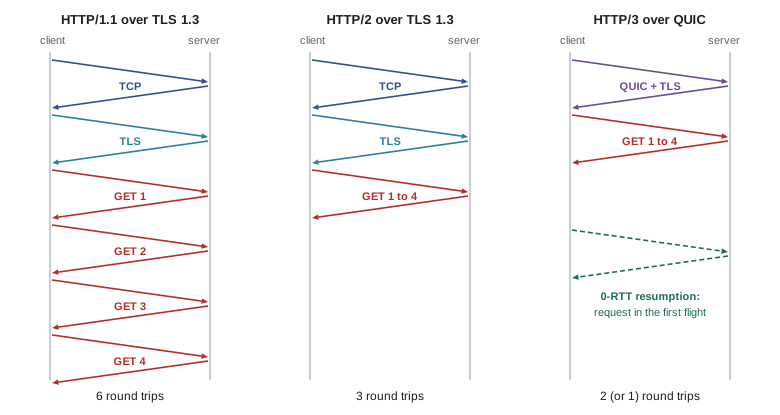
HTTP runs over TCP, and opening a TCP connection costs one round trip for the three-way handshake (lesson 7). HTTPS adds a TLS handshake: one more round trip with TLS 1.3, two with TLS 1.2. HTTP/1.0 originally opened a new connection for every object, so a page with ten images paid the handshake cost eleven times. HTTP/1.1 made connections persistent by default: after a response, the connection stays open for the next request. Pipelining, sending several requests without waiting for responses, was also allowed but almost never used, because responses had to come back in order and a slow response blocked all later ones. Browsers instead open several connections to each server, typically six, and send requests in parallel.
The program below estimates page load time for a page with ten small images when the round-trip time is 50 ms, counting only round trips and ignoring transmission time, which is small for small objects. It shows why each generation of HTTP has concentrated on removing round trips.
# Page load time under different HTTP versions: one HTML page plus 10 small images
RTT, objects = 0.050, 10        # seconds; images on the same server
t_tcp, t_tls13 = 1 * RTT, 1 * RTT
cases = {
    "HTTP/1.0, new TCP+TLS per object": (t_tcp + t_tls13 + RTT) * (1 + objects),
    "HTTP/1.1, 1 persistent connection, no pipelining": t_tcp + t_tls13 + RTT * (1 + objects),
    "HTTP/1.1, 6 parallel persistent connections": t_tcp + t_tls13 + RTT + RTT * -(-objects // 6),
    "HTTP/2, one connection, multiplexed": t_tcp + t_tls13 + RTT + RTT,
    "HTTP/3 over QUIC (combined 1-RTT handshake)": RTT + RTT + RTT,
    "HTTP/3 resumed with 0-RTT": RTT + RTT,
}
for name, t in cases.items():
print(f"{name:48s} {t*1000:6.0f} ms ({t/RTT:.0f} RTT)")HTTP/1.0, new TCP+TLS per object 1650 ms (33 RTT) HTTP/1.1, 1 persistent connection, no pipelining 650 ms (13 RTT) HTTP/1.1, 6 parallel persistent connections 250 ms (5 RTT) HTTP/2, one connection, multiplexed 200 ms (4 RTT) HTTP/3 over QUIC (combined 1-RTT handshake) 150 ms (3 RTT) HTTP/3 resumed with 0-RTT 100 ms (2 RTT)
HTTP/2: binary framing and multiplexing
HTTP/2, standardized in 2015 and now specified in RFC 9113, kept HTTP's methods, status codes and headers but changed how they are carried. Messages are split into binary frames, each tagged with a stream identifier, and many streams are interleaved on a single TCP connection. A slow response no longer blocks others at the HTTP level, and one connection replaces six, which is kinder to the network and lets TCP's congestion control work better. HTTP/2 also compresses headers with HPACK, which matters because many requests repeat the same long cookies and user-agent strings, and lets clients assign priorities to streams. A feature called server push, which let servers send objects before they were requested, proved hard to use well, and major browsers have removed support for it.
HTTP/2 left one problem unsolved. TCP delivers a single ordered byte stream, so if one packet is lost, every byte after it waits in the receiver's buffer until the retransmission arrives, even bytes belonging to other HTTP/2 streams that were received intact. This is transport-level head-of-line blocking. On lossy mobile networks it can make HTTP/2 slower than several HTTP/1.1 connections.
HTTP/3 and QUIC
QUIC, specified in RFC 9000 in 2021 and originally developed at Google, is a transport protocol that runs over UDP and provides reliable, congestion-controlled streams with built-in encryption. HTTP/3, RFC 9114, maps HTTP onto QUIC. Because QUIC knows about streams, a lost packet delays only the streams whose data it carried. QUIC also combines the transport and TLS 1.3 handshakes into a single round trip, and lets a client that has talked to a server before send its first request in its very first packet (0-RTT resumption), at the cost that such early data could be replayed by an attacker and so must be limited to safe requests. QUIC connections are identified by connection IDs rather than by IP addresses and ports, so a phone moving from Wi-Fi to cellular can keep its connection. And because almost the entire QUIC header is encrypted, middleboxes cannot inspect or interfere with it, which frees the protocol to evolve. CISSP-112 covers TLS 1.3's cryptography; lesson 7 compares QUIC's congestion control with TCP's.
# Head-of-line blocking: one lost packet delays every stream on a TCP connection
streams = [f"img{i}" for i in range(5)]               # five responses of 4 packets each
order = [name for k in range(4) for name in streams]  # packets interleaved in sending order
lost = 5                                              # the second packet of img0 is lost
RTT, gap = 50, 2                                      # ms; one packet arrives every 2 ms
repair = lost * gap + RTT                             # retransmission arrives one RTT later
def finish(per_stream):
    done = {}
    for i, name in enumerate(order):
        t = i * gap
        blocked = i >= lost and (not per_stream or name == order[lost])
        ready = max(t, repair) if blocked else t     # TCP: all later bytes wait; QUIC: only that stream
        done[name] = max(done.get(name, 0), ready)
    return done
tcp, quic = finish(False), finish(True)
print("stream  TCP (HTTP/2)  QUIC (HTTP/3)")
for name in streams:
print(f"{name:6s} {tcp[name]:8d} ms {quic[name]:10d} ms")stream TCP (HTTP/2) QUIC (HTTP/3) img0 60 ms 60 ms img1 60 ms 32 ms img2 60 ms 34 ms img3 60 ms 36 ms img4 60 ms 38 ms
In the simulation, five responses are interleaved on one connection and one packet of the first is lost. Over TCP, every stream with data after the lost packet waits for the retransmission, so all five finish late; over QUIC, only the stream that lost a packet waits, and the other four finish 22 to 28 ms sooner. QUIC runs in user space as a library inside the browser or server, so it can be updated quickly, but it costs more processor time than kernel TCP, partly because each UDP packet is processed separately. By 2025, large content delivery networks reported that roughly a fifth to a third of the web requests they handled used HTTP/3, and every major browser supports it. Browsers discover that a server supports HTTP/3 from an Alt-Svc header or a DNS HTTPS record, and fall back to TCP when UDP is blocked.
Worked problem
Choosing the bottleneck for a page load
A page consists of an HTML file and 30 small objects of 20 KB each from one server, over a 100 Mbit/s path with an RTT of 80 ms. Using HTTP/2 over TLS 1.3, estimate the load time, first counting only round trips and then including transmission time. Assume TCP can send all the objects in the round trip after the HTML arrives, which ignores slow start.
Show solution
- Round trips: TCP handshake 1, TLS 1, HTML request 1, all 30 objects multiplexed 1: \(4 \times 80 = 320\) ms.
- Transmission time of the objects: \(30 \times 20{,}000 \times 8 = 4.8 \times 10^6\) bits at \(10^8\) bit/s is 48 ms.
- Total about 370 ms; round trips dominate. In practice slow start (lesson 7) needs a few extra RTTs to send 600 KB on a new connection, so real load times are higher still.
- With HTTP/3, the combined handshake saves one RTT, giving about 290 ms; with 0-RTT resumption, another RTT, about 210 ms.
Answer: About 370 ms with HTTP/2 over TLS 1.3, dominated by four round trips; HTTP/3 saves one or two of them.
Cookies: adding state to a stateless protocol
Because HTTP is stateless, websites that need to recognize returning users, such as to keep someone logged in or remember a shopping cart, use cookies, defined in RFC 6265. A server includes a Set-Cookie header in a response; the browser stores the cookie and sends it back in a Cookie header on later requests to the same site. The server uses the value, typically a random session identifier, to look up the user's state in its database. Cookie attributes control scope and security: Secure sends the cookie only over HTTPS, HttpOnly hides it from JavaScript, and SameSite limits whether it is sent with requests initiated by other sites, an important defence against cross-site request forgery.
Third-party cookies, set by an embedded resource from a different domain such as an advertising network, let companies track users across many sites. Privacy law and browser policy have both pushed back. In Canada, PIPEDA and Quebec's Law 25 require meaningful consent for collecting personal information, and in the United States several states' privacy laws give users rights to opt out of targeted advertising; CISSP-111 and CMPUT-291 lesson 11 discuss privacy law in more depth. Safari and Firefox block third-party cookies by default. Google announced in 2024 that Chrome would not remove them after all and instead offer users a choice, and in 2025 abandoned the separate prompt as well, leaving third-party cookies enabled by default in Chrome.
Web caches and conditional requests
Caching keeps copies of responses closer to clients. A browser cache stores objects on the user's own device; a proxy cache or a content delivery network (lesson 4) stores them in the network. The Cache-Control header tells caches how long a response stays fresh: max-age=60 in our server's response means it may be reused without asking for 60 seconds. After that, the cache revalidates with a conditional request, sending If-None-Match with the ETag (or If-Modified-Since with a date). If the object has not changed, the server replies 304 Not Modified with no body, saving the transfer of the object while still costing a round trip. Responses marked no-store must never be cached, which is appropriate for private data such as bank statements.
Worked problem
Benefit of an institutional cache
A campus with a 1 Gbit/s access link generates 1,500 requests per second for objects averaging 100 KB. The RTT from the campus to origin servers averages 120 ms, and the access link delay model is that delay rises sharply above 80% utilization. What is the access link utilization without a cache? With a cache that answers 40% of requests locally in 2 ms, what is the new utilization and average response delay, ignoring transmission time?
Show solution
- Traffic: \(1500 \times 100{,}000 \times 8 = 1.2 \times 10^9\) bit/s, which exceeds the 1 Gbit/s link: utilization 120%, so queues grow without bound and delay becomes enormous.
- With a 40% hit rate, only 60% of requests cross the link: \(0.72 \times 10^9\) bit/s, utilization 72%, below the danger zone.
- Average delay: \(0.4 \times 2 + 0.6 \times 120 = 72.8\) ms, plus some queueing at 72% load.
- A cache costs far less than doubling the access link, and also reduces load on origin servers.
Answer: Without a cache the link is overloaded at 120%; with a 40% hit rate utilization falls to 72% and average delay to about 73 ms plus modest queueing.
HTTPS everywhere has changed the caching picture. A shared proxy in an ISP cannot cache encrypted responses it cannot read, so most shared caching now happens in content delivery networks that act on the content provider's behalf and hold its TLS certificates. The browser cache remains as important as ever.
Common mistakes
MistakeThinking HTTP/2 eliminated head-of-line blocking completely.
InsteadHTTP/2 removed it at the HTTP level, but TCP still blocks all streams behind a lost packet; QUIC fixes this at the transport level.
MistakeBelieving HTTP keeps session state on its own.
InsteadHTTP is stateless; applications add state with cookies or tokens.
MistakeTreating a 304 response as an error.
Instead304 Not Modified tells the client to use its cached copy; it saves bandwidth.
MistakeAssuming bigger bandwidth will fix slow page loads with many objects.
InsteadPage loads are often dominated by round trips; reducing round trips matters more.
MistakeThinking QUIC is unreliable because it uses UDP.
InsteadQUIC implements reliability, ordering per stream and congestion control itself on top of UDP.
MistakeSending 0-RTT data for requests that change state.
InsteadEarly data can be replayed, so it should be limited to safe, idempotent requests.
Summary and key terms
- Applications use client–server or peer-to-peer architectures and communicate between processes through sockets.
- HTTP is a stateless request–response protocol with methods, status codes and headers.
- Persistent connections avoid repeating TCP and TLS handshakes for every object.
- HTTP/2 multiplexes binary framed streams over one TCP connection and compresses headers.
- TCP's in-order delivery causes head-of-line blocking across HTTP/2 streams when a packet is lost.
- HTTP/3 runs over QUIC, which provides per-stream delivery, a combined 1-RTT handshake, 0-RTT resumption and connection migration.
- Cookies add state; caches with Cache-Control and conditional requests reduce load and delay.
- Client–server
- An architecture in which always-on servers answer requests from clients.
- Persistent connection
- A TCP connection that carries several HTTP requests and responses.
- Status code
- A three-digit code in an HTTP response indicating the result, such as 200 or 404.
- Stream
- An independent sequence of frames within one HTTP/2 or QUIC connection.
- Head-of-line blocking
- Delay of later data because earlier data in the same ordered stream is missing.
- QUIC
- A UDP-based transport protocol with built-in TLS 1.3, streams and connection migration.
- 0-RTT resumption
- Sending application data in the first packet to a previously visited server.
- Cookie
- A value set by a server and returned by the browser to maintain state across requests.
- ETag
- An identifier for a version of a resource, used in conditional requests.
- Conditional GET
- A request that asks for a resource only if it has changed since a cached version.
Practice problems
Work each problem on paper first, then reveal the answer to check.
What does the Host header allow?
Show answer
Many websites to share one server address, since the client names the site it wants.
How many round trips does a new HTTPS connection with TLS 1.3 need before the first request can be sent?
Show answer
Two: one for TCP and one for TLS.
What does the status code 429 mean?
Show answer
Too Many Requests: the client is being rate limited.
Why did browsers rarely use HTTP/1.1 pipelining?
Show answer
Responses had to return in order, so one slow response blocked the rest, and some proxies mishandled it.
Give two features of HTTP/2 not present in HTTP/1.1.
Show answer
Binary framing with multiplexed streams; HPACK header compression.
Why can QUIC keep a connection alive when a phone changes networks?
Show answer
Connections are identified by connection IDs, not by IP addresses and ports.
What does the HttpOnly cookie attribute do?
Show answer
Prevents JavaScript from reading the cookie, reducing the impact of cross-site scripting.
What is the difference between max-age and no-store?
Show answer
max-age gives a freshness lifetime for caching; no-store forbids caching at all.
Why are shared proxy caches less effective today?
Show answer
Most traffic is encrypted with HTTPS, so proxies cannot read or cache it; CDNs cache on behalf of providers.
How does a browser learn that a server supports HTTP/3?
Show answer
From an Alt-Svc response header or a DNS HTTPS record.
Lesson quiz · 5 questions
Score 60% or more to complete this lesson.
Create a free account to save your progress, take quizzes and earn a certificate.