
ROB-100 · Lesson 8 of 12 · 27 min
Robot software and the sense-plan-act loop
Modern robots are as much software as hardware. A warehouse robot may run millions of lines of code: drivers for its sensors and motors, perception that turns raw data into obstacles and landmarks, localization that tracks where it is, planners that choose routes, controllers that follow them, task logic that decides what to fetch, safety monitors, user interfaces, logging and fleet communication. Organizing all of this so it is reliable, fast enough and possible to test and change is a central challenge of robotics. This lesson describes the classic sense-plan-act architecture and its alternatives, the layered hybrid architectures used today, how robot software is split into communicating parts using the Robot Operating System 2, how robots decide what to do next using state machines and behavior trees, why timing and data volumes matter, and how simulation and testing are used to build trustworthy robot software.
Sense, plan, act
The earliest approach to organizing a robot's intelligence, seen in Shakey (lesson 2), was a strict sequence: sense the world, build a complete model of it, plan a full sequence of actions in that model, then act, and repeat. This sense-plan-act, or deliberative, architecture is logical and can produce clever plans, but it has serious drawbacks. Building a complete world model is slow and error-prone; the world may change while the robot is still planning; and if the model is wrong, the robot carries on blindly with an inappropriate plan. A robot that stops to think for a minute every time a person walks by is not useful.
Reactive architectures, such as the behavior-based robots of the 1980s, went to the other extreme: connect sensors directly to actions through simple rules, such as turn away if an obstacle is close, and let more complex behavior emerge from many such rules working together. Reactive robots respond within milliseconds and cope well with surprises, but they struggle with tasks that need foresight, such as finding a route through a building or assembling a product in the right order.
Hybrid, layered architectures
Almost all modern robots use a hybrid architecture that combines both approaches in layers. A common pattern has three layers. The bottom, reactive layer runs fast control loops and reflexes: motor control, balance, emergency stops and immediate obstacle avoidance. The middle, executive layer sequences behaviors and monitors progress: it starts and stops skills such as drive to a waypoint, dock or pick an item, checks whether they succeed and handles failures. The top, deliberative layer plans: it chooses routes on a map, schedules tasks and reasons about goals. Each layer works at a different time scale, from milliseconds at the bottom to seconds or minutes at the top, and each can be developed and tested separately. The sense, think and act loop of lesson 1 is still there, but it runs at several levels at once.
The software pipeline of a mobile robot
A typical autonomous mobile robot processes information through a pipeline of components:
- Drivers read raw data from sensors such as lidars, cameras, encoders and IMUs, and send commands to motor controllers.
- Perception processes the raw data: filtering noise, detecting obstacles, people and objects, and extracting features such as walls or landmarks.
- Localization and mapping estimate where the robot is on a map and update the map as the world changes, using techniques such as simultaneous localization and mapping (SLAM).
- Planning finds a route from the current position to the goal on the map (global planning) and computes safe, smooth motion around nearby obstacles (local planning).
- Control converts the planned motion into wheel or joint commands and holds them with feedback loops.
- Task management decides which goals to pursue, in what order, and what to do when something goes wrong.
- Safety monitoring runs alongside everything, often on separate hardware, and can stop the robot regardless of what the other components are doing.
Robot arms have similar pipelines: perception finds the object to grasp, a grasp planner chooses where to hold it, a motion planner finds a collision-free path for the arm, and controllers execute it.
ROS 2: robot software as communicating nodes
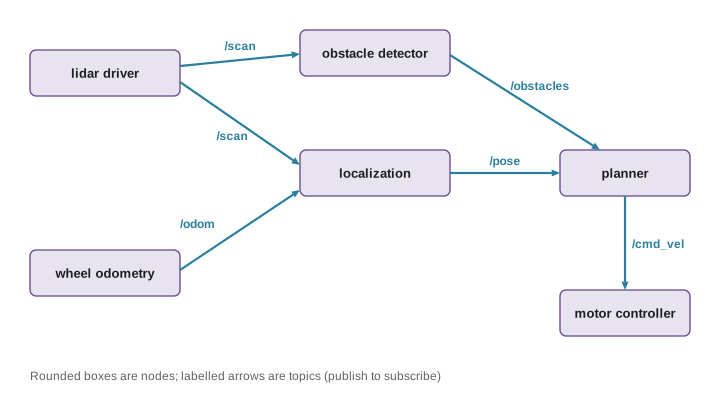
Rather than writing one huge program, roboticists usually split robot software into many small programs that communicate. The Robot Operating System 2 (ROS 2), despite its name, is not an operating system but a set of open-source libraries and tools, usually running on Linux, for building robot software this way. In ROS 2, each program is a node with one job, such as driving a lidar, estimating the robot's position or planning paths. Nodes exchange data by publishing and subscribing to named topics: a lidar driver node publishes scans on a topic, and any node that needs them, such as a mapping node or an obstacle detector, subscribes. Messages on topics have defined types, such as laser scans, images, poses and velocity commands. For requests that need an answer, nodes use services, and for long-running tasks with progress feedback and the option to cancel, such as navigate to the loading dock, they use actions. Parameters let users configure nodes without changing code, and launch files start a whole set of nodes together.
ROS 2 is built on a communication standard called the Data Distribution Service (DDS), which lets nodes find each other automatically on a network and offers quality-of-service settings, for example to choose whether old messages may be dropped in favor of new ones. ROS 2 comes with tools for visualizing sensor data and robot models, recording and replaying data, and simulating robots, plus large libraries contributed by the community, such as Nav2 for mobile robot navigation and MoveIt for arm motion planning. Many companies build commercial robots on ROS 2, and many research papers release ROS code. Industrial robot arms, by contrast, are traditionally programmed in their manufacturers' own languages on their controllers, though most can now be connected to ROS.
Worked problem
How much data does a camera produce?
A robot carries a color camera producing 1,920 × 1,080 pixel images, with 3 bytes per pixel, at 30 frames per second, and a 3-D lidar producing 600,000 points per second, each stored in 16 bytes. Estimate the raw data rate of each and the storage needed to record both for a 10-minute test run.
Show solution
- Camera: \( 1{,}920 \times 1{,}080 \times 3 \times 30 \approx 186.6 \) million bytes per second, about 187 MB/s.
- Lidar: \( 600{,}000 \times 16 = 9.6 \) MB/s.
- Total: about 196 MB/s.
- Ten minutes is 600 s: \( 196 \times 600 \approx 117{,}600 \) MB, about 118 GB.
- This is why robots compress images, record only selected topics, and process data near the sensor rather than sending everything over Wi-Fi.
Answer: About 187 MB/s for the camera, about 10 MB/s for the lidar and about 118 GB for 10 minutes of raw recording.
Deciding what to do: state machines and behavior trees
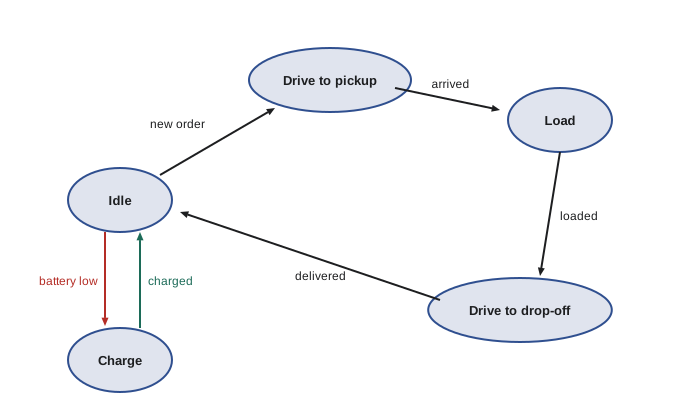
The executive layer needs a way to describe what the robot should do and when. A simple and widely used tool is the finite state machine: the robot is always in one of a fixed set of states, such as idle, driving to pickup, picking, driving to drop-off and charging, and defined events, such as goal reached, item picked or battery low, cause transitions between states. State machines are easy to draw and understand for small tasks but become tangled as tasks grow, because every new state may need transitions to and from many others.
Behavior trees, which came to robotics from video-game programming, organize behavior as a tree of tasks. Leaf nodes perform actions or check conditions; inner nodes combine them, for example a sequence node runs its children in order and fails if any fails, while a fallback node tries alternatives until one succeeds. A behavior tree for docking might be: fallback (already docked?, sequence (drive to dock area, align with dock, drive forward slowly, check charging)). Behavior trees are modular and easy to extend, and ROS 2's Nav2 navigation system uses them to coordinate planning, control and recovery behaviors such as backing up or clearing the map when the robot gets stuck.
Worked problem
Tracing a state machine
The delivery robot in the figure is idle with 18 % battery. Its rule is to charge when the battery is below 20 % while idle. An order arrives at the same moment. Which transitions happen, assuming the battery rule has priority?
Show solution
- In the idle state, two events are active: new order and battery low.
- The battery rule has priority, so the robot goes from idle to charge.
- When charging completes, it returns to idle, where the waiting order triggers drive to pickup.
- This shows why designers must define priorities between events, or the robot's behavior becomes ambiguous.
Answer: Idle to charge, then back to idle, then to drive to pickup.
Timing and real-time software
Robot software must not only compute the right answer but compute it in time. A motor control loop that should run every millisecond fails if it sometimes takes ten. Real-time systems guarantee that tasks finish within their deadlines; hard real-time systems treat a missed deadline as a failure, while soft real-time systems tolerate occasional delays. Low-level control usually runs on microcontrollers or real-time operating systems with predictable timing; higher-level software on Linux is usually soft real-time, though Linux can be configured for better timing. Delays also add up through a pipeline: if a camera takes 30 ms to deliver an image, detection takes 40 ms and planning takes 20 ms, the robot is reacting to the world as it was 90 ms ago, which at 2 m/s means 18 cm of travel. Engineers budget latency carefully, as the example in lesson 1 showed.
Simulation, testing and security
Testing robot software on real hardware is slow, expensive and sometimes dangerous, so roboticists test heavily in simulation first. Simulators such as Gazebo, NVIDIA Isaac Sim and Webots model robot bodies, sensors and physics, letting developers run thousands of test scenarios, including rare and dangerous ones, without risking hardware or people. Simulation is never perfect: the gap between simulated and real behavior, called the sim-to-real gap, means every system must still be tested on real robots, starting slowly and in controlled spaces. Good robot teams also use the ordinary practices of software engineering: version control, code review, automated tests run on every change, logging and the ability to replay recorded data to reproduce bugs. Because robots are increasingly networked, security is part of the design too: a robot that can be hijacked can damage property or hurt people, so communications should be authenticated and encrypted, software kept updated and access controlled. ROS 2 includes security features for this purpose.
| Tool or idea | What it does | Example |
|---|---|---|
| Hybrid architecture | Combines reactive, executive and deliberative layers | Reflexes plus route planning |
| ROS 2 node | A program with one job | Lidar driver |
| Topic | Named stream of messages | /scan, /cmd_vel |
| Service | Request and reply | Reset the map |
| Action | Long task with feedback, cancellable | Navigate to a goal |
| State machine | States and event-driven transitions | Delivery robot cycle |
| Behavior tree | Modular tree of tasks and conditions | Nav2 recovery behaviors |
| Simulator | Virtual testing of robots | Gazebo, Isaac Sim, Webots |
Fleets add another layer. A warehouse may run hundreds of robots at once, so fleet management software assigns tasks, plans traffic so robots do not block each other at intersections, schedules charging and reports performance. Each robot still runs its own pipeline, but it also listens to the fleet manager for goals and shares its position and status, so problems on one robot can be seen and solved centrally.
Common mistakes
MistakeWriting one monolithic program for the whole robot.
InsteadSplit software into components with clear interfaces, such as ROS 2 nodes.
MistakePlanning in a stale world model.
InsteadCombine planning with fast reactive layers that handle surprises.
MistakeLeaving event priorities undefined in a state machine.
InsteadSpecify which events win when several occur together.
MistakeIgnoring latency through the pipeline.
InsteadBudget delays from sensing to action and check them at operating speed.
MistakeTrusting simulation alone.
InsteadTest on real hardware, slowly and safely, to close the sim-to-real gap.
Summary and key terms
- Pure sense-plan-act is slow and brittle; pure reactive control lacks foresight.
- Hybrid architectures layer reactive, executive and deliberative software.
- Mobile robot pipelines run drivers, perception, localization, planning, control, task management and safety.
- ROS 2 nodes communicate through topics, services and actions, over DDS.
- State machines and behavior trees organize what a robot does next.
- Robot software must meet timing deadlines and manage large data volumes.
- Simulation, software engineering practice and security make robot software trustworthy.
- Deliberative architecture
- Software that models the world and plans before acting.
- Reactive architecture
- Software that links sensing directly to action.
- Hybrid architecture
- Layers combining reactive control with planning.
- ROS 2
- An open-source framework of libraries and tools for robot software.
- Node
- A ROS 2 program that performs one function.
- Topic
- A named channel over which ROS 2 nodes publish messages.
- Finite state machine
- A model with fixed states and event-driven transitions.
- Behavior tree
- A tree that organizes tasks, conditions and fallbacks.
- Real-time system
- A system that must meet timing deadlines.
- Sim-to-real gap
- The difference between simulated and real robot behavior.
Practice problems
Work each problem on paper first, then reveal the answer to check.
Why is pure sense-plan-act too slow?
Show answer
Building complete models and plans takes time while the world changes.
Name the three layers of a common hybrid architecture.
Show answer
Reactive, executive and deliberative.
What does a localization component do?
Show answer
Estimates where the robot is on a map.
In ROS 2, what is a topic?
Show answer
A named channel of messages between nodes.
When would you use a ROS 2 action instead of a service?
Show answer
For long tasks with feedback that may be canceled.
Raw data rate of 640 × 480 × 3 bytes at 30 fps?
Show answer
About 27.6 MB/s.
What does a fallback node in a behavior tree do?
Show answer
Tries children in turn until one succeeds.
Total latency of 25 ms sensing, 50 ms processing and 25 ms planning? Distance at 1.5 m/s?
Show answer
100 ms; 15 cm.
Name two robot simulators.
Show answer
Gazebo, Isaac Sim, Webots.
Why does robot security matter?
Show answer
A hijacked robot can cause physical harm.
Lesson quiz · 5 questions
Score 60% or more to complete this lesson.
Create a free account to save your progress, take quizzes and earn a certificate.