
MSBA-261 · Lesson 6 of 12 · 21 min
CALCULATE and filter context
▶ Video coming soon A video version of this lesson is on the way.
At the October meeting of the deans, Dr. Philippa Ondaatje-Ruiz, the privacy officer, was not the one asking questions for once. The deans were. They wanted each program's share of college-wide enrollment, Lakeshore's tuition compared with the college average, and the number of registrations in health programs regardless of which program a reader had selected. Every one of those questions needed a number calculated in a different filter context from the cell it appeared in. Signe had a one-word answer: CALCULATE. This lesson explains how it works, and how to use it correctly.
What CALCULATE does
CALCULATE evaluates an expression in a modified filter context. Its first argument is the expression, usually a measure. Every argument after that is a filter argument that changes the filter context before the expression is evaluated. When the calculation finishes, the original filter context is restored for the rest of the visual.
Health Registrations =
CALCULATE ( [Registrations], Program[School] = "Health Sciences" )
CALCULATE is the only function in DAX, along with its table-returning sibling CALCULATETABLE, that can change filter context in this way. Many other functions, such as TOTALYTD, are shortcuts built on it. Learning precisely what CALCULATE does with its arguments is the key to almost every advanced measure.
The order of operations
When CALCULATE runs, it follows a sequence that is worth knowing exactly.
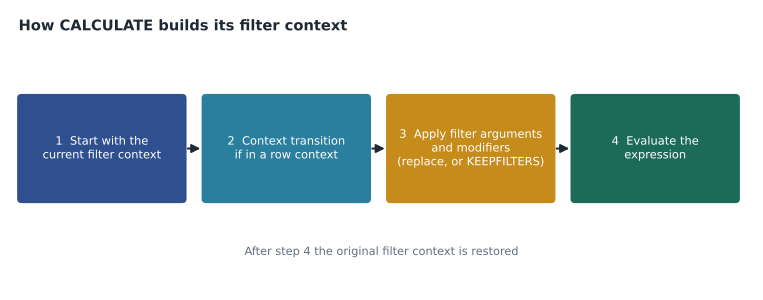
- Start with the filter context the measure was called in: the visual cell, slicers, filters and security.
- Context transition: if CALCULATE is called inside a row context, the current row becomes filters.
- Apply filter arguments: each filter argument replaces any existing filter on the same columns, unless wrapped in KEEPFILTERS. Filter modifiers such as REMOVEFILTERS, ALL, USERELATIONSHIP and CROSSFILTER adjust the context in this step.
- Evaluate the expression in the resulting filter context.
The replacement rule in the third step is what makes CALCULATE powerful and what surprises people most. In a matrix with schools on rows, Health Registrations shows the health sciences total on every row, including the Business row, because the filter argument on Program[School] overwrites the row's own filter on the same column.
Boolean and table filters
Filter arguments come in two forms.
A Boolean filter is a simple condition on a column, such as Program[School] = "Health Sciences" or Registration[Credits] >= 3. It is shorthand: the engine treats it as a filter on all values of that column that meet the condition. Boolean filters are fast and readable, and they work on one column at a time, so a condition comparing two columns, or using a measure, cannot be written this way.
A table filter is any expression that returns a table, most often FILTER. FILTER iterates a table and keeps the rows where a condition is true, which allows conditions on several columns or on measures.
Large Section Registrations =
CALCULATE (
    [Registrations],
    FILTER ( VALUES ( 'Course Section'[SectionKey] ), [Registrations] >= 40 )
)
A frequent mistake is to filter a whole fact table, such as FILTER ( Registration, Registration[Credits] >= 3 ). It works, but it iterates every row of the largest table and filters on all its columns, which can be slow and can also override filters in unexpected ways. Filter the column you need, or use a Boolean filter, instead of the whole table.
Removing filters: ALL, REMOVEFILTERS and ALLEXCEPT
Many business questions need a number with some filters removed, such as the denominator of a share. The REMOVEFILTERS function, and the older ALL used as a filter modifier, remove filters from a table or from specific columns.
All Programs Registrations =
CALCULATE ( [Registrations], REMOVEFILTERS ( Program ) )

Share of Registrations =
DIVIDE ( [Registrations], [All Programs Registrations] )
In a matrix with programs on rows and a Fall 2026 slicer, Share of Registrations divides each program's registrations by all registrations for Fall 2026, because only the Program filters were removed. If a reader also selects Lakeshore in a campus slicer, the shares become shares of Lakeshore's total, which is usually what readers expect. To make a share of the whole college regardless of campus too, remove the Campus filters as well.
ALLEXCEPT removes every filter from a table except those on the columns you list. ALLSELECTED removes filters coming from the visual itself while keeping filters from outside it, such as slicers, which suits "share of the visible total". REMOVEFILTERS is preferred when the intent is only to remove filters, because its name says what it does; ALL can also return a table when used outside CALCULATE.
| Function used in CALCULATE | Effect on filters | Example question |
|---|---|---|
| REMOVEFILTERS ( Program ) | Removes all filters on the Program table | Share of all programs |
| REMOVEFILTERS ( Program[Program Name] ) | Removes filters on one column only | Share within the selected school |
| ALLEXCEPT ( Program, Program[School] ) | Removes Program filters except School | Share of the program's school |
| ALLSELECTED ( Program ) | Removes the visual's Program filters, keeps outside selections | Share of the total shown in this visual |
| KEEPFILTERS ( Program[School] = "Business" ) | Adds the filter without replacing existing ones | Business registrations only where Business is already in context |
KEEPFILTERS
Sometimes the replacement rule is not wanted. KEEPFILTERS wraps a filter argument so that it is combined with the existing filters on the same column instead of replacing them. In the schools matrix, CALCULATE ( [Registrations], KEEPFILTERS ( Program[School] = "Health Sciences" ) ) shows the health sciences number on the Health Sciences row and blank on every other row, because the row's filter and the argument are both applied and only one school can satisfy both.
Kwabena used KEEPFILTERS in measures that defined a subset, such as Online Registrations, so that a reader who had already filtered to in-person sections would see blank rather than an online total that contradicted their selection.
Comparing with an average or a benchmark
The deans' question about Lakeshore compared with the college average combined these ideas.
Tuition per Credit All Campuses =
CALCULATE ( [Tuition per Credit], REMOVEFILTERS ( Campus ) )

Tuition per Credit vs College =
DIVIDE ( [Tuition per Credit] - [Tuition per Credit All Campuses], [Tuition per Credit All Campuses] )
Measures like these read naturally in a table with campuses on rows: each row shows its own value, the college value and the difference. Because the benchmark measure removes only Campus filters, a term slicer still applies to both numbers, which keeps the comparison fair.
CALCULATE with time and relationships
Filter arguments can also include the modifiers met in earlier lessons. USERELATIONSHIP activates an inactive relationship for the calculation, as in the registration-date measure. CROSSFILTER changes a relationship's direction for the calculation. And the time intelligence functions in the next lesson, such as DATESYTD, are table expressions that return sets of dates, used as filter arguments of CALCULATE.
TREATAS
One more filter function deserves a mention because it solves a real Lumenvale problem. The finance office's Program Budget table had no relationship to a separate Strategic Targets table that a planning consultant had supplied, keyed by program code. Rather than adding another relationship, Kwabena used TREATAS, which applies the values of one column as filters on another, unrelated column.
Target Seats =
CALCULATE (
    SUM ( Targets[Seats] ),
    TREATAS ( VALUES ( Program[ProgramCode] ), Targets[ProgramCode] )
)
TREATAS is a useful tool for small, occasional links. For anything used widely, a real relationship is clearer and usually faster.
Worked problem
Predicting a CALCULATE result
A matrix has School on rows and a slicer set to Downtown. Measure A = CALCULATE ( [Registrations], Program[School] = "Business" ). Measure B = CALCULATE ( [Registrations], KEEPFILTERS ( Program[School] = "Business" ) ). What do A and B show on the Health Sciences row?
Show solution
- The Health Sciences row's filter context is School = Health Sciences and Campus = Downtown.
- Measure A replaces the School filter with School = Business, keeping Campus = Downtown, so it shows Downtown business registrations.
- Measure B keeps School = Health Sciences and adds School = Business; no row satisfies both, so it shows blank.
- On the Business row, A and B both show Downtown business registrations.
Answer: A shows Downtown business registrations on every row; B shows blank on the Health Sciences row and a value only on the Business row.
CALCULATE inside other measures
Because measures can reference other measures, CALCULATE results combine. Health Registrations was later used in Health Share = DIVIDE ( [Health Registrations], [All Programs Registrations] ). When this measure is evaluated in a cell for Lakeshore and Fall 2026, each referenced measure applies its own CALCULATE to the same starting context: Health Registrations replaces any School filter with Health Sciences, and All Programs Registrations removes the Program filters, and both keep Lakeshore and Fall 2026. The result is the health sciences share of Lakeshore's fall registrations, without any extra code.
This composability is what makes a model with good base measures pleasant to work with. Kwabena's team kept a short list of base measures, such as Registrations, Net Tuition and Total Credits, and built everything else on top of them with CALCULATE. When the definition of Registrations changed to exclude audit-only students, every derived measure followed automatically.
Context transition and CALCULATE together
CALCULATE's first step, context transition, matters whenever a measure is evaluated inside an iterator. Consider a measure that counts the programs whose registrations grew compared with last year.
Programs Growing =
COUNTROWS (
    FILTER (
        VALUES ( Program[Program Name] ),
        [Registrations] > [Registrations PY]
    )
)
FILTER creates a row context over the distinct program names. For each program, the references to [Registrations] and [Registrations PY] trigger context transition, so they are evaluated for that program only, still inside any campus or term filters from the visual. FILTER keeps the programs where this year beats last year, and COUNTROWS counts them. Without context transition, both measures would return the totals for all visible programs on every row, and the comparison would be meaningless.
Diagnosing a CALCULATE that does nothing
A common support question at the Tuesday clinic was "my CALCULATE filter is ignored". Almost always, one of three things was happening. The filter was on a column in a table that the visual was not related to, so it could not reach the fact table. A KEEPFILTERS wrapper, or a filter already on the same column, made the result blank rather than different. Or the expression inside CALCULATE was a variable, already evaluated before CALCULATE ran, so the new filter context had nothing to change. Checking those three possibilities solved most cases within minutes.
Worked problem
Fixing an ignored filter
Kwabena writes VAR Regs = [Registrations] RETURN CALCULATE ( Regs, Campus[CampusCode] = "LKS" ), expecting Lakeshore registrations. The measure returns the same value as [Registrations]. Why, and how should it be written?
Show solution
- The variable Regs is evaluated where it is defined, in the original filter context, before CALCULATE runs.
- CALCULATE then evaluates a constant, so its filter argument has no effect.
- Move the measure reference inside CALCULATE: CALCULATE ( [Registrations], Campus[CampusCode] = "LKS" ).
- Use variables for results that should be fixed, and put anything that must respond to the new context inside CALCULATE.
Answer: Variables are constants once evaluated. Write CALCULATE ( [Registrations], Campus[CampusCode] = "LKS" ) instead.
When not to use CALCULATE
CALCULATE is powerful enough that new modelers reach for it everywhere. Signe's advice was to use it only when the filter context genuinely needs to change. A plain aggregation that should follow the visual's filters, such as total credits, needs no CALCULATE. A filter that every report should apply, such as excluding test registrations, belongs in Power Query or the source, not in a CALCULATE repeated in every measure. And a filter that only one page needs is often clearer as a page-level filter than as a special measure. Fewer, simpler measures are easier to trust.
A note on ALL as a table function
ALL has a second life outside CALCULATE: it returns a table of all rows of a table, or all distinct values of columns, ignoring filters. That is why it appears as the table argument of iterators, such as RANKX ( ALL ( Program[Program Name] ), [Registrations] ), and inside COUNTROWS to count every program regardless of filters. REMOVEFILTERS cannot be used this way; it only works as a CALCULATE modifier. When reading other people's DAX, check which role ALL is playing: as a filter argument it removes filters, and as a table expression it supplies rows to iterate. Kwabena's team standardized on REMOVEFILTERS for the first role and ALL for the second, so the intent of each formula was obvious at a glance.
Common mistakes
MistakeForgetting that a filter argument replaces existing filters on the same column.
InsteadExpect replacement by default, and use KEEPFILTERS when the filter should combine with the visual's filters.
MistakeFiltering an entire fact table with FILTER ( Registration, ... ).
InsteadFilter only the columns needed, or use Boolean filters, which are faster and safer.
MistakeRemoving filters from every table to compute a share.
InsteadRemove only the filters the question is about, such as Program, so other slicers still apply.
MistakeUsing TREATAS everywhere instead of designing relationships.
InsteadUse TREATAS for occasional links and build real relationships for common paths.
Summary and key terms
- CALCULATE evaluates an expression in a filter context modified by its filter arguments, then restores the original context.
- The order is: start context, context transition, apply filter arguments and modifiers, evaluate.
- Filter arguments replace existing filters on the same columns unless wrapped in KEEPFILTERS.
- Boolean filters handle simple conditions on one column; FILTER handles conditions on several columns or measures.
- REMOVEFILTERS, ALL, ALLEXCEPT and ALLSELECTED remove filters to compute shares, totals and benchmarks.
- USERELATIONSHIP, CROSSFILTER and time intelligence functions are used as CALCULATE filter arguments.
- TREATAS applies values from one column as a filter on an unrelated column.
- CALCULATE
- The DAX function that evaluates an expression in a modified filter context.
- Filter argument
- An argument of CALCULATE that adds, replaces or removes filters.
- Boolean filter
- A simple condition on one column used as a CALCULATE filter argument.
- REMOVEFILTERS
- A filter modifier that removes filters from a table or columns.
- KEEPFILTERS
- A wrapper that combines a filter argument with existing filters instead of replacing them.
- ALLSELECTED
- A function that removes filters coming from the visual while keeping outside selections.
- TREATAS
- A function that applies one column's values as filters on another column.
Practice problems
Work each problem on paper first, then reveal the answer to check.
Write a measure for registrations across all campuses, keeping other filters.
Show answer
CALCULATE ( [Registrations], REMOVEFILTERS ( Campus ) )
Why might FILTER ( Registration, Registration[Credits] >= 3 ) be a poor filter argument?
Show answer
It iterates the whole fact table and filters every column, which is slow and can override other filters; Registration[Credits] >= 3 as a Boolean filter is better.
What does ALLEXCEPT ( Program, Program[School] ) keep?
Show answer
Only the filters on Program[School]; all other Program filters are removed.
Lesson quiz · 5 questions
Score 60% or more to complete this lesson.
Create a free account to save your progress, take quizzes and earn a certificate.