
MSBA-220 · Lesson 5 of 12 · 19 min
Guest and external access
▶ Video coming soon A video version of this lesson is on the way.
Corvallin works with people it does not employ every day: physicians' offices that refer clients, a hospital discharge team, pharmacies, a payroll contractor and the regional health authority that funds part of its care. Until now, those relationships ran on phone calls and email attachments. Dr. Marguerite Ostrander-Bey wanted the case conferences with physicians to move into Teams, and the payroll lead wanted the contractor in a shared workspace. Both requests landed on Teodor's desk on the same day.
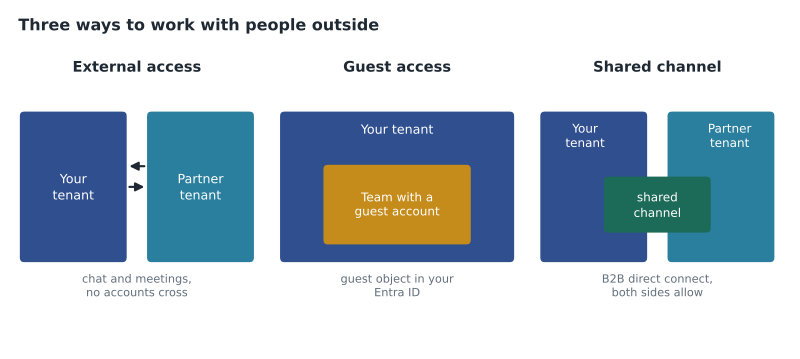
Teams offers three different ways to work with people outside the organization, and choosing the wrong one is one of the most common planning mistakes. This lesson explains external access, guest access and shared channels, shows where each is configured, and covers how to control and remove external people. In the MS-700 study guide, external collaboration is its own skill group within the largest domain.
Three ways to collaborate externally
| External access (federation) | Guest access | Shared channels (B2B direct connect) | |
|---|---|---|---|
| What the outside person gets | Chat, calls and meeting invitations with your users, from their own tenant | Membership of a team in your tenant, with a guest account | Membership of one channel, while staying in their own tenant |
| Account in your tenant | None | A guest user object in your Microsoft Entra ID | None |
| Access to team files and channels | No | Yes, to teams they are added to | Only the shared channel and its files |
| Switching tenants needed | No | Yes, the guest switches to your organization in Teams | No; the channel appears in their own Teams |
| Main settings | Teams admin center, External access | Entra external collaboration, Teams guest access, Microsoft 365 groups, SharePoint sharing | Entra cross-tenant access settings, Teams channel policies |
| Typical use | Talking to people at partner organizations | Working inside a team with a contractor | An ongoing project with another organization |
External access
External access, sometimes called federation, lets your users find, chat with, call and meet with users in other Microsoft 365 organizations. Nobody joins anyone else's tenant. A Corvallin coordinator can search for a physician by email address and start a chat if both organizations allow it.
External access is configured in the Teams admin center under Users, then External access. The organization chooses one of four approaches for other Teams organizations: allow all external domains, which is the default; allow only specific domains; block specific domains while allowing the rest; or block all external domains. Separate settings decide whether users can communicate with unmanaged Teams accounts, meaning people using Teams with a personal Microsoft account, and whether those people can start the conversation.
Policies refine this at user level. External access policies can turn federation on or off for particular users or groups, and Microsoft now lets administrators control external access by domain for specific users and groups, which the October 2026 study guide lists explicitly. That lets an organization allow everyone to chat with the health authority while only the clinical leads can chat with any other organization.
Corvallin chose to allow only specific domains. The allowed list included the regional health system, the two hospitals it worked with most, and the physicians' practices that used Microsoft 365. Unmanaged accounts were blocked, because the privacy officer did not want staff discussing clients with anyone using a personal Teams account, and HIPAA rules expected the agency to control who received protected health information.
Both sides matter. If Corvallin allows a hospital's domain but the hospital blocks Corvallin, the two cannot chat. When federation fails between two organizations that both use Teams, the first step is to check both tenants' external access lists.
Guest access
Guest access lets a team owner add someone from outside the organization to a team. The person receives an invitation, redeems it, and gets a guest user object in your Entra ID. Inside the team, the guest can take part in channel conversations, join meetings and work on files, subject to the settings the organization chooses. Guests switch to your organization in Teams to see your teams, and they appear with "(Guest)" after their names.
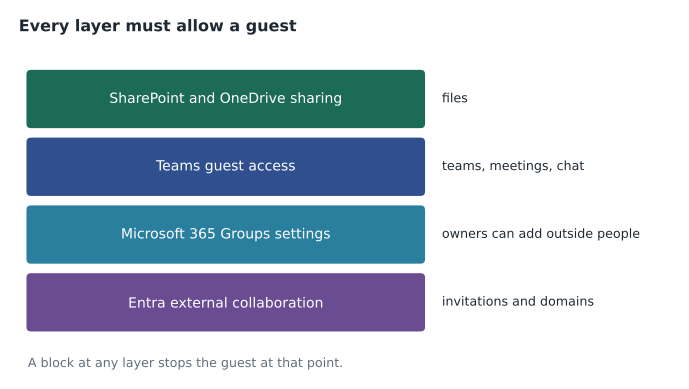
Guest access depends on settings in four portals. If any of them blocks guests, guest access fails, which makes troubleshooting a matter of checking each layer in turn.
| Layer | Where | What to set |
|---|---|---|
| Identity | Microsoft Entra admin center, External Identities, External collaboration settings | Who can invite guests, what guests can see in the directory, and allowed or blocked domains for invitations |
| Teams | Teams admin center, Users, Guest access | Turn guest access on; choose guest capabilities for calling, meetings and messaging |
| Microsoft 365 groups | Microsoft 365 admin center, Settings, Org settings, Microsoft 365 Groups | Let group owners add people outside the organization, and let guests access group content |
| Files | SharePoint admin center, Policies, Sharing | SharePoint and OneDrive sharing must allow new and existing guests, or at least existing guests, for guests to use team files |
Guest access in Teams has been on by default for tenants since 2021, but Corvallin's tenant had an older Entra setting that allowed only administrators to invite guests, so owners' invitations had been failing quietly. Teodor changed it so that members could invite guests to the allowed partner domains only, and turned off guests' ability to see the full directory.
Worked problem
Finding why a guest cannot open files
The payroll contractor has been added to the Payroll Operations team as a guest. She can read and post channel messages but gets an access error on every file in the Files tab. Which layer should Teodor check first, and why?
Show solution
- The guest can see the team, so Entra external collaboration, Microsoft 365 groups settings and Teams guest access are all allowing her in.
- Files live in the team's SharePoint site, so file access depends on SharePoint sharing.
- Check the tenant-level SharePoint sharing setting and the sharing setting of the team's site.
- If either is set to only people in the organization, guests cannot open files even though they are team members.
Answer: Check SharePoint sharing at tenant and site level first; it is the layer that controls files.
Controlling guests team by team
Some teams should never have guests, whatever the tenant allows. There are two main ways to enforce that. Sensitivity labels applied to teams, configured in Microsoft Purview, can set whether a team allows guests and what its privacy level is. When a team owner creates a team with the Clinical Confidential label, the label blocks guests automatically. Alternatively, administrators can use the Entra group settings, through Microsoft Graph PowerShell, to block guests from being added to a specific group.
Corvallin used labels, because they were visible to users and easy to audit. Dr. Ostrander-Bey's Clinical Leadership team carried a label that blocked guests; the Case Conferences team carried one that allowed them but kept the team private. Lesson 7 returns to sensitivity labels for teams and meetings.
Reviewing and removing guests
Guests accumulate. A contractor finishes, a partner changes staff, and the guest account remains. Teams owners can remove a guest from a team at any time, which removes access to that team but leaves the guest account in the tenant. To remove a guest entirely, an administrator deletes the guest user in the Microsoft Entra admin center or the Microsoft 365 admin center, which removes them from every team.
Microsoft Entra access reviews, which need Microsoft Entra ID P2 or Entra ID Governance licenses for the people being reviewed or doing the reviewing, let organizations ask team owners or guests themselves to confirm at regular intervals that access is still needed. Corvallin set up a quarterly review of guests in all teams, with automatic removal if an owner did not respond.
Licensing for guests is lighter than for employees. Guests do not need Microsoft 365 licenses to collaborate in a team. Microsoft Entra External ID bills guest use by monthly active users, with a free allowance that covers the needs of most small and mid-sized organizations, so Corvallin's few dozen partners cost nothing extra. Advanced features applied to guests, such as access reviews, still need the appropriate governance licensing.
Shared channels and B2B direct connect
A shared channel is a channel that can be shared with people outside its team, including people in other organizations, without making them guests. External participants see the channel in their own Teams client, in their own tenant, beside their own teams. That is the experience the payroll contractor wanted, and it is often a better choice than guest access for long-running cross-organization projects.
External sharing in shared channels uses Microsoft Entra B2B direct connect, which is off by default. Both organizations must configure their cross-tenant access settings in the Microsoft Entra admin center to allow each other: Corvallin allows outbound B2B direct connect to the contractor's tenant for the right users, and the contractor allows inbound B2B direct connect from Corvallin. In Teams, channel policies must also allow users to create shared channels and invite external people to them.
| Setting | Corvallin (host) | Contractor (participant) |
|---|---|---|
| Cross-tenant access, organizational settings | Add the contractor's tenant | Add Corvallin's tenant |
| B2B direct connect | Outbound allowed for the Payroll group | Inbound allowed from Corvallin for its payroll staff |
| Teams channel policy | Allow creating shared channels and inviting external users | Allow participating in external shared channels |
| Applications | Office 365 or all applications allowed for B2B direct connect | The same |
Organizations that share a parent company, or that work together constantly, can go further and form a multitenant organization (MTO) in Microsoft Entra ID. An MTO links several tenants so that their people can find each other, collaborate in Teams with fewer prompts and use features such as multitenant meetings more smoothly. Corvallin had no need for one, but the study guide expects administrators to know when an MTO is appropriate and that it is configured through Entra cross-tenant settings.
Choosing the right option: a decision path
Teodor turned the comparison into a short set of questions that the help desk and champions could use whenever someone asked to work with an outside person. Does the outside person only need to chat, call or meet? Use external access, provided their organization's domain is allowed. Do they need to work in one specific channel over a long period, and does their organization use Microsoft 365? Use a shared channel, if B2B direct connect is configured with their organization. Do they need to work across a whole team, including several channels, files and apps, or does their organization not use Microsoft 365? Use guest access. Do they only need to attend a single meeting? Invite them to the meeting; they can join through the lobby without any of the above.
The last option is easy to forget. Meetings do not need external access or guest accounts: anyone with the link can join a Teams meeting from a browser or the app, subject to the meeting's lobby settings and the organization's anonymous join setting. Corvallin's case conferences with physicians whose clinics did not use Teams worked exactly that way, with every external attendee waiting in the lobby until the clinical lead admitted them.
| Request | Recommended option |
|---|---|
| A pharmacist needs to chat with a nurse about a prescription | External access, if the pharmacy uses Teams and its domain is allowed |
| A physician joins one case conference | Meeting invitation with the lobby |
| The payroll contractor works with payroll staff every week in one workspace | Shared channel with B2B direct connect |
| A consultant needs several channels, files and Planner in a project team | Guest access, in a team whose label allows guests |
Monitoring external collaboration
External collaboration needs regular attention. Teodor added three checks to the monthly report from lesson 11: the number of guest accounts in the tenant and how many had signed in during the last 90 days, the list of teams with guests and their sensitivity labels, and any changes to external access or cross-tenant settings recorded in the audit log. Inactive guests went into the next access review. Entra ID can show each guest's last sign-in, which made the list easy to build with a short Microsoft Graph PowerShell script.
The first report found 41 guest accounts left over from the old, ungoverned Teams. Twenty-nine had not signed in for more than a year. After owners confirmed they were no longer needed, Teodor deleted them, and the access review process kept the number small from then on.
Common mistakes
MistakeAdding a partner as a guest when they only need to chat and meet.
InsteadUse external access for chat and meetings; use guest access only when they need to work inside a team.
MistakeTurning on guest access in Teams and assuming guests can now use files.
InsteadCheck Entra, Microsoft 365 groups and SharePoint sharing as well; every layer must allow guests.
MistakeConfiguring B2B direct connect only in your own tenant.
InsteadBoth organizations must allow each other in their cross-tenant access settings.
MistakeRemoving a guest from a team and thinking the guest is gone.
InsteadDelete the guest user in Entra ID to remove them from the tenant entirely.
Summary and key terms
- External access lets users chat, call and meet across tenants without accounts; guest access adds an external person to your teams with a guest account; shared channels let people collaborate in one channel from their own tenant.
- External access can allow all, allow some, block some or block all domains, with separate settings for unmanaged Teams accounts and per-user policies.
- Guest access needs Entra external collaboration, Microsoft 365 groups settings, Teams guest access and SharePoint sharing all to allow it.
- Sensitivity labels or group settings can block guests from specific teams.
- Access reviews and deleting guest users keep guest access under control.
- Shared channels with external people use Entra B2B direct connect, which both organizations must allow in cross-tenant access settings; MTOs link closely related tenants.
- External access
- Federation that lets users chat, call and meet with users in other organizations without guest accounts.
- Unmanaged Teams account
- A Teams account that belongs to a personal Microsoft account rather than an organization.
- Guest user
- An external person's account object in your Entra ID, created when they redeem an invitation.
- B2B direct connect
- An Entra trust between tenants that lets users join shared channels without guest accounts.
- Cross-tenant access settings
- Entra settings that control inbound and outbound collaboration with specific organizations.
- Multitenant organization
- A group of related tenants linked in Entra ID for smoother collaboration.
Practice problems
Work each problem on paper first, then reveal the answer to check.
A physician only needs to chat and join meetings with Corvallin's nurses. Which option fits best?
Show answer
External access, provided both organizations allow each other's domains.
Name the four layers that must all allow guest access.
Show answer
Entra external collaboration, Microsoft 365 groups settings, Teams guest access and SharePoint sharing.
What must both organizations do before users can join each other's shared channels?
Show answer
Allow B2B direct connect with each other in their Entra cross-tenant access settings.
Lesson quiz · 5 questions
Score 60% or more to complete this lesson.
Create a free account to save your progress, take quizzes and earn a certificate.