
JS-240 · Lesson 9 of 12 · 29 min
Real-time updates and notifications
▶ Video coming soon A video version of this lesson is on the way.
Gareth was away the week of July 3, so the next session is on Thursday, July 6, 2028. Over the break, Mira wrote down what the kitchen board actually needs to send and receive. The board shows the next delivery day's orders and must change within seconds when an agency edits or withdraws an order. The only changes the kitchen makes are marking an order loaded and an order delivered, a few times a day, and lesson 6 decided that those are made by a signed-in person on Rosa's laptop or a phone, never by the board itself. Almost all the traffic flows one way, from the server to the board. That observation decides the technology.
This lesson builds the partner service's real-time layer with server-sent events (SSE): the event stream format, a parser that copes with data arriving in pieces, reconnection without missing events, and an in-process hub that publishes changes only after they are safely in the database. It then turns from screens to people, with the notifications the agencies asked for: a list on the partner page, emails through Theo's mail queue, and preferences so that nobody is flooded. By the end, the design for both is agreed.
Choosing server-sent events
Server-sent events are part of the HTML standard. The client makes one ordinary HTTP GET request, and the server answers with the content type text/event-stream and then keeps the response open, writing short text events into it whenever something happens. Browsers provide an EventSource object that opens the stream, parses it, and reconnects by itself if the connection drops, telling the server the id of the last event it received.
| Need | Server-sent events | WebSocket |
|---|---|---|
| Server to client updates | Yes | Yes |
| Client to server messages | No: use ordinary POST or PATCH requests | Yes |
| Works through ordinary HTTP proxies and servers | Yes: it is a normal response | Needs upgrade support |
| Cookies, CORS and authentication | The usual HTTP rules | Only at the handshake |
| Automatic reconnection and resume | Built into EventSource | Write it yourself |
| Binary data | No: text only | Yes |
For the board, every row favors SSE. The kitchen's two actions, loaded and delivered, become ordinary PATCH requests to the partner API from a staff member's own signed-in device, with the same authentication, authorization, validation and rate limits as every other request, and the stream carries the results back to every open board and partner page. Theo does not need to change his web server's configuration for upgrades, only to make sure it does not buffer the stream. Mira keeps lesson 8's message protocol ideas, such as event types and sequence numbers, because they carry over directly.
The event stream format
An event stream is UTF-8 text made of events separated by a blank line. Each event is a few lines, each of the form field: value. Four field names have a meaning; a line starting with a colon is a comment and is ignored, which makes it useful as a heartbeat to keep idle connections open.
| Field | Meaning |
|---|---|
| event | The event type; the client listens for it by name (default: message) |
| data | The payload; several data lines are joined with newlines |
| id | The event id; the browser remembers it and sends it back as Last-Event-ID when it reconnects |
| retry | How many milliseconds the browser should wait before reconnecting |
| : text | A comment, ignored by the client |
function sseEvent({ id, event, data, retry }) {
  const lines = [];
  if (retry !== undefined) lines.push(`retry: ${retry}`);
  if (id !== undefined) lines.push(`id: ${id}`);
  if (event) lines.push(`event: ${event}`);
  const text = typeof data === 'string' ? data : JSON.stringify(data);
  for (const line of text.split('\n')) lines.push(`data: ${line}`); // each line of data gets its own field
  return lines.join('\n') + '\n\n';
}

const heartbeat = ': keep-alive\n\n';
const out = sseEvent({ id: 118, event: 'order.changed', data: { id: 41, agency: 'northside', trays: 8 } })
  + heartbeat
  + sseEvent({ id: 119, event: 'note', data: 'Two vegetarian\nOne gluten-free' });
console.log(out.replaceAll('\n', '\\n\n'));id: 118\n
event: order.changed\n
data: {"id":41,"agency":"northside","trays":8}\n
\n
: keep-alive\n
\n
id: 119\n
event: note\n
data: Two vegetarian\n
data: One gluten-free\n
\nWhat this code does
sseEvent writes the optional retry, id and event fields and then one data line for every line of the payload, because a newline inside a data value would otherwise end the field early. Each event ends with a blank line, which is what tells the client that the event is complete. The printout shows every newline as a visible backslash n, so the blank lines between events can be seen.
The client side needs a parser that copes with the network. Data arrives in chunks whose boundaries have nothing to do with events: one chunk can hold half an event, or three and a bit. A correct parser keeps a buffer, takes complete events off the front whenever it sees a blank line, and leaves the rest for the next chunk.
function sseParser(onEvent) {
  let buffer = '', lastId = null;
  return (chunk) => {
    buffer += chunk;
    let end;
    while ((end = buffer.indexOf('\n\n')) !== -1) {
      const block = buffer.slice(0, end);
      buffer = buffer.slice(end + 2);
      const ev = { event: 'message', data: [] };
      for (const line of block.split('\n')) {
        if (line === '' || line.startsWith(':')) continue;
        const i = line.indexOf(':');
        const field = i === -1 ? line : line.slice(0, i);
        const value = i === -1 ? '' : line.slice(i + 1).replace(/^ /, '');
        if (field === 'data') ev.data.push(value);
        else if (field === 'id') lastId = value;
        else if (field === 'event') ev.event = value;
      }
      if (ev.data.length) onEvent({ id: lastId, event: ev.event, data: ev.data.join('\n') });
    }
  };
}

const feed = sseParser((e) => console.log(`#${e.id} ${e.event}: ${e.data}`));
// The same stream as before, arriving in awkward pieces
['id: 118\nevent: order.ch', 'anged\ndata: {"id":41,"trays":8}\n', '\n: keep-alive\n\nid: 119\nev',
'ent: note\ndata: Two vegetarian\ndata: One gluten-free\n\n'].forEach(feed);#118 order.changed: {"id":41,"trays":8}
#119 note: Two vegetarian
One gluten-freeWhat this code does
Each chunk is added to a buffer, and the loop removes and parses every complete event, found by its terminating blank line, leaving any partial event for later. Within an event, each line is split at its first colon and one optional space, comments are skipped, and data lines are collected and joined with newlines. The first event was cut in the middle of its type name, and it still comes out whole once the rest arrives.
Reconnecting without missing anything
Connections drop: the tablet's Wi-Fi blinks, Theo restarts the service for an update, or a proxy closes a response it thinks has been open too long. EventSource reconnects by itself after the retry delay and sends a Last-Event-ID header with the id of the last event it saw. If the server can replay everything after that id, the client misses nothing. The partner service numbers events per delivery day and keeps the day's events, so replay is a query. The demonstration shows a stream being read from the start and then resumed.
import http from 'node:http';

// The last few events for the day, kept so that a reconnecting client can catch up.
const events = [
  { id: 1, type: 'order.changed', data: { id: 41, agency: 'northside', trays: 8 } },
  { id: 2, type: 'order.withdrawn', data: { id: 44, agency: 'westview' } },
  { id: 3, type: 'order.delivered', data: { id: 42, agency: 'westview' } },
];

http.createServer((req, res) => {
  if (req.url !== '/v1/kitchen/days/2028-07-07/events') { res.writeHead(404); return res.end(); }
  res.writeHead(200, {
    'content-type': 'text/event-stream',
    'cache-control': 'no-store',
    'x-accel-buffering': 'no', // ask proxies not to hold the stream back
  });
  res.write('retry: 5000\n\n');
  const after = Number(req.headers['last-event-id'] ?? 0);
  for (const e of events.filter((x) => x.id > after)) {
    res.write(`id: ${e.id}\nevent: ${e.type}\ndata: ${JSON.stringify(e.data)}\n\n`);
  }
  res.end(': demo stream ends here; a real one stays open\n\n');
}).listen(3145);
What this code does
The server answers with the text/event-stream content type, Cache-Control no-store and a header asking proxies not to buffer, then writes a retry hint and the events. It reads Last-Event-ID from the request and sends only events with a higher id, which is how a reconnecting client catches up. A real stream stays open and adds events as they happen; this one ends after the stored events so the demonstration can finish.
$ node sse-client.mjs
200 text/event-stream
#1 order.changed {"id":41,"agency":"northside","trays":8}
#2 order.withdrawn {"id":44,"agency":"westview"}
#3 order.delivered {"id":42,"agency":"westview"}
$ node sse-client.mjs 2
200 text/event-stream
#3 order.delivered {"id":42,"agency":"westview"}// Read an event stream with fetch, the way the kitchen board does.
const url = 'http://localhost:3145/v1/kitchen/days/2028-07-07/events';
const headers = process.argv[2] ? { 'Last-Event-ID': process.argv[2] } : {};
const res = await fetch(url, { headers });
console.log(res.status, res.headers.get('content-type'));
let buffer = '';
for await (const chunk of res.body.pipeThrough(new TextDecoderStream())) {
buffer += chunk;
let end;
while ((end = buffer.indexOf('\n\n')) !== -1) {
const block = buffer.slice(0, end); buffer = buffer.slice(end + 2);
const e = { event: 'message', data: [] };
for (const line of block.split('\n')) {
if (line.startsWith(':')) continue;
const [field, ...rest] = line.split(':');
const value = rest.join(':').replace(/^ /, '');
if (field === 'data') e.data.push(value); else e[field] = value;
}
if (e.data.length) console.log(`#${e.id} ${e.event} ${e.data.join('\n')}`);
}
}What this code does
The client reads the response body as a stream of text with fetch and TextDecoderStream, and parses complete events from a buffer just like the browser example. If a command-line argument is given, it is sent as Last-Event-ID, which imitates a reconnection. The kitchen board uses this fetch-based approach rather than EventSource because it needs to send an Authorization header with its access token, which EventSource cannot do.
The second run, with Last-Event-ID 2, receives only event 3. That is the whole reconnection story: the client remembers one number, and the server answers the question what happened after that.
Publishing changes: the hub
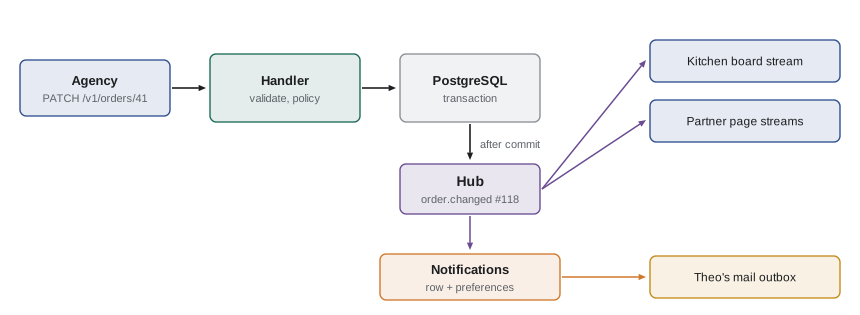
Somewhere in the partner service, a change to an order has to turn into an event on every open stream that cares about it. The service keeps a small publish and subscribe hub in memory: each open stream subscribes to a topic, such as the delivery day, and the code that changes an order publishes to that topic. Each topic keeps a short replay buffer of recent events with increasing ids, so a reconnecting client can catch up from memory; after a restart, the hub reloads the day's recent events from the database.
function createHub({ keep = 50 } = {}) {
  const topics = new Map(); // topic -> { seq, recent: [], listeners: Set }
  const topic = (name) => {
    if (!topics.has(name)) topics.set(name, { seq: 0, recent: [], listeners: new Set() });
    return topics.get(name);
  };
  return {
    publish(name, type, data) {
      const t = topic(name);
      const ev = { id: ++t.seq, type, data };
      t.recent.push(ev);
      if (t.recent.length > keep) t.recent.shift();
      for (const fn of t.listeners) fn(ev);
    },
    subscribe(name, fn, afterId = 0) {
      const t = topic(name);
      for (const ev of t.recent) if (ev.id > afterId) fn(ev); // replay what was missed
      t.listeners.add(fn);
      return () => t.listeners.delete(fn);
    },
  };
}

const hub = createHub({ keep: 3 });
const day = 'day:2028-07-07';
const board = (who) => (ev) => console.log(`${who} got #${ev.id} ${ev.type} ${JSON.stringify(ev.data)}`);

const stopBoard = hub.subscribe(day, board('board'));
hub.publish(day, 'order.changed', { id: 41, trays: 8 });
stopBoard(); // the tablet's Wi-Fi drops
hub.publish(day, 'order.withdrawn', { id: 44 });
hub.publish(day, 'order.changed', { id: 43, trays: 5 });
hub.subscribe(day, board('board (reconnected)'), 1);
hub.publish(day, 'order.delivered', { id: 42 });board got #1 order.changed {"id":41,"trays":8}
board (reconnected) got #2 order.withdrawn {"id":44}
board (reconnected) got #3 order.changed {"id":43,"trays":5}
board (reconnected) got #4 order.delivered {"id":42}What this code does
Each topic has its own sequence counter, a list of the most recent events and a set of listeners. Publishing numbers the event, stores it and calls every current listener; subscribing first replays any stored events newer than the client's last id and then adds the listener. While the board was disconnected, events 2 and 3 were published, and when it reconnects with last id 1, it receives them before the live event 4.
Two cautions apply. First, publish only after the database transaction commits. If the service published inside the transaction and the transaction then failed, every board would show a change that never happened. The partner service's repository returns the committed order, and only then does the handler publish. Second, a hub in memory works because the partner service is one process. A service with several processes needs the database or a message broker to pass events between them, for example PostgreSQL's LISTEN and NOTIFY commands, and Mira notes that in the design document as the point at which the design would have to change.
Practical details of streams
- Authentication. The partner page is on the same origin as the API, so EventSource sends the session cookie automatically. The board uses fetch with its Authorization header. Either way, the stream endpoint checks permissions like any other request: an agency's stream carries only its own agency's events.
- Heartbeats. Proxies and load balancers close connections that are silent for too long. The service writes a comment line every 25 seconds, which costs a few bytes and keeps the stream open.
- Buffering. Some proxies collect a response before passing it on, which would hold events back for minutes. The service sends Cache-Control no-store and asks Theo's web server not to buffer the stream.
- Connection limits. Over HTTP/1.1, browsers allow only six connections to the same host, and each open EventSource uses one. Theo's web server speaks HTTP/2, which carries many streams over one connection, so this limit does not bite, but the service still limits each person to three open streams.
- Closing. When a client goes away, the server's request emits a close event; the handler must unsubscribe from the hub there, or the hub will keep calling a listener for a connection that no longer exists.
Notifications for people
Streams are for screens that are open. The agencies also asked for notifications that reach people who are not looking: an order delivered, an order changed by the kitchen, or capacity lowered for a day they have ordered for. The service records every notification in a notifications table, which feeds GET /v1/me/notifications and a small badge on the partner page, and, if the person has asked for it, also writes an email for Theo's mail queue, using the same outbox folder as the reminders script from JS-230.
Each staff member chooses which kinds of notification they get by email. The defaults are conservative: email for changes made by the kitchen and for capacity reductions, which are rare and important, and no email for deliveries, which happen three times a week and are already visible on the page. The service also merges duplicates, such as two edits to the same order within a minute, and never sends a person more than 20 emails a day, the limit from lesson 7.
const prefs = {
  'dev@northside-shelter.example': { email: ['order.changed-by-kitchen', 'capacity.lowered'] },
  'joan@elmstreetseniors.example': { email: ['order.changed-by-kitchen', 'capacity.lowered', 'order.delivered'] },
};
const staffByAgency = { northside: ['dev@northside-shelter.example'], 'elm-seniors': ['joan@elmstreetseniors.example'] };
const sentRecently = new Map(); // dedupe key -> time
const outbox = [];

function notify(ev, now) {
  for (const person of staffByAgency[ev.agency] ?? []) {
    const key = `${person}|${ev.type}|${ev.orderId}`;
    if (now - (sentRecently.get(key) ?? -Infinity) < 60) { console.log(`merged duplicate for ${person}`); continue; }
    sentRecently.set(key, now);
    console.log(`page notification for ${person}: ${ev.type} #${ev.orderId}`);
    if (prefs[person]?.email.includes(ev.type)) outbox.push({ to: person, subject: `${ev.type} for order ${ev.orderId}` });
  }
}

notify({ type: 'order.delivered', agency: 'northside', orderId: 41 }, 0);
notify({ type: 'order.delivered', agency: 'elm-seniors', orderId: 43 }, 5);
notify({ type: 'order.changed-by-kitchen', agency: 'northside', orderId: 47 }, 10);
notify({ type: 'order.changed-by-kitchen', agency: 'northside', orderId: 47 }, 40);
console.log('emails for the outbox:', outbox);page notification for dev@northside-shelter.example: order.delivered #41
page notification for joan@elmstreetseniors.example: order.delivered #43
page notification for dev@northside-shelter.example: order.changed-by-kitchen #47
merged duplicate for dev@northside-shelter.example
emails for the outbox: [ { to: "joan@elmstreetseniors.example", subject: "order.delivered for order 43" }, { to: "dev@northside-shelter.example", subject: "order.changed-by-kitchen for order 47" } ]What this code does
Every event creates a page notification for each staff member of the agency concerned, but an email only for the kinds that the person has chosen. A repeat of the same kind of event for the same order within 60 seconds is merged, so Rosa adjusting an order twice in quick succession produces one notification, not two. The outbox entries are what the mail queue picks up; nothing is sent from inside the request.
Gareth mentions one more channel for the future. Browsers support web push, which delivers a notification to a person's phone or computer even when the partner page is closed, through a service worker and the browser vendor's push service. It needs the person's permission, keys to sign the messages and some care to avoid becoming a nuisance. The agencies seem happy with email for now, so web push goes on the list of ideas, not the plan.
Worked problem
Sizing the streams
On a delivery morning, the kitchen board, Rosa's laptop and staff at the three agencies may have the partner page open: the kitchen 2 streams, Northside 3, Elm Street 2 and Westview 1. Each open stream uses about 40 KB of memory in the service, and heartbeats are 15 bytes every 25 seconds. How much memory do the streams use, and how many bytes of heartbeats are sent per stream in a 9-hour day?
Show solution
- Total streams: 2 + 3 + 2 + 1 = 8.
- Memory: 8 × 40 KB = 320 KB, which is nothing for the server.
- Heartbeats per stream: 9 hours = 32,400 seconds; 32,400 ÷ 25 = 1,296 heartbeats.
- Bytes per stream: 1,296 × 15 = 19,440 bytes, about 19 KB a day.
Answer: About 320 KB of memory for 8 streams and about 19 KB of heartbeats per stream per day. Compared with the 268 KB a day of polling in lesson 8, each stream also delivers changes in well under a second.
Common mistakes
MistakeChoosing WebSockets for updates that only go from the server to the client.
InsteadServer-sent events do that with ordinary HTTP and built-in reconnection; send the rare client actions as normal requests.
MistakeAssuming each network chunk contains exactly one event.
InsteadBuffer the text and take complete events, ending in a blank line, off the front.
MistakePublishing an event before the database transaction commits.
InsteadPublish only after commit, or clients may show changes that were rolled back.
MistakeForgetting to unsubscribe when a stream closes.
InsteadRemove the listener in the request's close handler.
MistakeEmailing every event to everyone.
InsteadLet people choose, merge duplicates and cap emails per day.
Summary and key terms
- Server-sent events let a server push text events over one long HTTP response with the content type text/event-stream.
- Each event has optional id, event and retry fields and one or more data lines, and ends with a blank line; comment lines serve as heartbeats.
- Clients parse complete events from a buffer, and on reconnecting send Last-Event-ID so the server can replay what they missed.
- For the kitchen board, whose traffic is almost all server to client, SSE is simpler than WebSockets; the kitchen's actions are ordinary PATCH requests.
- The partner service's in-memory hub publishes numbered events per topic, keeps a replay buffer and publishes only after the database commits; several processes would need LISTEN and NOTIFY or a broker.
- Streams need authentication, heartbeats, no buffering, connection limits and clean unsubscribing.
- Notifications are stored for the partner page and emailed through Theo's mail queue according to each person's preferences, with duplicates merged and a daily cap.
- Server-sent events
- A standard for pushing text events from a server over a long-lived HTTP response.
- text/event-stream
- The content type of a server-sent event stream.
- EventSource
- The browser object that opens an event stream, parses it and reconnects automatically.
- Last-Event-ID
- The request header a reconnecting client sends with the id of the last event it received.
- Heartbeat
- A small message sent regularly to keep an idle connection open.
- Publish and subscribe
- A pattern in which publishers send events to topics and every subscriber to a topic receives them.
- Replay buffer
- A store of recent events kept so that reconnecting clients can catch up.
- Web push
- Notifications delivered to a browser through a push service even when the site is closed.
Practice problems
Work each problem on paper first, then reveal the answer to check.
What ends an event in an event stream?
Show answer
A blank line.
How does a reconnecting EventSource tell the server what it already has?
Show answer
With the Last-Event-ID request header.
Why does the kitchen board read its stream with fetch instead of EventSource?
Show answer
It needs to send an Authorization header, which EventSource cannot do.
When must the service publish an order change to the hub?
Show answer
After the database transaction has committed.
Name two things the notification service does to avoid flooding people.
Show answer
It follows each person's email preferences, merges duplicates within a minute and caps emails at 20 a day.
Try it yourself
Write an event
Complete toEvent(id, type, payload) so that it returns one server-sent event: an id: line, an event: line and a data: line with the payload as JSON, followed by a blank line.
If the payload is a string containing newlines, write it as several data: lines instead of JSON, one per line.
function toEvent(id, type, payload) {
  return `data: ${payload}\n`;
}

console.log(JSON.stringify(toEvent(7, 'order.changed', { id: 41, trays: 8 })));
console.log(JSON.stringify(toEvent(8, 'note', 'Two vegetarian\nOne gluten-free')));
Try it yourself
Replay after reconnecting
Complete missed(recent, lastEventId) so that it returns the events in recent whose id is greater than lastEventId, in order. lastEventId arrives from the header as a string, or as undefined for a first connection, which should replay nothing.
If lastEventId is older than the oldest event still in recent (so some events are lost), return the single event { id: 0, type: 'resync' }, which tells the client to reload the whole day.
function missed(recent, lastEventId) {
  return recent;
}

const recent = [{ id: 5, type: 'a' }, { id: 6, type: 'b' }, { id: 7, type: 'c' }];
console.log(JSON.stringify(missed(recent, undefined)));
console.log(JSON.stringify(missed(recent, '5')));
console.log(JSON.stringify(missed(recent, '7')));
console.log(JSON.stringify(missed(recent, '2')));
Lesson quiz · 5 questions
Score 60% or more to complete this lesson.
Create a free account to save your progress, take quizzes and earn a certificate.