
JS-230 · Lesson 6 of 12 · 34 min
Validation and error handling
▶ Video coming soon A video version of this lesson is on the way.
On Thursday, March 23, Mira shows Rosa the order endpoint working, and Rosa immediately tries to break it. She orders 400 trays of stew, then a delivery on a Sunday, then soup for yesterday, then an order with no lines at all. The server stores every one of them. "The kitchen would have a very strange Monday," she says. Gareth laughs. "Every request is a stranger at the door. Today the server learns to check what it is given and to say clearly what is wrong."
This lesson covers the two halves of handling bad input. Validation checks that a request has the right shape and follows the kitchen's rules before anything is stored: first by hand, to see what is involved, then with zod, a schema library. Error handling turns every problem, from a missing field to a bug, into a clear and consistent response without leaking internal details. Mira writes error classes, a validation middleware, a not-found handler and one error handler that answers in the same problem details format Theo's API uses. By the end, Rosa's four test orders each get a precise refusal.
Never trust the client
The partner order form checks its inputs in the browser, using the same rules Mira wrote for the volunteer form in JS-110. That is good for the person filling it in, who gets instant feedback, but it protects the server not at all. Anyone with the API key, or a bug in an agency's own program, can send any JSON at all. The server must check every value as if it had never been checked before, and it must check before it stores, calculates or passes anything on.
There are two layers of checks. Shape checks ask whether the data is the right kind: is deliveryDate a real date, is lines an array, is trays a whole number between 1 and 10, is item one of the three menu items? They need nothing but the request. Rule checks ask whether the request is allowed: is the delivery day one the kitchen delivers on, is it before the cut-off, is there enough capacity left? They need the current time and the database. Shape checks come first, so the rule checks can assume clean data.
| Check | Kind | Kitchen rule |
|---|---|---|
| deliveryDate is a date written as YYYY-MM-DD | Shape | |
| lines has 1 to 3 entries, each item at most once | Shape | |
| item is soup, stew or sandwiches | Shape | The current menu |
| trays is a whole number from 1 to 10 | Shape | Most trays one agency can carry per item |
| note is at most 500 characters | Shape | |
| Delivery is on a Monday, Wednesday or Friday | Rule | Delivery days |
| Now is before 12:00 two days before delivery | Rule | Cut-off for orders and changes |
| Delivery is at most 28 days ahead | Rule | Menus are planned four weeks out |
| The day stays within 40 trays in total | Rule | Kitchen capacity per delivery day |
Validating by hand
A validator for an object goes through the fields and collects every problem, rather than stopping at the first. A form that reports one error at a time makes people submit again and again; an API that reports all of them lets a developer fix everything at once. Each error names the field it belongs to, using a path such as lines.0.trays for the first line's trays, so a form can show the message next to the right input.
const ITEMS = ['soup', 'stew', 'sandwiches'];

function validateOrder(body) {
  const errors = [];
  const add = (field, message) => errors.push({ field, message });
  if (typeof body !== 'object' || body === null || Array.isArray(body)) return [{ field: null, message: 'must be an object' }];

  if (typeof body.deliveryDate !== 'string' || !/^\d{4}-\d{2}-\d{2}$/.test(body.deliveryDate)) {
    add('deliveryDate', 'must be a date written as YYYY-MM-DD');
  } else if (Number.isNaN(Date.parse(body.deliveryDate + 'T00:00:00Z')) || new Date(body.deliveryDate + 'T00:00:00Z').toISOString().slice(0, 10) !== body.deliveryDate) {
    add('deliveryDate', 'is not a real date');
  }
  if (!Array.isArray(body.lines) || body.lines.length < 1 || body.lines.length > 3) {
    add('lines', 'must be a list of 1 to 3 lines');
  } else {
    body.lines.forEach((line, i) => {
      if (!ITEMS.includes(line?.item)) add(`lines.${i}.item`, `must be one of ${ITEMS.join(', ')}`);
      if (!Number.isInteger(line?.trays) || line.trays < 1 || line.trays > 10) add(`lines.${i}.trays`, 'must be a whole number from 1 to 10');
    });
    const items = body.lines.map((l) => l?.item);
    if (new Set(items).size !== items.length) add('lines', 'each item may appear only once');
  }
  return errors;
}

console.log(validateOrder({ deliveryDate: '2028-03-22', lines: [{ item: 'soup', trays: 4 }] }));
console.log(validateOrder({ deliveryDate: '2028-02-30', lines: [{ item: 'stew', trays: 400 }, { item: 'stew', trays: '2' }] }));
console.log(validateOrder({ lines: [] }));
console.log(validateOrder('soup please'));[]
[ { field: "deliveryDate", message: "is not a real date" }, { field: "lines.0.trays", message: "must be a whole number from 1 to 10" }, { field: "lines.1.trays", message: "must be a whole number from 1 to 10" }, { field: "lines", message: "each item may appear only once" } ]
[ { field: "deliveryDate", message: "must be a date written as YYYY-MM-DD" }, { field: "lines", message: "must be a list of 1 to 3 lines" } ]
[ { field: null, message: "must be an object" } ]What this code does
validateOrder collects every problem in an array instead of returning at the first, and names each one with a field path. The date check has two steps: a regular expression for the format, then a round trip through Date to catch impossible dates such as February 30, which the format alone would accept. A valid order gives an empty array, and a value that is not even an object gets one general error.
The validator works, but it is already 30 lines for one small object, and it repeats patterns: is this a string, is it one of these values, is it a whole number in a range. Every new endpoint would need another one. It also only checks; the handler still has to trust that the fields it reads are the ones that were checked.
Schemas with zod
A schema describes the shape data must have, as a value in code. A validation library compares data with a schema and reports every difference. The partner service uses zod, a widely used library whose version 4 was released in July 2025. A zod schema is built from small pieces: z.string(), z.int(), z.enum([...]), z.array(...), z.object({...}), each with methods that add limits, such as .min(1) or .max(500).
The method schema.safeParse(data) returns an object with success: true and data, the checked value, or success: false and an error whose issues list every problem with its path and message. The data it returns is not just checked but cleaned: .trim() removes spaces, unknown properties are refused by .strict(), and the result has exactly the fields the schema describes. In TypeScript, zod also produces the type of the cleaned data, so the handler's code is checked against the schema too.
import * as z from 'zod';

const Line = z.object({
  item: z.enum(['soup', 'stew', 'sandwiches']),
  trays: z.int().min(1).max(10),
});

const NewOrder = z.object({
  deliveryDate: z.iso.date(),
  lines: z.array(Line).min(1).max(3)
    .refine((lines) => new Set(lines.map((l) => l.item)).size === lines.length, 'each item may appear only once'),
  note: z.string().trim().max(500).optional(),
}).strict();

const good = NewOrder.safeParse({ deliveryDate: '2028-03-22', lines: [{ item: 'soup', trays: 4 }], note: '  No onions please ' });
console.log(good.success, good.data);

const bad = NewOrder.safeParse({ deliveryDate: '22/03/2028', lines: [{ item: 'chili', trays: 0 }, { item: 'soup', trays: 2.5 }], extra: 1 });
for (const issue of bad.error.issues) console.log(issue.path.join('.') || '(order)', '-', issue.message);
What this code does
Line and NewOrder describe the order in about a dozen lines, and the refine step adds the rule that an item may appear only once. safeParse on a good order returns the cleaned data, with the note's spaces trimmed. On a bad order it returns one issue per problem, each with the path of the field and a message, including the unknown extra property that strict refuses.
$ node schema.mjs
true {
  deliveryDate: '2028-03-22',
  lines: [ { item: 'soup', trays: 4 } ],
  note: 'No onions please'
}
deliveryDate - Invalid ISO date
lines.0.item - Invalid option: expected one of "soup"|"stew"|"sandwiches"
lines.0.trays - Too small: expected number to be >=1
lines.1.trays - Invalid input: expected int, received number
(order) - Unrecognized key: "extra"
The messages are zod's defaults. They are clear enough for a developer reading the API's response, and zod can be given custom messages, or translated ones through its locales, for messages that agency staff will see. The partners' form shows its own friendly messages from the browser-side checks, so the server's messages are mainly for whoever builds or debugs a client.
A validation middleware
Because every route with a body needs the same steps, check against a schema, refuse with the errors or replace req.body with the cleaned data, they belong in middleware. validate(schema) returns middleware for one schema, and each route lists it before its handler. Handlers can then rely completely on req.body: if the handler runs, the body matched the schema.
// src/middleware/validate.js
export function validate(schema) {
  return (req, res, next) => {
    const result = schema.safeParse(req.body);
    if (!result.success) {
      return next(new ValidationError(result.error.issues.map((i) => ({
        field: i.path.join('.') || null,
        message: i.message,
      }))));
    }
    req.body = result.data; // the cleaned, typed values
    next();
  };
}

// src/routes/orders.js
ordersRouter.post('/', validate(NewOrder), async (req, res) => {
  const order = await orders.create(req.partner, req.body); // may throw a RuleError
  res.status(201).location(`${req.baseUrl}/${order.id}`).json(order);
});
What this code does
validate is a function that returns middleware for a given schema, like requireRole in Lesson 5. When the body does not match, it passes a ValidationError with a list of field and message pairs to next, so the error handler builds the response. When it does match, it replaces req.body with the cleaned data, so the route handler never sees unknown properties or untrimmed text.
The same middleware can check req.query and req.params with their own schemas. Query values and parameters are always strings, so their schemas use z.coerce, for example z.coerce.number().int().positive() for an order id, which turns '17' into 17 and refuses 'abc'.
Rules that need the clock
Shape checks cannot know what time it is. The cut-off rule says orders and changes close at 12:00 two days before delivery, and deliveries happen on Mondays, Wednesdays and Fridays. A Monday delivery therefore closes on the Saturday before at noon. Rule checks like this belong in the service's own code, not in the schema, and they take the current time as an argument, so tests can pass in any time they like instead of waiting for a real Saturday.
const DELIVERY_DAYS = [1, 3, 5]; // Monday, Wednesday, Friday (getUTCDay numbers)

// Kitchen times are written as local wall-clock times, 'YYYY-MM-DDTHH:MM'.
function cutoffFor(deliveryDate) {
  const d = new Date(deliveryDate + 'T12:00:00Z');
  d.setUTCDate(d.getUTCDate() - 2);
  return d.toISOString().slice(0, 16);
}

function checkRules(deliveryDate, now) {
  const errors = [];
  const day = new Date(deliveryDate + 'T00:00:00Z').getUTCDay();
  if (!DELIVERY_DAYS.includes(day)) errors.push('the kitchen delivers on Mondays, Wednesdays and Fridays');
  const cutoff = cutoffFor(deliveryDate);
  if (now >= cutoff) errors.push(`orders for ${deliveryDate} closed at ${cutoff.replace('T', ' ')}`);
  const days = (Date.parse(deliveryDate + 'T00:00:00Z') - Date.parse(now.slice(0, 10) + 'T00:00:00Z')) / 86_400_000;
  if (days > 28) errors.push('orders open 28 days ahead');
  return errors;
}

console.log(cutoffFor('2028-03-27'), '(Monday delivery)');
console.log(checkRules('2028-03-27', '2028-03-23T15:30'));
console.log(checkRules('2028-03-27', '2028-03-25T12:00'));
console.log(checkRules('2028-03-26', '2028-03-23T15:30'));
console.log(checkRules('2028-04-28', '2028-03-23T15:30'));2028-03-25T12:00 (Monday delivery) [] [ "orders for 2028-03-27 closed at 2028-03-25 12:00" ] [ "the kitchen delivers on Mondays, Wednesdays and Fridays" ] [ "orders open 28 days ahead" ]
What this code does
cutoffFor takes noon on the delivery day and moves it back two days, so a Monday delivery closes on Saturday at 12:00. checkRules compares the current time with the cut-off as text, which works because both are written in the same fixed format from the largest unit to the smallest. Because now is an argument, the same function can be checked for a time before the cut-off, exactly at it and for orders that are on the wrong day or too far ahead.
The example treats all times as the kitchen's local wall-clock time and does its arithmetic in UTC only to avoid daylight saving surprises, which is safe for whole days and noon. In the service, the current time comes from a clock function that returns the time in the kitchen's time zone, America/Chicago for Madison; Temporal, which Node 26 enables by default, makes this much simpler, and the course uses it in Lesson 12.
The capacity rule needs the database, because it depends on every other agency's orders for the same day. It is checked when the order is saved, inside a transaction, so two agencies ordering the last trays at the same moment cannot both succeed. Lesson 7 shows how.
Errors as values with a type
When something goes wrong deep inside the service, the code that notices it is rarely the code that sends the response. The repository function that finds the kitchen full does not know about res. The cleanest way to carry the problem up is to throw an error object that says what kind of problem it is and which status code it deserves. JavaScript lets classes extend Error, so the service defines a small family of error classes.
class HttpError extends Error {
  constructor(status, title, detail, extra = {}) {
    super(detail ?? title);
    this.name = 'HttpError';
    this.status = status;
    this.title = title;
    this.detail = detail;
    this.extra = extra;
  }
  toProblem() {
    return { title: this.title, status: this.status, ...(this.detail && { detail: this.detail }), ...this.extra };
  }
}
class ValidationError extends HttpError {
  constructor(errors) { super(422, 'Your request has some problems', undefined, { errors }); this.name = 'ValidationError'; }
}
class RuleError extends HttpError {
  constructor(detail) { super(409, 'The kitchen cannot accept this', detail); this.name = 'RuleError'; }
}

const errors = [
  new ValidationError([{ field: 'lines.0.trays', message: 'must be a whole number from 1 to 10' }]),
  new RuleError('Wednesday 2028-03-29 has 3 trays left'),
  new HttpError(404, 'Not found', 'No order 99 for this agency'),
  new TypeError("Cannot read properties of undefined (reading 'trays')"),
];
for (const err of errors) {
  const known = err instanceof HttpError;
  console.log(known ? err.status : 500, err.name, known ? JSON.stringify(err.toProblem()) : '(hidden from the client)');
}422 ValidationError {"title":"Your request has some problems","status":422,"errors":[{"field":"lines.0.trays","message":"must be a whole number from 1 to 10"}]}
409 RuleError {"title":"The kitchen cannot accept this","status":409,"detail":"Wednesday 2028-03-29 has 3 trays left"}
404 HttpError {"title":"Not found","status":404,"detail":"No order 99 for this agency"}
500 TypeError (hidden from the client)What this code does
HttpError extends Error and adds a status code, a short title and an optional detail, and toProblem turns it into the body of an error response. ValidationError and RuleError extend it with fixed statuses, so code can throw new RuleError('...') without thinking about status codes. A TypeError is not an HttpError, so instanceof is false: it is a bug, it becomes a 500, and its message is never shown to the client.
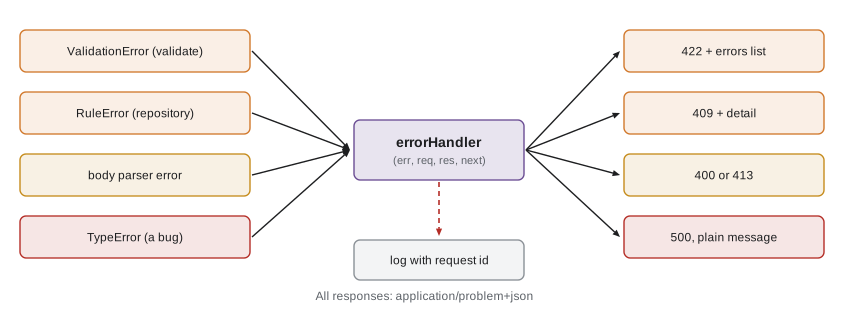
The status codes follow the same rules as Theo's API. 400 is for a request that cannot even be read, such as broken JSON. 422 Unprocessable Content is for a request that can be read but has invalid values, with the list of field errors. 409 Conflict is for a valid request that clashes with the current state, such as a full day or a closed cut-off. 404 is for an order that does not exist or belongs to another agency; the service answers 404 rather than 403 for another agency's order, so that agencies cannot even learn which order numbers exist.
Problem details
Every error from the service has the same JSON format, described in RFC 9457, Problem Details for HTTP APIs, the standard Theo's API already follows. The response has the content type application/problem+json and a body with a few standard members: type, a URI that identifies the kind of problem (about:blank when there is no special page); title, a short human-readable summary; status, the status code again; detail, an explanation of this occurrence; and instance, the path of the request. An API may add its own members, such as the errors list.
{
  "type": "about:blank",
  "title": "Your request has some problems",
  "status": 422,
  "instance": "/api/partners/v1/orders",
  "errors": [
    { "field": "deliveryDate", "message": "Invalid ISO date" },
    { "field": "lines.0.trays", "message": "Too big: expected number to be <=10" }
  ]
}
What this code does
The standard members tell any client the kind of problem and the status without reading the rest, and instance says which request it was about. The errors member is the service's own addition, listing each field problem with a path a form can use. A client can treat every error from the service the same way, whatever endpoint it came from.
One error handler for everything
Express sends errors to error-handling middleware, a function with four arguments, (err, req, res, next). It is added with app.use after all the routes. The service has two such pieces at the end of app.js. The first is an ordinary middleware, notFound, which runs only if no route answered and turns that into a 404 error. The second, errorHandler, receives every error, whether it came from next(err), a thrown exception, a rejected promise in an async handler or express.json's body parser, and sends one problem details response.
// src/middleware/errors.js
import { HttpError } from '../errors.js';

export function notFound(req, res, next) {
  next(new HttpError(404, 'Not found', `No route for ${req.method} ${req.originalUrl}`));
}

export function errorHandler(err, req, res, next) {
  if (res.headersSent) return next(err); // let Express close the connection

  let problem;
  if (err instanceof HttpError) {
    problem = err.toProblem();
  } else if (err.type === 'entity.parse.failed') {
    problem = { title: 'Body is not valid JSON', status: 400 };
  } else if (err.type === 'entity.too.large') {
    problem = { title: 'Body is too large', status: 413 };
  } else {
    req.log.error({ err, requestId: req.id }, 'unexpected error');
    problem = { title: 'Something went wrong on our side', status: 500,
      detail: `Please quote request ${req.id} if you contact the kitchen.` };
  }
  res.status(problem.status).type('application/problem+json')
    .json({ type: 'about:blank', ...problem, instance: req.originalUrl });
}

// src/app.js (at the very end, after all routes)
app.use(notFound);
app.use(errorHandler);
What this code does
notFound runs when no route matched and passes a 404 HttpError on, so even unknown paths get a problem details body instead of Express's default HTML page. errorHandler turns known errors into their problem details, recognizes the body parser's errors by their type property and treats everything else as a bug: it logs the full error with the request id and tells the client only that something went wrong, with the id to quote. If headers have already been sent, it hands the error back to Express, which closes the connection.
Three rules keep error handling safe. Never send a stack trace or an internal error message to a client: it can reveal file paths, library versions and SQL, which help an attacker and confuse everyone else. Always log unexpected errors with enough context to find them, which is what the request id is for. And keep the client's view consistent: every error, expected or not, has the same format.
A process can still fail outside any request, for example when a promise with no catch rejects in start-up code, or when a bug throws inside a timer. Node prints the error and, by default, stops the process, which is the right thing: the service manager restarts it in a clean state. The service adds process.on('unhandledRejection') and process.on('uncaughtException') handlers only to log the error in the service's log format before exiting, never to carry on as if nothing happened.
Worked problem
Which status code?
Decide the status code for each request: (a) the body is {"deliveryDate": "2028-03-22", "lines": [ (cut off); (b) trays is 12; (c) the order is for Sunday 2028-03-26; (d) Northside asks for order 31, which belongs to Elm Street; (e) Wednesday has 38 of 40 trays ordered and the order asks for 4; (f) the database is down.
Show solution
- (a) The JSON cannot be parsed: 400.
- (b) Readable, but a value breaks the schema: 422 with an error for lines.0.trays.
- (c) A valid date, but not a delivery day: the order clashes with the kitchen's rules, 409. (Some APIs use 422 here; the service keeps 422 for shape errors and 409 for rule errors.)
- (d) Another agency's order: 404, so its existence is not revealed.
- (e) Only 2 trays are left: 409 with a detail saying so.
- (f) A problem on the service's side: 500, or 503 Service Unavailable if the service knows the database is down.
Answer: 400, 422, 409, 404, 409 and 500 (or 503). Each tells the agency's developer whether to fix the request, change the order or try again later.
Common mistakes
MistakeThe browser form already checks the data, so the server can skip it.
InsteadAnyone can send any request. The server checks everything, every time.
MistakeA validator should stop at the first problem.
InsteadCollect every problem, so a client can fix them all at once.
MistakeShowing the error message and stack trace helps clients debug.
InsteadIt leaks internal details. Log them with a request id and send a plain message.
MistakeAn error handler can be added anywhere in app.js.
InsteadIt must come after all routes and have exactly four parameters, or Express treats it as normal middleware.
Summary and key terms
- Every request is checked on the server, first for shape (types, formats, ranges, allowed values) and then for rules that need the clock or the database (delivery days, cut-offs, capacity).
- Validators collect every problem with a field path. zod describes the shape as a schema; safeParse returns either cleaned data or a list of issues, and a validate middleware replaces req.body with the cleaned data or passes a ValidationError on.
- Rule checks take the current time as an argument so they can be tested.
- Error classes that extend Error carry a status and a title from where a problem is found to the error handler.
- The service answers 400 for unreadable requests, 422 for invalid values, 409 for conflicts with the kitchen's rules, 404 for missing or other agencies' orders and 500 for bugs, always as RFC 9457 problem details.
- A notFound middleware and a four-argument error handler at the end of the app handle everything, logging unexpected errors with the request id and never sending internal details to clients.
- Validation
- Checking that input has the right shape and follows the rules before it is used.
- Schema
- A description in code of the shape data must have, used to check and clean it.
- zod
- A JavaScript validation library that builds schemas from small pieces and reports every problem.
- safeParse
- A zod method that returns either the cleaned data or a list of issues, without throwing.
- 422 Unprocessable Content
- The response for a request that can be read but contains invalid values.
- 409 Conflict
- The response for a valid request that clashes with the current state.
- Problem details
- The RFC 9457 JSON format for API errors, with type, title, status, detail and instance.
- Error-handling middleware
- An Express function with four arguments (err, req, res, next) that turns errors into responses.
- Stack trace
- The list of function calls that led to an error, useful in logs and never sent to clients.
Practice problems
Work each problem on paper first, then reveal the answer to check.
What is the difference between a shape check and a rule check?
Show answer
A shape check needs only the request; a rule check also needs the time or the database.
Why does checkRules take now as an argument?
Show answer
So tests can check any time without waiting for it.
Which status does the service use for trays: 12, and which for an order after the cut-off?
Show answer
422 for trays: 12 and 409 after the cut-off.
Why does the service answer 404 for another agency's order?
Show answer
So agencies cannot learn which order numbers exist.
What does the error handler send to the client for an unexpected TypeError?
Show answer
A 500 problem details response with a plain message and the request id, never the error's message or stack.
Try it yourself
Validate an order line
Complete validateLine(line, i) so that it returns an array of errors for the line at position i. Each error is an object { field, message }.
item must be soup, stew or sandwiches (field lines.I.item, message unknown item). trays must be a whole number from 1 to 10 (field lines.I.trays, message must be 1 to 10 whole trays). A line that is not an object gives one error for field lines.I with message must be an object.
function validateLine(line, i) {
  return [];
}

console.log(JSON.stringify(validateLine({ item: 'soup', trays: 4 }, 0)));
console.log(JSON.stringify(validateLine({ item: 'chili', trays: 4 }, 1)));
console.log(JSON.stringify(validateLine({ item: 'stew', trays: 2.5 }, 2)));
console.log(JSON.stringify(validateLine({ item: 'stew', trays: '3' }, 0)));
console.log(JSON.stringify(validateLine(null, 1)));
Try it yourself
Turn errors into problem details
Complete toProblem(err, instance) so that it returns the body of a problem details response. If err has a numeric status below 500 and a title, return { type: 'about:blank', title, status, instance }, adding detail only if err.detail exists and errors only if err.errors exists.
For anything else, return { type: 'about:blank', title: 'Something went wrong on our side', status: 500, instance }, without the error's message.
function toProblem(err, instance) {
  return { title: err.message, status: 500, instance };
}

const cases = [
  Object.assign(new Error('x'), { status: 409, title: 'The kitchen cannot accept this', detail: 'Wednesday has 2 trays left' }),
  Object.assign(new Error('x'), { status: 422, title: 'Your request has some problems', errors: [{ field: 'deliveryDate', message: 'Invalid ISO date' }] }),
  new TypeError("Cannot read properties of undefined (reading 'trays')"),
  Object.assign(new Error('db down'), { status: 503, title: 'Database unavailable' }),
];
for (const err of cases) console.log(JSON.stringify(toProblem(err, '/api/partners/v1/orders')));
Lesson quiz · 5 questions
Score 60% or more to complete this lesson.
Create a free account to save your progress, take quizzes and earn a certificate.