
JAVA-260 · Lesson 2 of 12 · 23 min
Dependency injection and beans
▶ Video coming soon A video version of this lesson is on the way.
On Wednesday, January 19, Hamza came in having done the homework. He had read the start-up log of his hello application line by line and found that Spring had created over a hundred objects before his controller handled its first request. "I wrote two classes," he said. "Who made the rest?" Ingrid opened a blank file. "Tonight we build a container ourselves, a very small one, and then you will know." This lesson explains beans, the objects the Spring container manages, and dependency injection, the way the container hands each bean the other beans it needs.
Beans and the container
A bean is simply an object that the Spring container creates and manages. Your own classes become beans when they carry a stereotype annotation such as @Component, @Service, @Repository or @RestController, which the container finds by component scanning the packages under your @SpringBootApplication class. Other beans come from @Bean methods in @Configuration classes, which is how you register objects from libraries you cannot annotate, such as a Clock or an HttpClient. Auto-configuration registers many more, which is where most of the hundred-odd objects in Hamza's log came from.
For each bean the container keeps a bean definition: the class or factory method, the dependencies, the scope and any life-cycle callbacks. At start-up it reads every definition, works out the order in which to create the beans so that each one's dependencies exist first, and creates them. If a dependency cannot be satisfied, the application fails to start with a clear message, which is far better than a NullPointerException on the first Saturday customer.
| Annotation | Use it for | Example in the booking service |
|---|---|---|
| @Component | A general-purpose bean | SlotCalendar, which works out repair start times |
| @Service | A class that holds business rules | BookingService |
| @Repository | Data access; also translates database exceptions | BookingRepository |
| @RestController | A web controller whose methods return data | BookingController |
| @Configuration + @Bean | Beans built from library classes or with custom code | A Clock for the shop time zone |
A container in fifty lines
The example below is a working dependency injection container that uses only the JDK. You register classes with it; when you ask for one, it looks at the class's constructor with reflection, asks itself for an instance of each parameter type, calls the constructor and remembers the result, so that every later request gets the same object. That is the core of what Spring does for constructor injection, without the hundreds of features around it.
import java.lang.reflect.Constructor;
import java.util.*;

public class Main {
    static class Container {
        private final Set<Class<?>> registered = new LinkedHashSet<>();
        private final Map<Class<?>, Object> singletons = new HashMap<>();
        private final List<String> log = new ArrayList<>();

        void register(Class<?> type) { registered.add(type); }

        <T> T get(Class<T> wanted) {
            Class<?> impl = registered.stream().filter(wanted::isAssignableFrom).findFirst()
                    .orElseThrow(() -> new IllegalStateException("no bean of type " + wanted.getSimpleName()));
            Object existing = singletons.get(impl);
            if (existing != null) return wanted.cast(existing);
            try {
                Constructor<?> ctor = impl.getDeclaredConstructors()[0];
                Object[] args = Arrays.stream(ctor.getParameterTypes()).map(this::get).toArray();
                Object bean = ctor.newInstance(args);
                singletons.put(impl, bean);
                log.add("created " + impl.getSimpleName());
                return wanted.cast(bean);
            } catch (ReflectiveOperationException e) {
                throw new IllegalStateException(e);
            }
        }
    }

    interface BookingStore { int count(); }
    static class MemoryBookingStore implements BookingStore { public int count() { return 0; } }
    static class SlotCalendar { int slotsPerHour() { return 2; } }
    static class BookingService {
        final BookingStore store; final SlotCalendar calendar;
        BookingService(BookingStore store, SlotCalendar calendar) { this.store = store; this.calendar = calendar; }
    }
    static class BookingController {
        final BookingService service;
        BookingController(BookingService service) { this.service = service; }
    }

    public static void main(String[] args) {
        Container c = new Container();
        c.register(BookingController.class);
        c.register(BookingService.class);
        c.register(SlotCalendar.class);
        c.register(MemoryBookingStore.class);

        BookingController controller = c.get(BookingController.class);
        System.out.println(String.join("\n", c.log));
        System.out.println("Slots per hour: " + controller.service.calendar.slotsPerHour());
        System.out.println("Same service again: " + (c.get(BookingService.class) == controller.service));
    }
}created MemoryBookingStore created SlotCalendar created BookingService created BookingController Slots per hour: 2 Same service again: true
What this code does
Asking for the controller makes the container look at its constructor, see that it needs a BookingService, and ask itself for that first, which in turn needs a store and a calendar. The log therefore lists the beans in the order their dependencies were satisfied, deepest first, even though they were registered in another order. The last line shows that the container hands out the same instance every time, which is Spring's default singleton scope.
The request for BookingStore, an interface, worked because the container searched its registered classes for one that implements it. That is also how Spring resolves an interface parameter: it looks for beans whose type matches. When exactly one matches, all is well. When none matches, the application fails at start-up. And when two match, Spring needs to be told which one you mean.
Constructor injection in Spring
Spring supports three styles of injection: through the constructor, through setter methods and directly into fields marked @Autowired. The Spring team and almost every style guide recommend constructor injection for required dependencies. The fields can be final, the object is complete the moment it exists, a missing dependency is a start-up error rather than a later NullPointerException, and a test can create the class with new and pass fakes without any Spring at all. When a class has a single constructor, Spring uses it without any annotation.
package org.secondgear.api.booking;

import java.time.Clock;
import org.springframework.stereotype.Service;

@Service
public class BookingService {
    private final BookingRepository bookings;
    private final SlotCalendar calendar;
    private final Clock clock;

    public BookingService(BookingRepository bookings, SlotCalendar calendar, Clock clock) {
        this.bookings = bookings;
        this.calendar = calendar;
        this.clock = clock;
    }

    // business methods follow in later lessons
}
What this code does
The class has one constructor, so Spring calls it and supplies the three beans without any @Autowired annotation. Every field is final and set exactly once. A unit test can call the same constructor with an in-memory repository and a fixed clock.
package org.secondgear.api.config;

import java.time.Clock;
import java.time.ZoneId;
import org.springframework.context.annotation.Bean;
import org.springframework.context.annotation.Configuration;

@Configuration
public class ShopConfig {
    @Bean
    Clock shopClock() {
        return Clock.system(ZoneId.of("America/Toronto"));
    }
}
What this code does
A @Bean method registers whatever it returns as a bean, here a Clock in the shop's time zone, so every class that needs the time can receive it. The method name, shopClock, becomes the bean's name. Tests replace this bean with a fixed clock, which is why no class should call Clock.systemDefaultZone() for itself.
When two beans fit
In February the service would send a text message when a repair was finished, through the Notifier port from Hamza's design course. There would be two implementations: one that really sends messages through a text-message provider, and one that only writes to the log, for development. If both are beans, a constructor that asks for a Notifier is ambiguous, and Spring stops with an error that names both candidates. There are four ways to settle it. @Primary marks one bean as the default. @Qualifier names the one a particular constructor wants. A profile (lesson 6) can make only one of them exist in each environment. And a conditional bean, such as one created only when a property is set, removes the other from the running application.
import java.util.*;

public class Main {
    interface Notifier { String send(String phone, String text); }
    record Candidate(String name, Notifier bean, boolean primary) {}

    static Notifier resolve(List<Candidate> candidates, String qualifier) {
        if (qualifier != null) {
            return candidates.stream().filter(c -> c.name().equals(qualifier)).findFirst()
                    .orElseThrow(() -> new IllegalStateException("no bean named " + qualifier)).bean();
        }
        if (candidates.size() == 1) return candidates.get(0).bean();
        List<Candidate> primaries = candidates.stream().filter(Candidate::primary).toList();
        if (primaries.size() == 1) return primaries.get(0).bean();
        throw new IllegalStateException("expected one Notifier but found " +
                candidates.stream().map(Candidate::name).toList());
    }

    public static void main(String[] args) {
        Notifier sms = (phone, text) -> "SMS to " + phone + ": " + text;
        Notifier log = (phone, text) -> "LOG only: " + text;

        List<Candidate> two = List.of(new Candidate("smsNotifier", sms, false), new Candidate("logNotifier", log, false));
        try {
            resolve(two, null);
        } catch (IllegalStateException e) {
            System.out.println("Start-up fails: " + e.getMessage());
        }
        System.out.println(resolve(two, "logNotifier").send("614-555-0142", "Your bike is ready"));

        List<Candidate> withPrimary = List.of(new Candidate("smsNotifier", sms, true), new Candidate("logNotifier", log, false));
        System.out.println(resolve(withPrimary, null).send("614-555-0142", "Your bike is ready"));
    }
}Start-up fails: expected one Notifier but found [smsNotifier, logNotifier] LOG only: Your bike is ready SMS to 614-555-0142: Your bike is ready
What this code does
The resolve method follows the same order of rules as Spring: an explicit qualifier wins, a single candidate is used as it is, and otherwise exactly one primary bean must exist. With two plain candidates and no qualifier it refuses, which is the error Spring prints at start-up. Marking the SMS notifier as primary makes it the default while the qualifier still selects the log version where it is asked for by name.
@Component
@Primary
class SmsNotifier implements Notifier { /* calls the text-message provider */ }

@Component("logNotifier")
class LogNotifier implements Notifier { /* writes to the log only */ }

@Service
class ReadyForPickup {
    private final Notifier notifier;
    ReadyForPickup(@Qualifier("logNotifier") Notifier notifier) { this.notifier = notifier; }
}
What this code does
@Primary makes SmsNotifier the bean that any plain Notifier parameter receives. The qualifier on the constructor parameter overrides that for this one class and asks for the bean named logNotifier. In the capstone, profiles decide instead, so that only one notifier exists in each environment.
Scopes and life cycle
Most beans are singletons: the container creates one instance and shares it, which is why a singleton bean must be safe to use from many request threads at once and should not keep per-request state in fields. A prototype bean is created fresh each time it is requested. Web applications also have request and session scopes, one instance per HTTP request or per user session, which a REST service rarely needs. The container also calls life-cycle methods: a method marked @PostConstruct runs after the bean's dependencies are injected, and one marked @PreDestroy runs when the application shuts down, which is the place to close connections or flush a buffer.
import java.util.*;
import java.util.function.Supplier;

public class Main {
    enum Scope { SINGLETON, PROTOTYPE }

    static class Container {
        private final Map<String, Supplier<Object>> factories = new LinkedHashMap<>();
        private final Map<String, Scope> scopes = new HashMap<>();
        private final Map<String, Object> singletons = new LinkedHashMap<>();

        void define(String name, Scope scope, Supplier<Object> factory) {
            factories.put(name, factory);
            scopes.put(name, scope);
        }
        Object get(String name) {
            if (scopes.get(name) == Scope.PROTOTYPE) return factories.get(name).get();
            return singletons.computeIfAbsent(name, n -> factories.get(n).get());
        }
        void close() {
            List<String> names = new ArrayList<>(singletons.keySet());
            Collections.reverse(names);
            for (String n : names) System.out.println("destroy " + n);
        }
    }

    static int ticketsMade = 0;
    record Ticket(int number) {}

    public static void main(String[] args) {
        Container c = new Container();
        c.define("slotCalendar", Scope.SINGLETON, () -> { System.out.println("init slotCalendar"); return new Object(); });
        c.define("bookingService", Scope.SINGLETON, () -> { System.out.println("init bookingService"); return new Object(); });
        c.define("ticket", Scope.PROTOTYPE, () -> new Ticket(++ticketsMade));

        c.get("slotCalendar");
        c.get("bookingService");
        System.out.println("same calendar: " + (c.get("slotCalendar") == c.get("slotCalendar")));
        System.out.println(c.get("ticket") + " " + c.get("ticket"));
        c.close();
    }
}init slotCalendar init bookingService same calendar: true Ticket[number=1] Ticket[number=2] destroy bookingService destroy slotCalendar
What this code does
The singletons are created once, when first requested, and the same object comes back every time after that. The prototype factory runs on every request, so each ticket gets a new number. On close the container destroys singletons in the reverse order of creation, so a bean that depends on another is shut down before the thing it depends on, which is also what Spring does.
Spring creates singleton beans eagerly, at start-up, rather than on first request as the small container does. That is deliberate: a configuration mistake shows up the moment the application starts, on Hamza's laptop or in the deployment pipeline, rather than when the first customer books a repair. Beans can be made lazy with @Lazy, but that trades a fast failure for a slow start of the first request and is rarely worth it in a service.
Circular dependencies
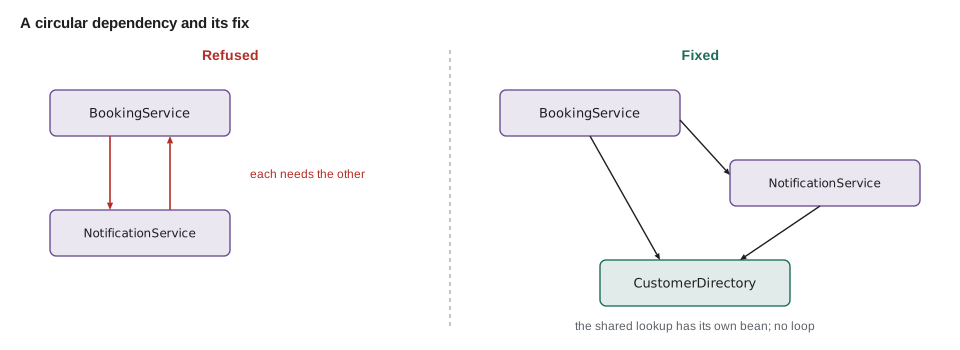
Sometimes two classes seem to need each other. Hamza's first sketch had BookingService calling NotificationService to send a message, and NotificationService calling BookingService to look up the customer's phone number. With constructor injection, neither can be created first, and since Spring Boot 2.6 the container refuses circular references by default and prints the cycle. The container is right to refuse: a cycle is a design problem. Usually one of the classes is doing two jobs, and the fix is to move the shared piece, here the customer lookup, into a third class that both can depend on.
Try it yourself
Detect a dependency cycle
needs maps each bean to the beans its constructor needs. Complete findCycle so it returns the first cycle it finds as a list such as [BookingService, NotificationService, BookingService], or an empty list when there is none, by a depth-first search from start.
Print the result for both graphs.
import java.util.*;

public class Main {
    static List<String> findCycle(Map<String, List<String>> needs, String start) {
        return List.of();
    }

    public static void main(String[] args) {
        Map<String, List<String>> bad = Map.of(
                "BookingService", List.of("NotificationService"),
                "NotificationService", List.of("BookingService"));
        Map<String, List<String>> good = Map.of(
                "BookingService", List.of("NotificationService", "CustomerDirectory"),
                "NotificationService", List.of("CustomerDirectory"),
                "CustomerDirectory", List.of());
        System.out.println(findCycle(bad, "BookingService"));
        System.out.println(findCycle(good, "BookingService"));
    }
}
Try it yourself
Inject through the constructor
ReminderService creates its own SystemClockSource, so the test below cannot control the time.
Change it to receive a ClockSource through its constructor, then make main pass the FixedClock so the program prints Reminder for Sat 2028-05-06.
import java.time.*;

public class Main {
    interface ClockSource { LocalDate today(); }
    static class SystemClockSource implements ClockSource { public LocalDate today() { return LocalDate.now(); } }
    static class FixedClock implements ClockSource { public LocalDate today() { return LocalDate.of(2028, 5, 5); } }

    static class ReminderService {
        private final ClockSource clock = new SystemClockSource();
        String reminderForTomorrow() {
            LocalDate d = clock.today().plusDays(1);
            return "Reminder for " + d.getDayOfWeek().toString().substring(0, 1)
                    + d.getDayOfWeek().toString().substring(1, 3).toLowerCase() + " " + d;
        }
    }

    public static void main(String[] args) {
        ReminderService service = new ReminderService();
        System.out.println(service.reminderForTomorrow());
    }
}
Before he left, Hamza deleted the field-injected @Autowired lines from his hello project and replaced them with constructors. "Now I could write the tests without Spring," he said, and Ingrid agreed that was the point.
Common mistakes
MistakeInjecting into fields with @Autowired.
InsteadUse constructor injection with final fields; it works without Spring in tests and fails fast at start-up.
MistakeKeeping per-request data in a singleton bean's fields.
InsteadSingletons are shared by every request thread; keep request data in local variables or method parameters.
MistakeCalling new for a dependency inside a bean.
InsteadLet the container supply it, or register the object with a @Bean method.
MistakeSilencing a circular reference by allowing it in the settings.
InsteadTreat the cycle as a design problem and move the shared responsibility into a separate bean.
MistakeLeaving two beans of the same type and hoping Spring picks the right one.
InsteadSettle it with @Primary, @Qualifier, a profile or a condition.
Summary and key terms
- A bean is an object created and managed by the Spring container.
- Classes become beans through @Component, @Service, @Repository or @RestController and component scanning, and library objects through @Bean methods in @Configuration classes.
- The container keeps a definition for each bean, creates beans in dependency order and fails at start-up if a dependency is missing.
- Constructor injection is the recommended style: final fields, complete objects, early failures and easy tests.
- When several beans fit one type, @Primary, @Qualifier, profiles or conditions decide.
- Singleton is the default scope; prototype creates a new instance per request; @PostConstruct and @PreDestroy run after injection and at shutdown.
- Spring refuses circular references by default, and the fix is to move the shared piece into its own bean.
- Bean
- An object created and managed by the Spring container.
- Dependency injection
- Supplying an object with the objects it needs from outside, instead of it creating them.
- Component scanning
- Searching packages for classes marked with stereotype annotations and registering them as beans.
- @Bean method
- A method in a @Configuration class whose return value is registered as a bean.
- Constructor injection
- Supplying dependencies as constructor arguments.
- Reflection
- Java's ability to inspect and call classes, constructors and methods at run time.
- Qualifier
- A name that selects one bean when several match a type.
- Singleton scope
- One shared instance of a bean for the whole container; the default.
- Prototype scope
- A new instance of a bean each time it is requested.
- Circular dependency
- Two or more beans that need each other, directly or through others.
Practice problems
Work each problem on paper first, then reveal the answer to check.
Which injection style do Spring guides recommend for required dependencies?
Show answer
Constructor injection.
What happens at start-up when a constructor needs a bean that does not exist?
Show answer
The application fails to start and names the missing bean.
Two Notifier beans exist. Name two ways to choose one.
Show answer
@Primary on one of them, or @Qualifier on the injection point; profiles and conditions also work.
Why must a singleton bean be safe for concurrent use?
Show answer
Every request thread shares the same instance.
When does a @PreDestroy method run?
Show answer
When the application context shuts down.
Lesson quiz · 5 questions
Score 60% or more to complete this lesson.
Create a free account to save your progress, take quizzes and earn a certificate.