
JAVA-230 · Lesson 9 of 12 · 24 min
JSON with Jackson
▶ Video coming soon A video version of this lesson is on the way.
On Wednesday, November 17, the problem came from the other direction. Second Gear's website, rebuilt by a volunteer over the summer, wanted a small feed of the parts the shop had in stock, and the volunteer's JavaScript expected JSON. The online booking form sent its requests as JSON too. "CSV is for tables people open in a spreadsheet," Ingrid said. "JSON is for programs talking to programs." JSON, JavaScript Object Notation, is a text format for nested data, standardized as RFC 8259 and ECMA-404, and nearly every web service in the world speaks it. Java has no JSON support in its standard library, so the usual choice is a library, and the most widely used one is Jackson.
What JSON looks like
JSON has six kinds of value: objects, written in braces as name and value pairs; arrays, written in square brackets; strings in double quotes; numbers; the literals true and false; and null. Objects and arrays nest to any depth. Names must be strings in double quotes, there are no comments, no trailing commas and no single quotes, and strings must escape quotes, backslashes and control characters with a backslash. Unlike CSV, there is one strict standard, which makes JSON much less surprising to parse.
| JSON | Natural Java type |
|---|---|
| {"code": "BELL", "quantity": 25} | a record or class with fields code and quantity |
| [1001, 1002, 1003] | List<Integer> or int[] |
| "Brass bell" | String |
| 899, 3.75 | int, long, double or BigDecimal |
| true / false | boolean |
| null | null, or an empty Optional in a getter |
| "2027-11-17" | LocalDate (written as an ISO 8601 string) |
Writing JSON by hand, and why escaping matters
Writing simple JSON with string building is possible, and seeing it once shows what a library does for you. The trap is escaping: a part description with a double quote in it, or a customer note with a line break, produces broken JSON unless those characters are escaped. A generator that escapes correctly is short, but getting every rule right, including Unicode control characters, is exactly the kind of detail a library has already tested.
import java.util.*;

public class Main {
    record Part(String code, String description, int quantity, long priceCents) { }

    static String str(String s) {
        StringBuilder b = new StringBuilder("\"");
        for (char c : s.toCharArray()) {
            switch (c) {
                case '"' -> b.append("\\\"");
                case '\\' -> b.append("\\\\");
                case '\n' -> b.append("\\n");
                case '\t' -> b.append("\\t");
                default -> {
                    if (c < 0x20) b.append(String.format("\\u%04x", (int) c));
                    else b.append(c);
                }
            }
        }
        return b.append('"').toString();
    }

    static String toJson(Part p) {
        return "{\"code\":" + str(p.code()) + ",\"description\":" + str(p.description())
                + ",\"quantity\":" + p.quantity() + ",\"priceCents\":" + p.priceCents() + "}";
    }

    public static void main(String[] args) {
        List<Part> parts = List.of(
            new Part("BELL", "Brass bell, \"ding\" sound", 25, 650),
            new Part("TUBE-700x25", "Tube\nPresta valve", 3, 899));
        StringJoiner array = new StringJoiner(",", "[", "]");
        for (Part p : parts) array.add(toJson(p));
        System.out.println(array);
    }
}[{"code":"BELL","description":"Brass bell, \"ding\" sound","quantity":25,"priceCents":650},{"code":"TUBE-700x25","description":"Tube\nPresta valve","quantity":3,"priceCents":899}]What this code does
str wraps a string in quotes and escapes the characters JSON does not allow raw: quotes, backslashes, line breaks, tabs and other control characters. The bell's quoted word and the tube's line break come out as \" and \n, so the result is valid JSON on one line. StringJoiner adds the commas and square brackets of the array.
The output is correct, but every new field means editing a string by hand, and reading JSON back is far harder than writing it. That is the point where a library earns its place.
Jackson
Jackson has been the most used JSON library in Java for over a decade, and frameworks such as Spring Boot, which JAVA-260 covers, use it by default. Jackson 3.0, released in October 2025, is a major rework: its packages and Maven group moved from com.fasterxml.jackson to tools.jackson (except the annotations, which kept their old names so both versions can live side by side), it needs Java 17 or later, mappers are immutable and built with builders, and its exceptions are now unchecked, extending RuntimeException instead of IOException. The 2.x line is still widely used and maintained, and most examples on the web are written for it, so it helps to recognize both. The listings below use Jackson 3. Maven Central cannot be reached from this course's build machine, so these listings are not compiled here, and their output is representative of what Jackson prints.
// build.gradle.kts
dependencies {
    implementation("tools.jackson.core:jackson-databind:3.0.0")   // check the current 3.x version
}
What this code does
A single dependency on jackson-databind brings in Jackson's core and annotations modules as well. The group name tools.jackson.core is the Jackson 3 name; Jackson 2 uses com.fasterxml.jackson.core, so a build should not mix them by accident. Check the current version before using it, as with any dependency.
import tools.jackson.databind.json.JsonMapper;
import java.util.List;

public class PartsFeed {
    record Part(String code, String description, int quantity, long priceCents) { }

    public static void main(String[] args) {
        JsonMapper mapper = JsonMapper.builder().build();
        List<Part> parts = List.of(
            new Part("BELL", "Brass bell, \"ding\" sound", 25, 650),
            new Part("TUBE-700x25", "Tube, 700x25, Presta valve", 3, 899));

        String json = mapper.writeValueAsString(parts);
        System.out.println(json);

        Part back = mapper.readValue("{\"code\":\"CHAIN-11\",\"description\":\"11-speed chain\",\"quantity\":2,\"priceCents\":2499}", Part.class);
        System.out.println(back);
    }
}
What this code does
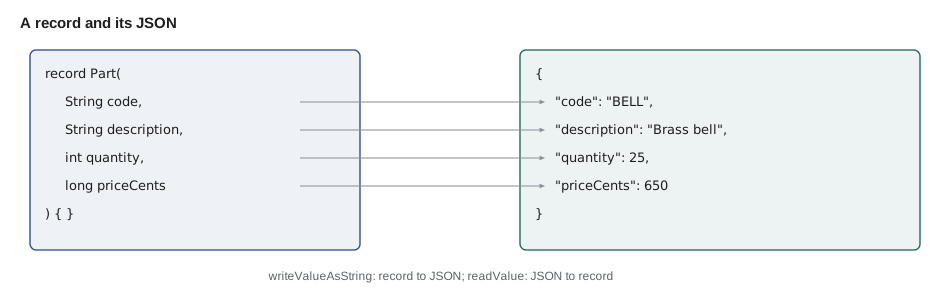
JsonMapper is built once and reused, because it is thread-safe and expensive to set up. writeValueAsString turns the list of records into a JSON array, using each record component's name as the member name, and readValue does the reverse, calling the record's constructor with the values it finds. Jackson has supported records directly since version 2.12, so no annotations are needed for this simple case.
$ java PartsFeed
[{"code":"BELL","description":"Brass bell, \"ding\" sound","quantity":25,"priceCents":650},{"code":"TUBE-700x25","description":"Tube, 700x25, Presta valve","quantity":3,"priceCents":899}]
Part[code=CHAIN-11, description=11-speed chain, quantity=2, priceCents=2499]
What this code does
This is representative output, not a capture from this machine, because Jackson could not be installed here. It shows the same escaping as the hand-written generator, a compact one-line array, and a record printed by its toString after reading. Members appear in the order of the record's components.
Shaping the JSON
Real JSON rarely matches your Java names exactly. The website's script wanted price_cents, not priceCents, wanted dates as ISO strings and did not want internal fields such as the supplier's account number at all. Jackson handles this with annotations on the record or class, and with mapper settings. @JsonProperty("price_cents") renames one member; a naming strategy such as PropertyNamingStrategies.SNAKE_CASE renames them all; @JsonIgnore leaves a member out; @JsonInclude(Include.NON_NULL) drops null values. java.time types are supported natively in Jackson 3, and need the jackson-datatype-jsr310 module in Jackson 2. For reading, the setting that matters most is what to do with members your class does not know: Jackson 3 ignores unknown properties by default, while Jackson 2 fails, which is the single most common surprise when moving between them.
import com.fasterxml.jackson.annotation.JsonIgnore;
import com.fasterxml.jackson.annotation.JsonProperty;
import tools.jackson.databind.PropertyNamingStrategies;
import tools.jackson.databind.SerializationFeature;
import tools.jackson.databind.json.JsonMapper;
import java.time.LocalDate;

public class BookingJson {
    record BookingRequest(String bike, LocalDate start, LocalDate end,
                          @JsonProperty("phone") String customerPhone,
                          @JsonIgnore String internalNote) { }

    public static void main(String[] args) {
        JsonMapper mapper = JsonMapper.builder()
                .propertyNamingStrategy(PropertyNamingStrategies.SNAKE_CASE)
                .enable(SerializationFeature.INDENT_OUTPUT)
                .build();
        var request = new BookingRequest("CARGO-1", LocalDate.of(2027, 11, 20), LocalDate.of(2027, 11, 21),
                "614-555-0188", "regular customer");
        System.out.println(mapper.writeValueAsString(request));

        String fromWebsite = """
            {"bike": "CITY-2", "start": "2027-11-27", "end": "2027-11-28",
             "phone": "614-555-0170", "referrer": "newsletter"}
            """;
        System.out.println(mapper.readValue(fromWebsite, BookingRequest.class));
    }
}
What this code does
The builder sets snake-case naming and indented output once for every object the mapper writes, while @JsonProperty fixes the phone member's name and @JsonIgnore keeps the internal note out of the JSON entirely. LocalDate values become ISO strings and are read back from them. The website's request carries a referrer member that the record does not have, and Jackson 3 ignores it by default.
$ java BookingJson
{
  "bike" : "CARGO-1",
  "start" : "2027-11-20",
  "end" : "2027-11-21",
  "phone" : "614-555-0188"
}
BookingRequest[bike=CITY-2, start=2027-11-27, end=2027-11-28, customerPhone=614-555-0170, internalNote=null]
What this code does
This representative output shows the indented form that Jackson's INDENT_OUTPUT feature produces. internal_note is missing from the JSON because of @JsonIgnore, and when reading, it is null because the website did not send it. The referrer member from the website was skipped without an error.
Reading JSON without a library
To understand what readValue does, it helps to see a parser. JSON's grammar is small enough that a recursive descent parser fits on a page: one method per kind of value, each reading characters and calling the others for nested values. The parser below turns JSON text into plain Java objects, maps, lists, strings, numbers and booleans, which is also what Jackson's tree model, JsonNode, gives you when you do not have a class to map into.
import java.util.*;

public class Main {
    private final String s;
    private int i = 0;
    Main(String s) { this.s = s; }

    Object value() {
        skip();
        char c = s.charAt(i);
        if (c == '{') return object();
        if (c == '[') return array();
        if (c == '"') return string();
        if (s.startsWith("true", i)) { i += 4; return true; }
        if (s.startsWith("false", i)) { i += 5; return false; }
        if (s.startsWith("null", i)) { i += 4; return null; }
        return number();
    }
    Map<String, Object> object() {
        Map<String, Object> m = new LinkedHashMap<>();
        i++; skip();
        if (s.charAt(i) == '}') { i++; return m; }
        while (true) {
            skip(); String key = string(); skip(); expect(':');
            m.put(key, value()); skip();
            if (s.charAt(i) == ',') { i++; continue; }
            expect('}'); return m;
        }
    }
    List<Object> array() {
        List<Object> a = new ArrayList<>();
        i++; skip();
        if (s.charAt(i) == ']') { i++; return a; }
        while (true) {
            a.add(value()); skip();
            if (s.charAt(i) == ',') { i++; continue; }
            expect(']'); return a;
        }
    }
    String string() {
        expect('"');
        StringBuilder b = new StringBuilder();
        while (s.charAt(i) != '"') {
            char c = s.charAt(i++);
            if (c == '\\') {
                char e = s.charAt(i++);
                b.append(switch (e) { case 'n' -> '\n'; case 't' -> '\t'; default -> e; });
            } else b.append(c);
        }
        i++;
        return b.toString();
    }
    Number number() {
        int start = i;
        while (i < s.length() && "+-0123456789.eE".indexOf(s.charAt(i)) >= 0) i++;
        String t = s.substring(start, i);
        if (t.contains(".") || t.contains("e") || t.contains("E")) return Double.parseDouble(t);
        return Long.parseLong(t);   // not a ?: expression, which would turn the long into a double
    }
    void skip() { while (i < s.length() && Character.isWhitespace(s.charAt(i))) i++; }
    void expect(char c) {
        if (s.charAt(i) != c) throw new IllegalArgumentException("expected " + c + " at position " + i + " but found " + s.charAt(i));
        i++;
    }

    public static void main(String[] args) {
        String json = """
            {"bike": "CITY-2", "days": 2, "accessories": ["lock", "basket"],
             "paid": true, "note": "Leave at the \\"back\\" door", "deposit": 25.0, "coupon": null}
            """;
        Map<String, Object> booking = (Map<String, Object>) new Main(json).value();
        System.out.println(booking);
        System.out.println("Days: " + booking.get("days") + " (" + booking.get("days").getClass().getSimpleName() + ")");
        System.out.println("Accessories: " + ((List<?>) booking.get("accessories")).size());
        try {
            new Main("{\"bike\": \"CITY-2\" \"days\": 2}").value();
        } catch (IllegalArgumentException e) {
            System.out.println("Rejected: " + e.getMessage());
        }
    }
}{bike=CITY-2, days=2, accessories=[lock, basket], paid=true, note=Leave at the "back" door, deposit=25.0, coupon=null}
Days: 2 (Long)
Accessories: 2
Rejected: expected } at position 18 but found "What this code does
Each kind of JSON value has its own method, and object and array call value for each member, which is how nesting to any depth works with very little code. Numbers with a decimal point become Double and whole numbers become Long, and the escaped quotes in the note come back as plain quotes. A missing comma between members is caught by expect with the position of the mistake, which is the same kind of message Jackson gives in its parse errors.
This parser skips some of the standard's details, such as \u escapes and strict number syntax, so it is a teaching tool, not a replacement for a library. Its value is in showing that a JSON document is a tree, which is the next idea.
Trees, streaming and validating input
Jackson offers three ways to work. Data binding, readValue and writeValueAsString with your classes, is the usual choice. The tree model, mapper.readTree(json) giving a JsonNode, is handy for exploring JSON whose shape you do not control, such as picking two fields out of a large response. The streaming API, JsonParser and JsonGenerator, reads and writes token by token for very large documents. Whichever you use, treat JSON from outside as untrusted input: map it into records, then check the values, such as an end date after the start date or a bike code that exists, before acting on it. Do not turn on Jackson's polymorphic typing features that let the JSON choose which Java class to create, which have caused serious security bugs; the Jackson team made them safer by default in later releases, but the safe habit is to map into known, simple types.
import java.time.*;
import java.util.*;

public class Main {
    record BookingRequest(String bike, LocalDate start, LocalDate end) {
        static final Set<String> FLEET = Set.of("CITY-1", "CITY-2", "CITY-3", "CITY-4", "CARGO-1", "TANDEM-1");
        BookingRequest {
            Objects.requireNonNull(bike, "bike is required");
            if (!FLEET.contains(bike)) throw new IllegalArgumentException("no such bike: " + bike);
            if (end.isBefore(start)) throw new IllegalArgumentException("end " + end + " is before start " + start);
        }
    }

    static String check(Map<String, String> fields) {
        try {
            var r = new BookingRequest(fields.get("bike"), LocalDate.parse(fields.get("start")), LocalDate.parse(fields.get("end")));
            return "accepted " + r;
        } catch (RuntimeException e) {
            return "rejected: " + e.getMessage();
        }
    }

    public static void main(String[] args) {
        System.out.println(check(Map.of("bike", "CARGO-1", "start", "2027-11-20", "end", "2027-11-21")));
        System.out.println(check(Map.of("bike", "CARGO-9", "start", "2027-11-20", "end", "2027-11-21")));
        System.out.println(check(Map.of("bike", "CITY-2", "start", "2027-11-28", "end", "2027-11-27")));
        System.out.println(check(Map.of("bike", "CITY-2", "start", "2027-11-31", "end", "2027-12-01")));
    }
}accepted BookingRequest[bike=CARGO-1, start=2027-11-20, end=2027-11-21] rejected: no such bike: CARGO-9 rejected: end 2027-11-27 is before start 2027-11-28 rejected: Text '2027-11-31' could not be parsed: Invalid date 'NOVEMBER 31'
What this code does
Whatever library parsed the JSON, the values end up in a record whose compact constructor checks them, so an invalid booking cannot exist as an object. A bike code that is not in the fleet and an end date before the start are rejected with clear messages. November 31 fails earlier, in LocalDate.parse, which shows that date parsing is itself part of validation.
The parts feed went live as a Jackson-generated JSON file that the website fetched once an hour, and the booking form's requests were mapped into the validated BookingRequest record. Hamza kept the hand-written parser in his notes; it was the first time a file format had felt like something he understood all the way down.
Try it yourself
Escape a JSON string
Complete str so that it returns the text wrapped in double quotes, with every " written as \" and every backslash written as \\.
The program should print "Brass bell" and "Size 3\" \\ 4\"", one per line.
public class Main {
    static String str(String s) {
        return "\"" + s + "\"";
    }

    public static void main(String[] args) {
        System.out.println(str("Brass bell"));
        System.out.println(str("Size 3\" \\ 4\""));
    }
}
Try it yourself
A JSON array of codes
Use a stream with map and Collectors.joining to turn the list of part codes into a JSON array of strings, with each code in double quotes, separated by commas and wrapped in square brackets.
The program should print ["BELL","CHAIN-11","TUBE-700x25"].
import java.util.*;
import java.util.stream.*;

public class Main {
    public static void main(String[] args) {
        List<String> codes = List.of("BELL", "CHAIN-11", "TUBE-700x25");
        String json = codes.toString();
        System.out.println(json);
    }
}
Common mistakes
MistakeBuilding JSON with string concatenation and no escaping.
InsteadUse a library such as Jackson, or escape quotes, backslashes and control characters every time.
MistakeCreating a new mapper for every call.
InsteadBuild one JsonMapper and reuse it; it is thread-safe.
MistakeMixing Jackson 2 and Jackson 3 packages by accident.
InsteadCheck the imports: com.fasterxml.jackson for 2, tools.jackson for 3 (annotations keep the old name).
MistakeActing on JSON from outside without checking it.
InsteadMap it into records with validating constructors, then check business rules.
MistakeLetting JSON choose which Java class to create.
InsteadMap into known, simple types and leave polymorphic typing off.
Summary and key terms
- JSON is a strict, standard text format for nested data, with objects, arrays, strings, numbers, booleans and null, and it is the usual format for programs talking to programs.
- Writing it by hand needs careful escaping, and reading it needs a parser; a recursive descent parser shows how, with one method per kind of value.
- Jackson is the standard Java library.
- Jackson 3.0, released in October 2025, moved to tools.jackson packages (annotations kept com.fasterxml.jackson.annotation), requires Java 17, uses immutable builder-made mappers such as JsonMapper and throws unchecked exceptions; Jackson 2 is still widely used. writeValueAsString and readValue map records to and from JSON by component name.
- Annotations such as @JsonProperty and @JsonIgnore, naming strategies and mapper features shape the output; Jackson 3 ignores unknown properties by default where Jackson 2 failed.
- The tree model and streaming API suit unknown shapes and very large documents.
- Always validate JSON from outside before acting on it.
- JSON
- JavaScript Object Notation, a standard text format for nested data.
- JSON object
- A set of name and value pairs written in braces.
- JSON array
- An ordered list of values written in square brackets.
- Escaping
- Writing special characters, such as quotes, with a backslash so the text stays valid.
- Jackson
- The most widely used JSON library for Java.
- JsonMapper
- Jackson's main object for converting between JSON and Java objects.
- Data binding
- Mapping JSON directly to and from Java classes or records.
- Tree model
- Working with JSON as a tree of nodes instead of mapping it to classes.
- Recursive descent parser
- A parser with one method per kind of construct, calling itself for nested parts.
Practice problems
Work each problem on paper first, then reveal the answer to check.
Why does Java need a library for JSON?
Show answer
The standard library has no JSON support.
What must a hand-written JSON writer escape?
Show answer
Quotes, backslashes and control characters such as line breaks.
Name two changes in Jackson 3.
Show answer
Any two of: tools.jackson packages, Java 17 minimum, immutable builder-made mappers, unchecked exceptions, unknown properties ignored by default.
Which annotation renames one member in the JSON?
Show answer
@JsonProperty.
What should happen after JSON from a website is mapped into a record?
Show answer
Its values should be validated before the program acts on them.
Lesson quiz · 5 questions
Score 60% or more to complete this lesson.
Create a free account to save your progress, take quizzes and earn a certificate.