
HSE-408 · Lesson 5 of 12 · 22 min
Designing work that tolerates error
Three months after the line 3 event, a contractor working on the bakery's oven controls mixed up two wires during a sensor replacement. The oven would not have started in the wrong state, because the new safety relay refused to energize with a mismatched signal pair. The contractor found the error in five minutes, swore quietly, and fixed it. Nobody filed a report, because nothing had happened. When Luis heard about it a week later, he said it was the best news he had had all month. 'That is what we want,' he said. 'Somebody made a mistake, and the equipment would not let it hurt anyone.'
Lessons 2 to 4 showed why error is normal and how context makes it more or less likely. This lesson turns to the response that HOP values most: designing equipment, layouts, procedures and tools so that errors are prevented where possible, caught where not, and unable to cause serious harm when they slip through.
A hierarchy for error
The hierarchy of controls, familiar from hazard management, has a close parallel for error. The stronger measures change the work so that the error cannot happen or cannot matter. The weaker measures rely on people noticing and remembering. Both have a place, but the stronger ones should be used at critical steps wherever practicable.
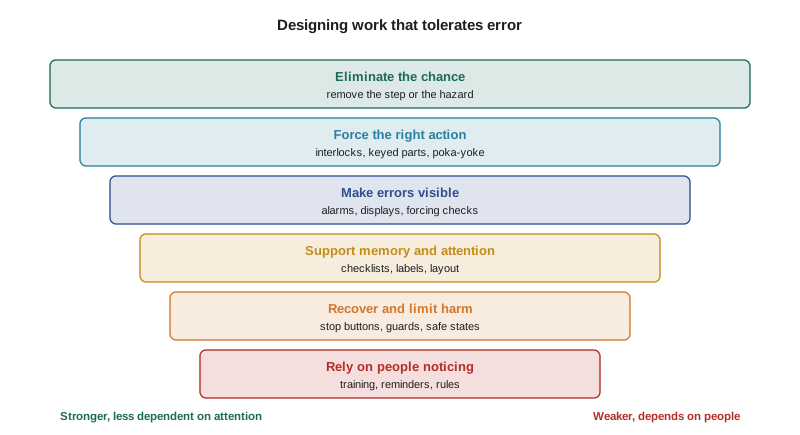
- Eliminate the chance. Remove the step, the choice or the hazard. If dough never needs clearing by hand, nobody can reach into a running conveyor to clear it.
- Force the right action. Make the wrong action physically impossible, through interlocks, keyed parts or fittings that only go together one way.
- Make errors visible. Give immediate, unmistakable feedback when something is wrong, through alarms, status lights or a check that will not let the process continue.
- Support memory and attention. Reduce reliance on memory with checklists, clear labels, logical layouts and visual cues.
- Recover and limit harm. Provide ways to stop quickly, guards that limit reach, and designs that fail to a safe state.
- Rely on people noticing. Training, procedures, reminders and rules. Necessary, but the weakest on its own.
Poka-yoke
Poka-yoke is a Japanese term usually translated as mistake-proofing. It is associated with Shigeo Shingo, an industrial engineer who worked with Toyota, and it grew out of quality control rather than safety. The idea is simple: design the process so that a mistake is either impossible or immediately obvious, rather than relying on inspection to catch defects afterwards.
Shingo distinguished between control devices, which stop the process when an error occurs, and warning devices, which signal the error but leave it to a person to respond. Control devices are stronger. He also described three common methods of detection:
- Contact methods detect whether a part or person is in the right position, using shape, size, sensors or limit switches. A guard door switch is a contact method.
- Fixed-value methods check that a set number of actions has happened, such as all six bolts tightened or all four isolation points locked.
- Motion-step methods check that steps happen in the right order, such as a fill that will not start until the drain valve is confirmed closed.
Mistake-proofing devices tend to be cheap, simple and specific. Many of the most effective at Harrowgate Foods Inc. cost less than a day's production of a single line.
Keyed couplings at the sauces plant
The sauces plant at Athens gave the project its clearest early example. Operators transferred cleaning chemicals and food-grade concentrates from drums to dosing tanks using hoses with identical quick couplings. The drums were labeled, and the procedure required the operator to read the label and match it to the tank. In two years there had been three wrong connections, one of which sent caustic cleaner into a concentrate tank. Each had been treated as a training issue.
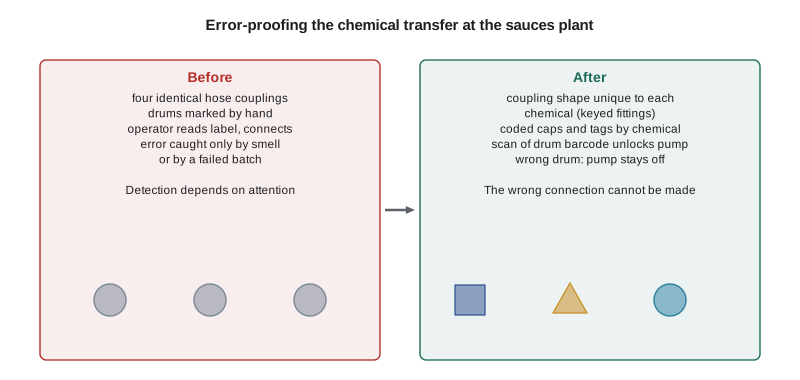
Owen Price, the sauces plant lead, worked with the operators and the supplier to fit couplings with a different shape for each chemical family, so that a caustic hose physically could not connect to an acid or concentrate tank. The supplier agreed to deliver drums with matching fittings. A barcode scan at each tank unlocked the dosing pump only for the correct product. The total cost was about the same as one batch of lost product. There have been no wrong connections since.
Human factors engineering
Human factors engineering applies knowledge about human abilities and limits to the design of equipment and work. Don Norman's book The Design of Everyday Things popularized several principles that apply directly to industrial controls.
- Visibility. The state of the system and the options available should be visible. A latched emergency stop that shows only as a small light at the far end of the line breaks this principle.
- Feedback. Every action should produce immediate, clear feedback. A start button that does nothing, whether because the machine is isolated or because an emergency stop is latched, gives ambiguous feedback.
- Mapping. The relationship between controls and their effects should be obvious. Disconnects arranged in the same order as the machines they control, with the machine name and a photograph on each, map better than a row of identical boxes.
- Constraints. Physical, logical and cultural constraints should limit the possible actions to the right ones.
- Consistency. Similar operations should work in similar ways across machines and sites, so that habits transfer safely.
- Affordances. The design should suggest how it is to be used. A handle invites pulling; a flat plate invites pushing.
The line 3 team used these principles to redesign the changeover. The disconnects were rearranged to match the order of the conveyor sections and engraved with the section name, a photograph and a number painted on the matching section. A large emergency stop beacon, visible from every point on the line, showed when any stop was latched. The start test moved to a dedicated button that displayed 'E-STOP ACTIVE: TEST NOT VALID' if pressed while a stop was latched. And the operator's restart screen showed which isolation points still had locks applied, so that the operator could see that someone was still inside.
Checklists
Checklists support memory and attention. They do not prevent errors on their own, but they make it much less likely that a critical step is forgotten, especially under interruption, fatigue or time pressure. Aviation has used them for decades. Atul Gawande's book The Checklist Manifesto brought them to a wider audience.
The most cited evidence comes from surgery. The World Health Organization introduced a surgical safety checklist in 2008, and a study published in the New England Journal of Medicine in 2009 reported results from eight hospitals in eight cities around the world. After the checklist was introduced, the death rate fell from 1.5 % to 0.8 % and the rate of complications from 11 % to 7.0 %. The study design could not prove that the checklist alone caused the change, and later studies have found that results depend heavily on how a checklist is introduced and whether teams actually use it, but the findings showed that a short, well-designed checklist can matter.
Good checklists share several features:
- Short. Usually five to nine items at each pause point, limited to the steps that are critical and most likely to be missed. A checklist that lists everything gets skimmed.
- Clear type. A read-do checklist is followed step by step; a do-confirm checklist is used to confirm after the work that the critical steps were done. Each suits different tasks.
- Pause points. The checklist is used at defined moments, such as before isolation and before restart, not as a running record.
- Written with users. The people who use the checklist test it on real work and help decide what goes on it.
- Revised. Items that are never missed are removed; new failure points are added.
Mei's changeover checklist had 31 items and ended with 'reset emergency stop, confirm ready'. It did not ask whether anyone was inside the guarding. The revised checklist had two pause points with seven items each. The restart pause point began with 'all locks removed from the isolation board' and 'technician confirms clear by radio', before any reset.
How much do checks add?
A common response to error is to add a second person to check the first. Peer checks and independent verification are useful, but they add less than people expect when the checker is not truly independent. A checker who watches the first person do the work, trusts them, or uses the same information is likely to miss the same errors. Luis wrote a calculation to show the effect.
# Chance that an error at a critical step passes undetected
p_error = 0.003       # chance the technician makes the error
miss_self = 0.5       # chance a self-check misses an error that was made
miss_peer = 0.2       # chance an independent peer check misses it

def undetected(miss_peer_given_self_missed):
    return p_error * miss_self * miss_peer_given_self_missed

print(f"no checks:                  1 in {1 / p_error:,.0f}")
print(f"self-check only:            1 in {1 / (p_error * miss_self):,.0f}")
print(f"fully independent peer:     1 in {1 / undetected(miss_peer):,.0f}")
# when the peer watches and trusts, they tend to miss what the first person missed
for dependent in (0.5, 0.8):
    print(f"peer miss {dependent:.0%} if self missed: 1 in {1 / undetected(dependent):,.0f}")

# a design change that makes the error impossible
print("interlock that blocks the error: no undetected errors at this step")no checks: 1 in 333 self-check only: 1 in 667 fully independent peer: 1 in 3,333 peer miss 50% if self missed: 1 in 1,333 peer miss 80% if self missed: 1 in 833 interlock that blocks the error: no undetected errors at this step
With these illustrative numbers, a fully independent peer check made an undetected error about five times rarer than a self-check alone and ten times rarer than no check at all. A peer who largely shared the first person's view added much less. The lesson Luis drew was that checks are worth having at critical steps, but they should be designed for independence: the checker should use separate information, check the physical state rather than the paperwork, and not simply watch. Where possible, an interlock or a forcing design should do the job instead.
Design that fails safe
Some errors cannot be prevented, so the design must limit the harm they cause. Fail-safe design means that when something goes wrong, the system moves to a safe state. A safety relay that de-energizes on a fault, a hold-to-run control that stops when released, a guard that limits reach regardless of what the person does, and an automatic stop when a light curtain is broken are all examples. On line 3, the team added a light curtain at the divider that stopped the conveyor if anything crossed it while the line was in changeover mode, as a backup to isolation rather than a replacement for it.
Worked problem
Choosing measures for a critical step
Show solution
- Step: before clearing dough from the divider, confirm the divider conveyor cannot move.
- Eliminate: a fixed long scraper mounted on the frame lets most dough be cleared from outside the guard, so reaching in is needed far less often.
- Force: the start test button refuses to run while any emergency stop is latched, so a false test cannot be taken as proof of isolation.
- Make visible: engraved, photo-labeled disconnects mapped to the sections, and a beacon showing any latched stop.
- Support memory: the revised checklist pause point before reaching in, with a peer check by the operator at the isolation board.
- Limit harm: a light curtain at the divider stops the belt in changeover mode if anything crosses it.
Answer: The step is now protected at several levels, and the strongest measures do not depend on anyone remembering or noticing.
Pitfalls
Design measures can fail if they fight the work. An interlock that slows a common task without good reason will be bypassed. Too many alarms train people to ignore all of them. A poka-yoke device fitted without the crew's input may block a legitimate task nobody told the designer about. Harrowgate Foods Inc. put every design change through the management of change process, asked the crew to test it, and checked after a month whether anyone had found a way around it. Where they had, the team treated the workaround as information about the design, not as misconduct.
Common mistakes
MistakeAnswering every error with retraining or a reminder.
InsteadLook first for ways to eliminate the error, force the right action or make the error visible.
MistakeWriting long checklists that list every step.
InsteadKeep checklists short, use pause points and include only critical, easily missed items.
MistakeAssuming a second person doubles protection.
InsteadDesign checks for independence, or use an interlock that makes the error impossible.
MistakeDesigning controls without the people who use them.
InsteadTest design changes with the crew and treat workarounds as information about the design.
MistakeFitting so many alarms that people stop noticing them.
InsteadReserve alarms for conditions needing action and make status visible in other ways.
Summary and key terms
- A hierarchy for error runs from eliminating the chance of error, through forcing the right action and making errors visible, to supporting memory, limiting harm and relying on people.
- Poka-yoke uses simple control and warning devices, based on contact, fixed-value or motion-step methods, to make mistakes impossible or obvious.
- Human factors principles such as visibility, feedback, mapping, constraints and consistency guide the design of controls and displays.
- Short, well-designed checklists with pause points help ensure critical steps are not missed; the WHO surgical checklist study showed what they can achieve.
- Peer checks add less than expected unless they are designed to be independent.
- Fail-safe design limits harm when errors get through, and design changes should be tested with the crew.
- Poka-yoke
- Mistake-proofing: designing a process so that errors are impossible or immediately obvious.
- Control device
- A poka-yoke device that stops the process when an error occurs.
- Forcing function
- A design feature that prevents the next step until the right action has been taken.
- Mapping
- The relationship between controls and their effects, which good design makes obvious.
- Do-confirm checklist
- A checklist used after the work to confirm that critical steps were completed.
- Fail-safe
- A design that moves to a safe state when a fault or error occurs.
Practice problems
Work each problem on paper first, then reveal the answer to check.
What is the difference between a poka-yoke control device and a warning device?
Show answer
A control device stops the process when an error occurs; a warning device signals the error and leaves the response to a person.
Which human factors principle did the latched emergency stop light at the far end of the line break?
Show answer
Visibility; the state of the system could not be seen from where the action was taken. It also gave ambiguous feedback.
What did the 2009 surgical checklist study report for deaths and complications?
Show answer
Deaths fell from 1.5 % to 0.8 % and complications from 11 % to 7.0 % across eight hospitals.
Why does a dependent peer check add little protection?
Show answer
A checker who watches, trusts or uses the same information tends to miss the same errors as the first person.
How did the sauces plant make wrong chemical connections impossible?
Show answer
Couplings with a different shape for each chemical family, matching drum fittings, and a barcode scan that unlocks the pump only for the correct product.
Lesson quiz · 5 questions
Score 60% or more to complete this lesson.
Create a free account to save your progress, take quizzes and earn a certificate.