
ELV-310 · Lesson 11 of 12 · 21 min
Diagnostic tools, fault logs and remote monitoring
Ray's diagnostic tools for Tillicum car 1 fit in one pouch: a meter, a set of insulated probes, a flashlight, the prints and his notebook. Priya's for Quayside fill a backpack: the same meter, a laptop with the maker's service software, a handheld service tool, a cable for the controller's network port, and a tablet with the remote monitoring system's history for every car on the route. Neither set is better. Ray's tools work on any car ever built; Priya's let her see what a car was doing at the moment it failed, three days ago, when nobody was there. This lesson covers the tools controls mechanics use, how to read a fault log, and how remote monitoring changes maintenance.
The service tool
Every microprocessor controller has some way of showing its state and changing its settings. On Larchmont's independent controller, it is a small display and four buttons on the main board, with menus for inputs, outputs, faults and parameters. On Quayside's, it is a handheld tool that plugs into the controller and the car top station, and a laptop program that connects over the controller's network port and shows the same information in more detail, with traces of speed, position and drive current during runs. With either tool, a mechanic can see every input and output, the state of the run sequence, the car's position and speed, the drive's status, the safety board's status, and the logs, and can run guided tests, adjust parameters within the access level of their password, and save or restore the parameter set.
Access is controlled. Most tools have levels: a viewing level for anyone trained, an adjusting level for mechanics, and a protected level for safety parameters and software changes, sometimes held only by the maker. Passwords are personal and recorded. Lesson 4's story of the fire alternate level changed by a technician with a borrowed password shows why.
Fault logs and event logs
A microprocessor controller records two kinds of history. The fault log lists every fault the controller detected, each with a code, a short description, the date and time, and usually the car's position, direction, speed, load and the state of the doors at that moment. The event log records ordinary events as well, such as mode changes, door reversals, runs and calls, and is often the key to understanding what led up to a fault. Logs have limited space, and older entries are overwritten, so a mechanic who arrives for a callback copies the log before doing anything else.
A fault code on its own rarely gives the cause. It says what the controller saw, not why. A door lock fault means the lock circuit opened when the controller expected it closed; the cause could be a worn lock, a misaligned door, a broken wire or a passenger forcing the door. The value of the log is in the pattern: which floor, which direction, what time, how often, after what event. Priya reads a fault log in four passes: which codes occur most, where and when they occur, what else happened just before, and whether anything changed on the car around the time they started.
# Read a fault log: count by code, then by floor and hour for the most common code
log = [
    ("2026-10-02 14:12", "DZ discrepancy", 22, "up"), ("2026-10-02 15:40", "DZ discrepancy", 22, "down"),
    ("2026-10-03 09:05", "door lock open", 14, "up"),  ("2026-10-03 14:55", "DZ discrepancy", 21, "up"),
    ("2026-10-04 15:22", "DZ discrepancy", 22, "up"),  ("2026-10-05 13:48", "DZ discrepancy", 22, "down"),
    ("2026-10-05 16:01", "drive overcurrent", 1, "up"), ("2026-10-06 15:10", "DZ discrepancy", 23, "up"),
    ("2026-10-07 08:30", "door lock open", 14, "down"), ("2026-10-07 14:35", "DZ discrepancy", 22, "up"),
]
from collections import Counter
codes = Counter(code for _, code, _, _ in log)
print("faults by code:")
for code, n in codes.most_common():
    print(f"  {code:<18} {n}")
top = codes.most_common(1)[0][0]
floors = Counter(f for _, c, f, _ in log if c == top)
hours = Counter(int(t[11:13]) for t, c, _, _ in log if c == top)
print(f"'{top}' by floor:", dict(sorted(floors.items())))
print(f"'{top}' by hour of day:", dict(sorted(hours.items())))
afternoon = sum(n for h, n in hours.items() if 13 <= h <= 16)
print(f"{afternoon} of {codes[top]} between 13:00 and 16:59")faults by code:
DZ discrepancy 7
door lock open 2
drive overcurrent 1
'DZ discrepancy' by floor: {21: 1, 22: 5, 23: 1}
'DZ discrepancy' by hour of day: {13: 1, 14: 3, 15: 3}
7 of 7 between 13:00 and 16:59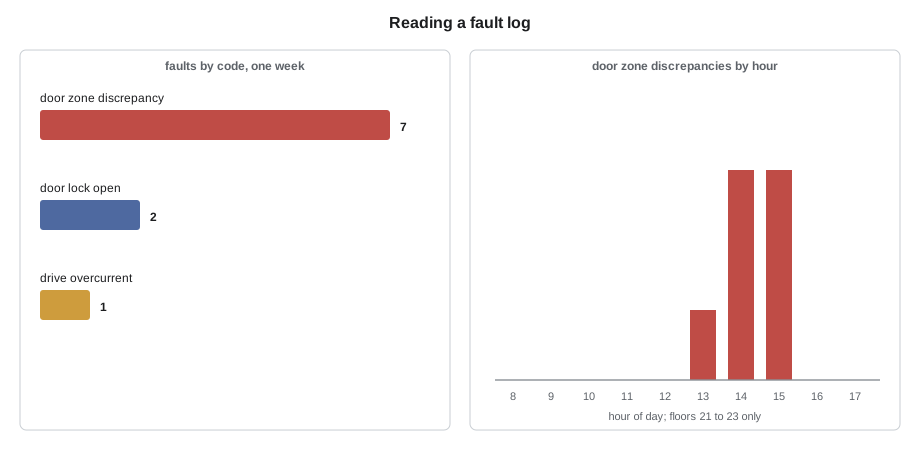
The pattern stands out at once: the door zone discrepancies cluster at floors 21 to 23 and in the afternoon. A fault tied to a place and a time of day is usually tied to something physical that changes with the time of day, such as temperature or sunlight. That log is the start of the capstone in Lesson 12.
Meters, scopes and loggers
The meter remains the most important diagnostic tool on any controller. ELV-210 covered how to measure voltage across contacts, check supplies and test insulation. On microprocessor controllers, the meter checks the supplies, the inputs at their terminals when the display and the device disagree, the outputs at their loads, and the resistance of serial line terminations with power off. The meter's minimum and maximum recording function catches a supply that dips during a start.
Two other tools help with faults that come and go. An oscilloscope, or a scope function on a meter, shows how a signal changes over thousandths of a second: an encoder signal with noise, a serial line with reflections, or a supply with ripple. A data logger records a few signals over hours or days, so a fault that appears twice a week can be caught. Priya uses a small four-channel logger clipped to a car's inputs, such as a door lock circuit and a door zone input, with the car in service, when the controller's own log does not record enough detail.
Remote monitoring
Most new controllers, and many older ones fitted with an add-on unit, can be monitored remotely. The controller or the add-on sends its faults, events and status to a server over a cellular or building network connection, and the contractor's dispatch office and mechanics see them on a screen. Northcrest monitors all four Quayside cars, Larchmont and the two Holloway cars this way, and the Tillicum cars through a small add-on that watches the safety circuit, the doors and the car's movement.
Remote monitoring changes maintenance in three ways. First, the office knows about a shutdown, and often about a trapped passenger, as soon as it happens, sometimes before the building calls. Many systems detect an entrapment from the car stopped between floors with its doors closed and the alarm or the emergency phone used, and dispatch a mechanic at once. Second, a mechanic arriving at a callback can look at the history on the way, and often arrives with a good idea of the cause and the part needed. Third, the data shows trends: door close times getting longer, more door reversals at one floor, brake currents rising, run counts and door cycles that set when parts should be changed. Maintenance can then be planned around the condition of the equipment instead of a fixed calendar.
# Trend in door closing time from remote monitoring: when does it cross the alert level?
weeks = list(range(1, 11))
close_time = [3.10, 3.12, 3.11, 3.15, 3.18, 3.22, 3.27, 3.31, 3.38, 3.44]   # seconds, weekly average
alert = 3.6
n = len(weeks)
mx, my = sum(weeks) / n, sum(close_time) / n
slope = sum((x - mx) * (y - my) for x, y in zip(weeks, close_time)) / sum((x - mx) ** 2 for x in weeks)
latest = close_time[-1]
weeks_left = (alert - latest) / slope if slope > 0 else float("inf")
print(f"closing time rising by {slope * 1000:.0f} ms per week; latest {latest:.2f} s")
print(f"alert level {alert} s reached in about {weeks_left:.1f} weeks")
print("plan: inspect door operator, gibs and track at the next routine visit")closing time rising by 38 ms per week; latest 3.44 s alert level 3.6 s reached in about 4.2 weeks plan: inspect door operator, gibs and track at the next routine visit
A door that takes longer to close each week usually has a dirty or worn track, worn gibs or a failing operator. Left alone, it eventually causes door faults and shutdowns; caught in the trend, it is a routine repair on a planned visit. Priya added the Larchmont car's door to her next visit list after a chart like this one.
Security of remote access
A controller connected to a network is also a controller that someone could try to reach without permission. Remote monitoring in most systems only reads data, and the safety functions do not depend on the connection. Some systems also allow remote changes, such as putting a car out of service, changing parking floors or adjusting door times. Elevator makers, contractors and building owners now treat this connection as part of the building's security: the connection is through a gateway or cellular link separate from the building's office network, access is by named account with strong passwords, changes are logged, and safety parameters cannot be changed remotely. Recent code editions have begun to address the security of remote and network access to elevator controls. When Quayside's building manager asked whether the elevators could be put on the building's guest Wi-Fi to save the cost of the cellular link, Priya explained why the answer was no.
The diagnostic method
Tools change; the method does not. Northcrest's controls mechanics follow the same sequence on every fault, whether the car is relay or microprocessor.
- Make it safe. Find out whether anyone is trapped and release them first. Lock out or put the car on inspection before working on it.
- Gather the history. Talk to whoever reported it, read the logbook, copy the fault and event logs, and check the remote monitoring history.
- Define the fault precisely: what happens, where, when, how often, and what does not happen.
- Find the step at which the sequence stops or the signal that is wrong, using the service tool or the relay sequence.
- Measure at the device and its wiring, not just at the controller.
- Fix the cause, not the symptom, and do not change settings to hide a problem.
- Test, including any tests the maker or code requires after the repair, and watch the car in service.
- Record what was found and done, in the logbook and the maintenance record.
The last step is the one most often skipped, and it is the one that saves the most time later. A logbook entry that says "door lock fault, fixed" helps nobody; one that says "floor 14 hoistway door lock roller worn, lock intermittently opening at the end of the close, replaced roller, adjusted lock engagement, tested at all floors" tells the next mechanic exactly what happened.
Worked problem
A callback with a history
At 07:40 the remote monitoring system reports Quayside car 4 shut down with a drive overcurrent fault at the lobby. The history shows three earlier overcurrent faults in two weeks, all on starts from the lobby in the up direction with a heavy load, and the drive's start current trend has been rising. What should Tamsin bring and check?
Show solution
- The pattern is on heavy up starts, which is where the drive needs the most torque at brake lift.
- A rising start current suggests the drive is working harder than it should at the start: the brake may be dragging or lifting late, or pre-torque may be wrong because load weighing reads low.
- Bring the service tool for traces of drive current, brake lift and load reading on a start, and test weights for a load weighing check.
- On site, copy the logs, check the brake lift and its timing, check load weighing with test weights, and look at a start trace before changing any drive setting.
Answer: The history points to the start: brake lift or load weighing, checked with traces and test weights before any drive adjustment.
Common mistakes
MistakeClearing the fault log at the start of a callback.
InsteadCopy it first; it is the history of the fault and may be overwritten.
MistakeTreating a fault code as the cause.
InsteadA code says what the controller saw; find why from the pattern and from measurements.
MistakeConnecting the elevator controller to a building's general network for convenience.
InsteadUse a separate, secured connection with named access and logged changes.
MistakeIgnoring a slow trend because the car still runs.
InsteadTrends predict faults; plan the repair before the shutdown.
MistakeWriting 'fixed' in the logbook.
InsteadRecord what was found, what was done and how it was tested.
Summary and key terms
- Service tools show inputs, outputs, sequence state, position, drive and safety board status, logs and guided tests, under controlled access levels.
- Fault logs record what the controller saw and the conditions at that moment; the pattern by floor, time and event points to the cause.
- Meters, scopes and data loggers measure at the device and catch faults that come and go.
- Remote monitoring reports shutdowns and entrapments at once, gives the history before arrival, and shows trends for planned maintenance.
- Remote connections must be secured and separate from general building networks.
- The diagnostic method is the same on any car: make safe, gather history, define, find the step, measure, fix the cause, test and record.
- Service tool
- A display, handheld unit or laptop program for reading a controller's state and logs and adjusting parameters.
- Fault log
- The controller's record of detected faults with time, position and conditions.
- Event log
- The controller's record of ordinary events such as runs, mode changes and door reversals.
- Data logger
- A device that records selected signals over hours or days to catch intermittent faults.
- Remote monitoring
- Sending a controller's faults, events and status to the contractor over a network.
- Entrapment
- A passenger trapped in a stopped car.
- Condition-based maintenance
- Maintenance planned from the measured condition and use of equipment rather than a fixed calendar.
Practice problems
Work each problem on paper first, then reveal the answer to check.
What is the first thing to do with the fault log on a callback, after making the car safe?
Show answer
Copy it before doing anything that might clear or overwrite it.
A fault occurs only at three floors and only in the afternoon. What kind of cause does that suggest?
Show answer
Something physical at those floors that changes with time of day, such as temperature or sunlight.
Name three ways remote monitoring helps maintenance.
Show answer
Immediate notice of shutdowns and entrapments, history before arrival, and trends for planned maintenance.
Why should safety parameters not be changeable remotely?
Show answer
A remote connection could be misused or mistaken; safety settings need a mechanic on site with the tests that follow.
Rewrite the logbook entry 'door fault fixed' usefully.
Show answer
For example: floor 9 door lock contact misaligned, intermittent open at end of close; realigned and tested at all floors.
Lesson quiz · 5 questions
Score 60% or more to complete this lesson.
Create a free account to save your progress, take quizzes and earn a certificate.