
CMPUT-313 · Lesson 8 of 12 · 32 min
The network layer I: the data plane
The network layer moves datagrams from a source host to a destination host across many networks, and it is the only layer implemented in every host and every router. Its work divides into two parts. Forwarding is the local, per-router action of moving an arriving packet to the right output link, done in nanoseconds in hardware. Routing is the network-wide process of computing the paths packets follow, done in software over seconds or minutes. Forwarding is the data plane; routing is the control plane, the subject of lesson 9. This lesson looks inside a router, at the IPv4 datagram, at addressing and longest-prefix matching, at the network address translation that most home networks rely on, at IPv6, and at the generalized forwarding of software-defined networks. CISSP-113 lesson 2 covered addressing and subnetting from the security side; we review only what we need and focus on how forwarding works.
Inside a router
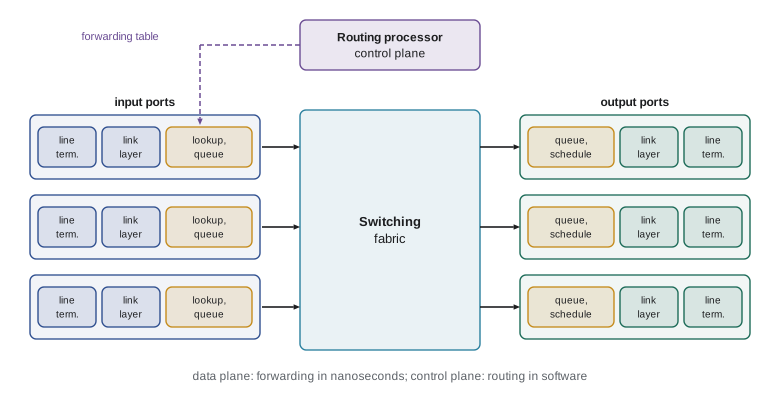
A router has four components. Input ports terminate incoming links, perform link-layer processing and, crucially, look up each packet's destination in a forwarding table to decide its output port. A switching fabric connects input ports to output ports; it may be shared memory, a shared bus or an interconnection network such as a crossbar. Output ports queue packets and transmit them onto outgoing links. A routing processor runs the routing protocols, maintains the routing tables and computes the forwarding table that it installs in the input ports. High-end routers forward billions of packets per second, so lookups are done in specialized hardware such as ternary content-addressable memory (TCAM), which compares an address against every table entry at once.
Queues can form at both input and output ports. If the switching fabric is not fast enough to move packets from all inputs at once, they queue at input ports, and a packet at the head of a queue that is waiting for a busy output can block packets behind it that are headed for idle outputs: head-of-line blocking again, in a new place. Output queues form when several inputs send to the same output at once, which is the queueing and loss of lesson 1. A scheduler decides which queued packet goes next: first come first served, priority queueing, round robin, or weighted fair queueing, which shares a link among classes of traffic in proportion to assigned weights.
The IPv4 datagram
IPv4, defined in RFC 791 in 1981, still carries most internet traffic, though IPv6 is catching up. Its header is at least 20 bytes. Key fields include the version (4), header length, total length, an identifier with flags and a fragment offset for fragmentation, the time-to-live, which every router decrements and which causes the packet to be discarded at zero (stopping packets from circulating forever in a routing loop), the protocol number of the payload (6 for TCP, 17 for UDP), a header checksum, and 32-bit source and destination addresses. The type-of-service byte now carries a six-bit Differentiated Services Code Point used for priority and two bits for ECN (lesson 7).
Because each router decrements the TTL, each must also recompute the header checksum. The program below builds a header, verifies it, and forwards it one hop. (RFC 1624 describes a faster incremental update that avoids recomputing the whole sum.) IPv6 dropped the header checksum entirely, relying on link-layer and transport checks, partly to save routers this work.
import struct
def checksum(data):
    total = sum(w for (w,) in struct.iter_unpack("!H", data))
    while total >> 16:
        total = (total & 0xFFFF) + (total >> 16)
    return ~total & 0xFFFF
# Build an IPv4 header, compute its checksum, then forward it like a router would
hdr = bytearray(struct.pack("!BBHHHBBH4s4s", 0x45, 0, 60, 0x1c46, 0x4000, 64, 6, 0,
                            bytes([10, 0, 0, 23]), bytes([142, 250, 69, 99])))
struct.pack_into("!H", hdr, 10, checksum(bytes(hdr)))
print("header :", hdr.hex(" "))
print("valid  :", checksum(bytes(hdr)) == 0)
ver_ihl, tos, total, ident, frag, ttl, proto, csum = struct.unpack("!BBHHHBBH", hdr[:12])
print(f"version {ver_ihl >> 4}, header {4 * (ver_ihl & 15)} B, total {total} B, DF={frag >> 14 & 1}, TTL {ttl}, protocol {proto}")
# A router decrements TTL, so it must update the checksum
hdr[8] -= 1
struct.pack_into("!H", hdr, 10, 0)
struct.pack_into("!H", hdr, 10, checksum(bytes(hdr)))
print("after one hop: TTL", hdr[8], "new checksum", f"0x{struct.unpack('!H', hdr[10:12])[0]:04x}",
"valid", checksum(bytes(hdr)) == 0)header : 45 00 00 3c 1c 46 40 00 40 06 40 02 0a 00 00 17 8e fa 45 63 valid : True version 4, header 20 B, total 60 B, DF=1, TTL 64, protocol 6 after one hop: TTL 63 new checksum 0x4102 valid True
Fragmentation and the MTU
Each link has a maximum transmission unit (MTU), the largest datagram it can carry: 1,500 bytes on standard Ethernet, more on links with jumbo frames, less on some tunnels and VPNs. When IPv4 must forward a datagram larger than the next link's MTU, a router may fragment it into several smaller datagrams, each with its own header, the same identifier, a fragment offset measured in 8-byte units and a more-fragments flag. Only the destination reassembles them. Fragmentation is costly and fragile: losing one fragment loses the whole datagram, and middleboxes often mishandle fragments. Modern practice therefore avoids it. TCP sets the don't-fragment flag and uses path MTU discovery: a router that would need to fragment drops the packet and returns an ICMP message reporting the MTU, and the sender reduces its segment size. IPv6 routers never fragment; only the source may.
# IPv4 fragmentation of a 4,000-byte datagram (20-byte header) onto a link with MTU 1,500
total, hdr, mtu = 4000, 20, 1500
data = total - hdr
per_frag = (mtu - hdr) // 8 * 8            # data per fragment must be a multiple of 8 bytes
offset = 0
while data > 0:
    size = min(per_frag, data)
    more = 1 if data > size else 0
    print(f"fragment: {hdr + size:5d} bytes total, data {size:4d}, offset field {offset // 8:4d} (byte {offset:4d}), MF={more}")
offset += size; data -= sizefragment: 1500 bytes total, data 1480, offset field 0 (byte 0), MF=1 fragment: 1500 bytes total, data 1480, offset field 185 (byte 1480), MF=1 fragment: 1040 bytes total, data 1020, offset field 370 (byte 2960), MF=0
Addressing, subnets and CIDR
An IPv4 address is 32 bits, written in dotted decimal such as 10.20.30.7. Addresses belong to interfaces, not hosts: a router with five interfaces has five addresses. A subnet is a group of interfaces that can reach each other without passing through a router, and its addresses share a common prefix. Classless inter-domain routing (CIDR) writes this as an address and prefix length, a.b.c.d/x, meaning the first \(x\) bits identify the subnet. A /24 has 256 addresses (254 usable, since the all-zeros and all-ones host addresses are reserved for the network and broadcast); a /16 has 65,536.
CIDR lets ISPs aggregate addresses: an ISP that holds 200.23.16.0/20 can give /23 blocks to eight customers and still advertise the single /20 to the rest of the internet, keeping global routing tables smaller. Organizations obtain addresses from their ISP or from a regional internet registry: ARIN serves Canada, the United States and parts of the Caribbean. ARIN's free pool of IPv4 addresses ran out in 2015, and IPv4 addresses are now traded on a market, recently at prices of tens of dollars per address.
import ipaddress
# Divide a /22 allocation among four campus subnets of different sizes (largest first)
block = ipaddress.ip_network("10.40.0.0/22")
needs = [("residence Wi-Fi", 500), ("labs", 200), ("staff", 100), ("servers", 25)]
free = [block]
for name, hosts in needs:
    prefix = 32 - (hosts + 2 - 1).bit_length()      # +2 for network and broadcast addresses
    for i, f in enumerate(free):
        if f.prefixlen <= prefix:
            sub = next(f.subnets(new_prefix=prefix))
            rest = list(f.address_exclude(sub))
            free = free[:i] + sorted(rest) + free[i + 1:]
            print(f"{name:16s} needs {hosts:3d} -> {sub} ({sub.num_addresses - 2} usable)")
            break
print("left over:", ", ".join(map(str, sorted(free))))residence Wi-Fi needs 500 -> 10.40.0.0/23 (510 usable) labs needs 200 -> 10.40.2.0/24 (254 usable) staff needs 100 -> 10.40.3.0/25 (126 usable) servers needs 25 -> 10.40.3.128/27 (30 usable) left over: 10.40.3.160/27, 10.40.3.192/26
Longest-prefix matching
A router's forwarding table maps address prefixes to output ports. Because prefixes overlap, an address can match several entries, and the router chooses the most specific: the longest matching prefix. A default route, 0.0.0.0/0, matches everything and catches addresses that match nothing else. Longest-prefix matching lets an organization route most traffic for a large block one way while sending a smaller sub-block another way, without listing every address.
import ipaddress
# A forwarding table and longest-prefix matching with a binary trie
table = [("0.0.0.0/0", "to ISP (default)"), ("10.0.0.0/8", "core"), ("10.20.0.0/16", "campus north"),
         ("10.20.30.0/24", "lab building"), ("10.20.30.128/25", "robotics lab"), ("192.168.1.0/24", "office")]
trie = {}
for prefix, port in table:
    net = ipaddress.ip_network(prefix)
    node = trie
    bits = format(int(net.network_address), "032b")[:net.prefixlen]
    for b in bits:
        node = node.setdefault(b, {})
    node["port"] = (prefix, port)
def lookup(addr):
    node, best = trie, trie.get("port")
    for b in format(int(ipaddress.ip_address(addr)), "032b"):
        if b not in node:
            break
        node = node[b]
        best = node.get("port", best)
    return best
for a in ("10.20.30.200", "10.20.30.7", "10.20.99.1", "10.99.0.1", "8.8.8.8", "192.168.1.40"):
    prefix, port = lookup(a)
print(f"{a:14s} matches {prefix:17s} -> {port}")10.20.30.200 matches 10.20.30.128/25 -> robotics lab 10.20.30.7 matches 10.20.30.0/24 -> lab building 10.20.99.1 matches 10.20.0.0/16 -> campus north 10.99.0.1 matches 10.0.0.0/8 -> core 8.8.8.8 matches 0.0.0.0/0 -> to ISP (default) 192.168.1.40 matches 192.168.1.0/24 -> office
Software routers often use tries like this one, compressed to reduce memory; hardware routers use TCAM, which stores entries with don't-care bits and returns the highest-priority match in a single cycle. The global IPv4 routing table held close to a million prefixes in 2025, and the IPv6 table roughly 200,000 or more, so lookup structures must be both fast and compact.
Worked problem
Which interface gets the packet?
A router's forwarding table contains 172.16.0.0/12 to interface A, 172.16.64.0/18 to interface B, 172.16.96.0/19 to interface C, and a default route to interface D. Where are packets for 172.16.100.5, 172.16.70.1, 172.20.1.1 and 172.40.0.1 sent?
Show solution
- 172.16.100.5: the third byte 100 is 0110 0100. The /18 covers third bytes 64 to 127, and the /19 covers 96 to 127, so both match; the longer /19 wins: interface C.
- 172.16.70.1: third byte 70 is in 64 to 127 but not 96 to 127, so the /18 matches: interface B.
- 172.20.1.1: 172.16.0.0/12 covers 172.16.0.0 to 172.31.255.255, so it matches A only: interface A.
- 172.40.0.1: outside 172.16.0.0/12, so only the default route matches: interface D.
Answer: C, B, A and D respectively.
DHCP: getting an address
When your laptop joins a network, it needs an IP address, a subnet mask, the address of its first-hop router (the default gateway) and the address of a DNS resolver. The Dynamic Host Configuration Protocol (DHCP, RFC 2131) provides all four. A new host, which has no address yet, broadcasts a DHCP discover message from address 0.0.0.0 over UDP to port 67. A DHCP server replies with an offer; the client broadcasts a request for the offered address, and the server confirms with an acknowledgment. This four-step exchange is often remembered as DORA: discover, offer, request, acknowledge. The address is leased for a limited time, and the client renews the lease before it expires. In home networks the router is the DHCP server; in large networks a relay agent on each subnet forwards requests to a central server.
Network address translation
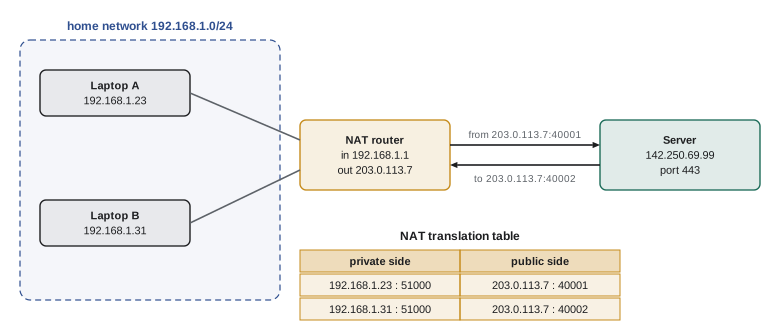
Most homes and many organizations use private addresses from ranges reserved by RFC 1918, such as 192.168.0.0/16 and 10.0.0.0/8, which are not routed on the public internet. A NAT router connects such a network to the internet using one public address. For every outgoing connection it rewrites the source address and port to its public address and a port it chooses, records the mapping, and rewrites replies in the reverse direction. To the outside world the whole home network looks like a single host.
import itertools
# A home router performing NAT (network address and port translation)
public_ip = "203.0.113.7"
next_port = itertools.count(40001)
table = {}                                  # (private ip, private port) -> public port
reverse = {}
def outbound(src_ip, src_port, dst):
    key = (src_ip, src_port)
    if key not in table:
        p = next(next_port); table[key] = p; reverse[p] = key
    return f"{src_ip}:{src_port} -> {dst}  becomes  {public_ip}:{table[key]} -> {dst}"
def inbound(dst_port, src):
    if dst_port not in reverse:
        return f"{src} -> {public_ip}:{dst_port}  dropped (no mapping)"
    ip, port = reverse[dst_port]
    return f"{src} -> {public_ip}:{dst_port}  becomes  {src} -> {ip}:{port}"
print(outbound("192.168.1.23", 51000, "142.250.69.99:443"))
print(outbound("192.168.1.31", 51000, "142.250.69.99:443"))    # same private port, different host
print(outbound("192.168.1.23", 51002, "198.51.100.5:443"))
print(inbound(40002, "142.250.69.99:443"))
print(inbound(45555, "198.51.100.9:22"))192.168.1.23:51000 -> 142.250.69.99:443 becomes 203.0.113.7:40001 -> 142.250.69.99:443 192.168.1.31:51000 -> 142.250.69.99:443 becomes 203.0.113.7:40002 -> 142.250.69.99:443 192.168.1.23:51002 -> 198.51.100.5:443 becomes 203.0.113.7:40003 -> 198.51.100.5:443 142.250.69.99:443 -> 203.0.113.7:40002 becomes 142.250.69.99:443 -> 192.168.1.31:51000 198.51.100.9:22 -> 203.0.113.7:45555 dropped (no mapping)
NAT stretched the life of IPv4 enormously, and many ISPs now add carrier-grade NAT, so that thousands of customers share a pool of public addresses. But NAT breaks the end-to-end model: hosts behind a NAT cannot easily accept incoming connections, which complicates peer-to-peer applications, games and video calls. Techniques such as STUN, TURN and ICE, used by WebRTC, help peers discover their public mappings and connect, relaying through a server when they cannot. NAT is also a middlebox that rewrites transport headers, which makes it harder to deploy new transport protocols, one reason QUIC runs over UDP. NAT provides no real security by itself; a firewall does that job.
IPv6
IPv6, standardized in 1998 and now specified in RFC 8200, replaces 32-bit addresses with 128-bit ones, written as eight groups of four hexadecimal digits, such as 2001:db8:85a3::8a2e:370:7334, where :: stands for a run of zero groups. The header is a fixed 40 bytes, simpler than IPv4's: there is no header checksum, no fragmentation by routers and no options in the main header; options move to extension headers chained after it. A flow label lets routers treat packets of the same flow consistently. Hosts can configure their own addresses with stateless address autoconfiguration, deriving the interface part from random values for privacy.
Moving the whole internet to a new network layer cannot happen on a single day. During the transition, hosts and routers run both protocols (dual stack), and IPv6 packets may be tunnelled inside IPv4 packets across networks that do not yet support IPv6. Adoption has been slow but steady: Google's measurements showed roughly half of its users reaching it over IPv6 by 2025, with large differences between countries and networks. CISSP-113 lesson 2 covers IPv6 addressing and its security implications in more detail.
| Feature | IPv4 | IPv6 |
|---|---|---|
| Address size | 32 bits | 128 bits |
| Header size | 20 to 60 bytes | 40 bytes fixed, plus extension headers |
| Header checksum | Yes, recomputed at every hop | No |
| Fragmentation | By routers or source | Source only, with path MTU discovery |
| Address configuration | DHCP or manual | SLAAC, DHCPv6 or manual |
| Typical home use | Private addresses behind NAT | Globally routable addresses for every device |
ICMP
The Internet Control Message Protocol (ICMP, RFC 792; ICMPv6, RFC 4443) carries error and diagnostic messages for the network layer. Routers send destination unreachable messages when they cannot deliver a packet, time exceeded when a TTL reaches zero, and packet too big (in IPv6) or fragmentation needed (in IPv4) for path MTU discovery. Hosts use echo request and echo reply for ping. ICMP messages travel inside IP datagrams but are part of the network layer. Lesson 1 described how traceroute uses time-exceeded messages to map a path. Blocking all ICMP at a firewall is a common mistake: it breaks path MTU discovery, leading to connections that hang when large packets are sent.
Generalized forwarding and software-defined networking
Traditional forwarding looks only at the destination address. Generalized forwarding, popularized by OpenFlow in 2008, lets a switch match on many header fields at once, such as source and destination addresses, ports, protocol and VLAN, and apply an action: forward to a port, drop, modify a field, or send to a controller. A flow table of match–action rules can make a single device act as a router, a firewall, a NAT or a load balancer depending on its rules. In software-defined networking (SDN), a logically centralized controller computes these rules for many switches. Lesson 9 returns to SDN as a way to organize the control plane, and CISSP-113 lesson 9 discusses its role in cloud networks.
Worked problem
A match–action table as a firewall
Write three match–action rules for a switch protecting a server at 10.0.0.10: allow HTTPS from anywhere, allow SSH only from the admin subnet 10.0.9.0/24, and drop everything else to the server.
Show solution
- Rule 1 (priority 300): match destination 10.0.0.10, protocol TCP, destination port 443; action: forward to the server port.
- Rule 2 (priority 200): match source 10.0.9.0/24, destination 10.0.0.10, protocol TCP, destination port 22; action: forward to the server port.
- Rule 3 (priority 100): match destination 10.0.0.10; action: drop.
- Higher-priority rules are checked first, so specific allow rules come before the general drop.
Answer: Two prioritized allow rules for TCP 443 from anywhere and TCP 22 from 10.0.9.0/24, followed by a lower-priority drop for all other traffic to the server.
Common mistakes
MistakeConfusing forwarding with routing.
InsteadForwarding moves a packet to an output port using the table; routing computes the table across the network.
MistakeChoosing the first matching prefix in a forwarding table.
InsteadRouters choose the longest matching prefix, the most specific route.
MistakeThinking an IP address identifies a host.
InsteadAddresses belong to interfaces; a router or multi-homed host has several.
MistakeAssuming routers reassemble fragments.
InsteadOnly the destination reassembles; modern stacks avoid fragmentation with path MTU discovery.
MistakeBelieving NAT is a security device.
InsteadNAT hides addresses but is not a firewall; filtering needs explicit rules.
MistakeBlocking all ICMP for safety.
InsteadBlocking ICMP breaks path MTU discovery and diagnostics; filter selectively.
Summary and key terms
- The data plane forwards packets locally in hardware; the control plane computes routes across the network.
- Routers have input ports with lookup, a switching fabric, output queues with scheduling, and a routing processor.
- The IPv4 header includes TTL, protocol, header checksum and addresses; routers decrement TTL and update the checksum.
- Fragmentation splits datagrams larger than a link's MTU; path MTU discovery avoids it.
- CIDR prefixes aggregate addresses; routers forward by longest-prefix match.
- DHCP configures hosts; NAT lets many private hosts share one public address but breaks end-to-end connectivity.
- IPv6 has 128-bit addresses and a simpler fixed header; generalized forwarding matches many fields and applies actions.
- Forwarding
- Moving a packet from an input port to the correct output port of one router.
- Routing
- Computing the paths packets take from source to destination across the network.
- Forwarding table
- A table mapping address prefixes to output ports, used for each packet.
- Time-to-live (TTL)
- A header field decremented at each hop; the packet is discarded when it reaches zero.
- MTU
- Maximum transmission unit: the largest datagram a link can carry.
- CIDR
- Classless inter-domain routing: addresses written with a prefix length, a.b.c.d/x.
- Longest-prefix match
- Choosing the most specific forwarding table entry that matches an address.
- DHCP
- A protocol that gives hosts an address, mask, gateway and DNS server.
- NAT
- Network address translation: rewriting private addresses and ports to a public address.
- Generalized forwarding
- Matching on multiple header fields and applying actions such as forward, drop or modify.
Practice problems
Work each problem on paper first, then reveal the answer to check.
How many usable host addresses does a /26 have?
Show answer
64 - 2 = 62.
Why must a router recompute the IPv4 header checksum?
Show answer
It decrements the TTL, which changes the header.
A 3,000-byte IPv4 datagram with a 20-byte header crosses an MTU of 1,500. How many fragments result?
Show answer
Three: 1,480 + 1,480 + 20 bytes of data.
What does the default route 0.0.0.0/0 match?
Show answer
Every address; it is used when nothing more specific matches.
Name the four DHCP messages in order.
Show answer
Discover, offer, request, acknowledge.
Which private address ranges does RFC 1918 reserve?
Show answer
10.0.0.0/8, 172.16.0.0/12 and 192.168.0.0/16.
Why do peer-to-peer apps struggle with NAT?
Show answer
Hosts behind NAT cannot easily accept incoming connections without a mapping.
Give two simplifications in the IPv6 header compared with IPv4.
Show answer
No header checksum; no router fragmentation (also a fixed size with options in extension headers).
What ICMP message does traceroute rely on?
Show answer
Time exceeded, sent when the TTL reaches zero.
What does a TCAM do in a router?
Show answer
Matches an address against all forwarding entries at once, returning the best match in one step.
Lesson quiz · 5 questions
Score 60% or more to complete this lesson.
Create a free account to save your progress, take quizzes and earn a certificate.