
CMPUT-301 · Lesson 8 of 12 · 33 min
Version control and collaboration with Git
Version control records every change to a project's files, who made it, when and why, and lets many people work on the same code at once and combine their work. ROB-110 lesson 4 and CMPUT-201 lesson 12 introduced Git's everyday workflow: init, add, commit, log, and simple branches. This lesson goes further into what teams need: how Git stores history, branching and merging strategies, rebasing, resolving conflicts, pull requests and code review, tags and semantic versioning, finding regressions with bisect, and conventions that keep a shared history useful. All the Git transcripts in this lesson are real output from running the commands in a scratch repository; commit identifiers are shortened hashes and will differ on your machine.
How Git stores history
Git, created by Linus Torvalds in 2005 for Linux kernel development, is a distributed version control system: every clone holds the complete history, so developers can commit, branch and inspect history offline, and any clone can serve as a backup. Git stores snapshots, not differences. Each commit records a pointer to a snapshot of the whole project tree, the author and committer, a message, and pointers to its parent commits. Everything is identified by a cryptographic hash of its content, historically SHA-1, with SHA-256 repositories supported since Git 2.29 in 2020 and planned to become the default. Because each commit's identifier depends on its parents, history cannot be altered without changing every later identifier, which makes tampering evident.
A branch is simply a movable pointer to a commit, and HEAD is a pointer to the branch you are on. Creating a branch is therefore instant and cheap, which is why Git encourages branching for every piece of work. The history forms a directed acyclic graph: most commits have one parent, merge commits have two.
git switch -c feature/waitlist
printf "\ndef is_full(cap, taken):\n    return taken >= cap\n" >> shifts.py
git commit -qam "Add is_full helper for the waiting list"
git log --oneline --graph --all$ git switch -c feature/waitlist Switched to a new branch 'feature/waitlist' $ printf "\ndef is_full(cap, taken):\n return taken >= cap\n" >> shifts.py $ git commit -qam "Add is_full helper for the waiting list" $ git log --oneline --graph --all * 6aa60ae Add is_full helper for the waiting list * 3c3e2ed Add capacity calculation
Merging
When work on a branch is done, it is merged back. If the target branch has not moved since the branch was created, Git simply moves the target pointer forward, a fast-forward merge, and no merge commit is needed. If both branches have new commits, Git performs a three-way merge using the two branch tips and their common ancestor, and records a merge commit with two parents. Many teams use the --no-ff option to always create a merge commit for a feature, so the history shows where each feature began and ended.
git merge --no-edit feature/waitlist
git log --oneline --graph --all$ git merge --no-edit feature/waitlist Merge made by the 'ort' strategy. shifts.py | 3 +++ 1 file changed, 3 insertions(+) $ git log --oneline --graph --all * 2e7c2ff Merge branch 'feature/waitlist' |\ | * 6aa60ae Add is_full helper for the waiting list * | ce9eedc Add README |/ * 3c3e2ed Add capacity calculation
Rebasing
Rebasing is the alternative to merging. git rebase main replays the commits of the current branch, one at a time, on top of the latest main, producing new commits with new identifiers. The result is a straight, linear history, as if the work had started from the current main. Interactive rebase (git rebase -i) can also squash, reorder and edit commits to tidy a branch before sharing it.
git switch -q feature/waitlist
git rebase main
git switch -q main
git merge --ff-only feature/waitlist
git log --oneline --graph --all$ git switch -q feature/waitlist $ git rebase main Rebasing (1/1) Successfully rebased and updated refs/heads/feature/waitlist. $ git switch -q main $ git merge --ff-only feature/waitlist Updating ce9eedc..1e1ca22 Fast-forward shifts.py | 3 +++ 1 file changed, 3 insertions(+) $ git log --oneline --graph --all * 1e1ca22 Add is_full helper for the waiting list * ce9eedc Add README * 3c3e2ed Add capacity calculation
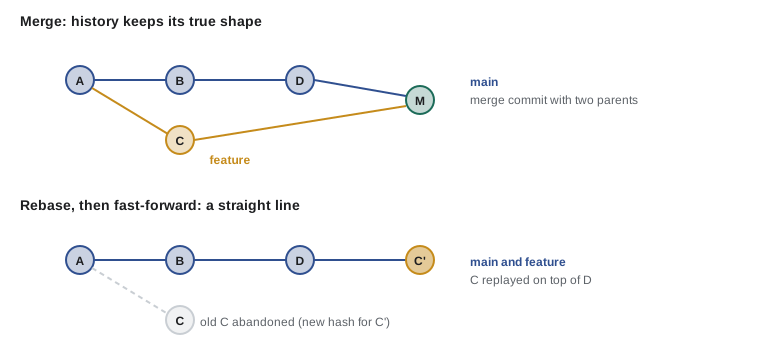
The golden rule of rebasing is never to rebase commits that others have already based work on, such as a shared branch that has been pushed. Rebasing creates new commits; anyone who had the old ones now has a divergent history and must untangle it. Rebasing your own unpublished feature branch onto main is safe and common. Teams choose a policy: merge commits preserve the true history and are simplest to reason about; rebase and fast-forward give a linear history that is easier to read and bisect; and squash merging, offered by GitHub and GitLab, combines a whole pull request into one commit on main, trading detailed history for a clean one.
Resolving conflicts
A merge conflict happens when two branches change the same lines, or one deletes a file the other edits, and Git cannot decide which version to keep. Git stops, marks the conflicting region in the file with <<<<<<<, ======= and >>>>>>> markers, and waits for a person to resolve it. Resolving means deciding what the code should be, which often combines both changes, then staging the file and committing. Conflicts are not errors; they are Git correctly refusing to guess.
git merge feature/minimum
cat shifts.py
printf "def capacity_left(capacity, taken):\n    return max(0, capacity - taken)\n" > shifts.py
git add shifts.py
git commit -q --no-edit
git log --oneline --graph$ git merge feature/minimum
Auto-merging shifts.py
CONFLICT (content): Merge conflict in shifts.py
Automatic merge failed; fix conflicts and then commit the result.
$ cat shifts.py
<<<<<<< HEAD
def capacity_left(capacity, taken):
return capacity - taken
=======
def capacity_left(cap, taken):
return max(0, cap - taken)
>>>>>>> feature/minimum
$ printf "def capacity_left(capacity, taken):\n return max(0, capacity - taken)\n" > shifts.py
$ git add shifts.py
$ git commit -q --no-edit
$ git log --oneline --graph
* 6c34d76 Merge branch 'feature/minimum'
|\
| * d272705 Never report negative capacity
* | 6d7c729 Use a clearer parameter name
|/
* 3c3e2ed Add capacity calculationThe resolution here keeps the clearer name from main and the max(0, ...) logic from the feature. A good habit is to run the tests after resolving, because a resolution can be syntactically clean and still wrong. Conflicts are less frequent and smaller when branches are short-lived and merged often, which is the main argument for trunk-based development below. Tools help too: git diff during a conflict shows both sides, and git config merge.conflictstyle zdiff3 also shows the common ancestor's version, which often makes the right resolution obvious.
Branching strategies
A branching strategy is a team's agreement about which branches exist and how work flows between them. Three are common. Git Flow, described by Vincent Driessen in 2010, uses long-lived main and develop branches plus feature, release and hotfix branches; it suits software released in numbered versions on a schedule, but its complexity is a poor fit for continuously deployed web applications, as its author later acknowledged. GitHub Flow keeps one long-lived branch, main, which is always deployable; every change happens on a short-lived feature branch, opened as a pull request, reviewed, merged and deployed. Trunk-based development goes further: developers integrate into main at least daily, using very short branches or committing directly, and hide unfinished features behind feature flags (lesson 11). The DORA research associates trunk-based development, with fewer than three active branches and merges at least daily, with higher delivery performance.
| Strategy | Long-lived branches | Best for | Main risk |
|---|---|---|---|
| Git Flow | main, develop (plus release and hotfix branches) | Versioned products with scheduled releases | Long-lived branches drift and merge painfully |
| GitHub Flow | main only | Web applications deployed often | Needs good automated tests on every pull request |
| Trunk-based | main only, branches last hours | Continuous integration and delivery at scale | Needs feature flags and discipline for unfinished work |
Pull requests and code review
A pull request (GitHub, Bitbucket) or merge request (GitLab) proposes merging a branch, shows the diff, runs automated checks and collects review comments. It has become the main unit of collaboration in most teams. Code review finds defects, spreads knowledge of the codebase, keeps style and design consistent, and mentors newer developers. Studies at Microsoft and Google found that knowledge transfer and catching design problems matter as much as finding bugs. Google's engineering practices emphasize that reviews should approve a change once it definitely improves the overall code health, even if it is not perfect.
Effective reviews follow a few habits. Keep pull requests small: reviewers find far more problems in a 200-line change than in a 2,000-line one, and a SmartBear study of reviews at Cisco suggested review effectiveness drops sharply beyond about 400 lines. Write a description that says what changed and why, and how it was tested. Let tools handle style and formatting so humans focus on correctness, design, tests, security and readability. Review promptly, because waiting for review is often the largest delay in a change's journey. And comment on the code, not the person, with suggestions phrased as questions where possible.
| Area | Questions a reviewer asks |
|---|---|
| Correctness | Does it do what the story requires? What happens with empty input, duplicates, time zones, failures? |
| Tests | Are the new behaviors tested, including error paths? Would the tests catch a regression? |
| Design | Does it fit the architecture and layer rules? Is anything duplicated? Are names clear? |
| Security and privacy | Is input validated? Are queries parameterized? Is personal data exposed in logs? |
| Accessibility | Do new interface elements have labels, keyboard access and sufficient contrast? |
| Operations | Will it be observable in production? Does it need a database migration or configuration change? |
Commit messages, tags and semantic versioning
A shared history is only useful if it can be read. Good commit messages have a short summary line in the imperative mood, under about 50 characters ('Add waiting list for full shifts'), a blank line, and a body explaining why the change was made and anything surprising. Each commit should be one logical change that builds and passes tests, which makes reviewing, reverting and bisecting easy. Many teams adopt the Conventional Commits specification, with prefixes such as feat:, fix: and docs:, so that tools can generate changelogs and choose version numbers automatically.
Releases are marked with tags, named pointers to commits that do not move. Version numbers usually follow Semantic Versioning (SemVer 2.0.0): MAJOR.MINOR.PATCH, where the major number increases for incompatible changes to the public interface, the minor number for backward-compatible new features, and the patch number for backward-compatible bug fixes. Pre-release versions such as 2.0.0-rc.1 sort before 2.0.0. SemVer is a promise to users about what an upgrade might break, so it only works if the public interface is clearly defined.
import re

def parse(v):
    m = re.fullmatch(r"(\d+)\.(\d+)\.(\d+)(?:-([0-9A-Za-z.-]+))?", v)
    if not m:
        raise ValueError(f"not a semantic version: {v}")
    major, minor, patch, pre = m.groups()
    # A release (no pre-release tag) sorts after any pre-release of the same version
    pre_key = (1,) if pre is None else (0, *[(0, int(p)) if p.isdigit() else (1, p)
                                             for p in pre.split(".")])
    return (int(major), int(minor), int(patch), pre_key)

def bump(v, change):
    major, minor, patch, _ = parse(v)
    return {"breaking": f"{major + 1}.0.0", "feature": f"{major}.{minor + 1}.0",
            "fix": f"{major}.{minor}.{patch + 1}"}[change]

versions = ["1.10.0", "1.2.3", "2.0.0", "2.0.0-rc.1", "2.0.0-beta.2", "1.2.10"]
print(sorted(versions, key=parse))
for change in ("fix", "feature", "breaking"):
print(f"1.4.2 + {change:8s} -> {bump('1.4.2', change)}")['1.2.3', '1.2.10', '1.10.0', '2.0.0-beta.2', '2.0.0-rc.1', '2.0.0'] 1.4.2 + fix -> 1.4.3 1.4.2 + feature -> 1.5.0 1.4.2 + breaking -> 2.0.0
Finding regressions with git bisect
When a bug appears and nobody knows which of the last hundred commits caused it, git bisect finds it by binary search. You mark a known good commit and a known bad one; Git checks out the midpoint; you test and mark it good or bad; and Git halves the range again, finding the culprit among 100 commits in about seven steps. With git bisect run and a script that exits with 0 for good and non-zero for bad, the whole search runs automatically. This is a strong argument for small commits that each build and pass tests: bisect can only pinpoint a change as precisely as the commits allow.
git log --oneline
git bisect start HEAD v1.0
git bisect run python3 check.py 2>&1 | grep -E "is the first bad commit|^[0-9a-f]{7}|Simplify"
git bisect reset$ git log --oneline
a70a76a Update notes 6
726113e Update notes 5
19ef882 Update notes 4
e7abbc4 Simplify capacity code
c5e1e8a Update notes 3
b0806ba Update notes 2
8bb436c Update notes 1
1c51839 Clamp capacity at zero
c9504bd Start
$ git bisect start HEAD v1.0
Bisecting: 3 revisions left to test after this (roughly 2 steps)
[c5e1e8af86afe7ea060510d7932f81172bbafce5] Update notes 3
$ git bisect run python3 check.py 2>&1 | grep -E "is the first bad commit|^[0-9a-f]{7}|Simplify"
[e7abbc4ecb11e3c4146c0452b076c73707992ba6] Simplify capacity code
e7abbc4ecb11e3c4146c0452b076c73707992ba6 is the first bad commit
Simplify capacity code
$ git bisect reset
Previous HEAD position was e7abbc4 Simplify capacity code
Switched to branch 'main'Bisect tested a handful of commits and named 'Simplify capacity code' as the first bad commit: the 'simplification' removed the clamp to zero. In a real project the check would be a failing test, and the next step would be to read that commit's diff and its message to understand why the change was made.
Keeping secrets and large files out
Some things must never be committed. Credentials such as API keys, passwords and private keys pushed to a repository should be treated as leaked, because history is copied to every clone; the fix is to revoke the secret, not just delete it in a new commit. Use a .gitignore file for build output, local configuration and environment files, keep secrets in environment variables or a secrets manager, and turn on secret scanning, which GitHub and GitLab provide. Large binary files, such as datasets and videos, bloat every clone; Git LFS stores them separately. Finally, sign release tags or commits (with GPG, SSH or Sigstore keys) when it matters that others can verify who produced them, a growing expectation in software supply-chain security (lesson 11).
Worked problem
Choosing a merge policy
A team of five deploys a web application several times a day. Pull requests average 150 lines and usually live for a day. Some developers want merge commits and others want a linear history. Recommend a policy and justify it.
Show solution
- With short-lived branches and frequent deploys, GitHub Flow or trunk-based development fits; Git Flow's develop and release branches would add ceremony without benefit.
- For history, either squash merging or rebase with fast-forward gives a linear main where each commit is a reviewed, tested change, which makes bisecting and reverting simple.
- Squash merging is the simplest rule to follow, at the cost of losing the individual commits inside a pull request; teams that write careful commit series may prefer rebase and fast-forward.
- Whatever the choice, protect main: require a passing CI pipeline and at least one approval before merging, and never rebase shared branches.
Answer: GitHub Flow with squash merges (or rebase and fast-forward) onto a protected main. The policy matters less than applying it consistently and keeping branches short.
Worked problem
A pull request that is too big
A developer opens a pull request titled "Waiting list" with 2,300 changed lines across 38 files, including a new feature, a renamed module, formatting changes to unrelated files and an upgraded library. How should it be handled?
Show solution
- Ask for it to be split: the library upgrade, the module rename, the formatting and the feature each become their own pull request.
- Formatting changes should come from running the team's formatter in a separate commit, ideally applied to the whole codebase once.
- The rename can be reviewed quickly because it is mechanical; the library upgrade needs a careful check of release notes and tests.
- The feature pull request, now perhaps 300 lines, gets a focused review of behavior, tests and design.
Answer: Split the change into small, single-purpose pull requests. Each is easier to review, test and revert, and reviewers will actually find the problems.
Common mistakes
MistakeRebasing a branch that others have already pulled.
InsteadRebase only your own unpublished commits; use merge for shared branches.
MistakeCommitting a secret and deleting it in the next commit.
InsteadThe secret remains in history and every clone; revoke and rotate it, then remove it from history if needed.
MistakeKeeping feature branches open for weeks.
InsteadLong-lived branches drift and produce large conflicts; integrate small changes often.
MistakeHuge pull requests that mix refactoring, formatting and features.
InsteadSplit them into small, single-purpose pull requests that can be reviewed properly.
MistakeSorting version numbers as text.
InsteadCompare semantic versions numerically, part by part, with pre-releases before the release.
Summary and key terms
- Git is distributed: every clone has the full history, stored as content-addressed snapshots linked by parent pointers.
- A branch is a movable pointer to a commit; merges are fast-forward when possible and otherwise create a merge commit with two parents.
- Rebasing replays commits on a new base to give linear history; never rebase commits others depend on.
- Conflicts occur when branches change the same lines; resolve them deliberately, then run the tests.
- Git Flow suits scheduled versioned releases; GitHub Flow and trunk-based development suit continuous delivery with short-lived branches.
- Small pull requests with clear descriptions, automated checks and prompt, respectful review improve quality and spread knowledge.
- Semantic versioning signals compatibility; tags mark releases; git bisect finds regressions by binary search; secrets never belong in a repository.
- Commit
- A snapshot of the project with metadata and pointers to parent commits.
- Branch
- A movable pointer to a commit.
- HEAD
- A pointer to the currently checked-out branch or commit.
- Fast-forward merge
- A merge that just moves the branch pointer because no divergent commits exist.
- Three-way merge
- A merge that combines two branch tips using their common ancestor.
- Rebase
- Replaying commits onto a different base commit, creating new commits.
- Merge conflict
- A situation in which Git cannot automatically combine changes to the same content.
- Pull request
- A proposal to merge a branch, with diff, review and automated checks.
- Semantic versioning
- A MAJOR.MINOR.PATCH scheme that signals breaking changes, features and fixes.
- git bisect
- A command that binary-searches history to find the commit that introduced a problem.
Practice problems
Work each problem on paper first, then reveal the answer to check.
When does git merge perform a fast-forward?
Show answer
When the target branch has no commits that are not already in the branch being merged, so its pointer can simply move forward.
Why do rebased commits have new hashes?
Show answer
A commit's hash depends on its parent; replaying it on a new parent produces a different commit.
State the golden rule of rebasing.
Show answer
Do not rebase commits that have been shared and that others may have based work on.
A library goes from 2.4.1 to 2.5.0. What does SemVer promise?
Show answer
New backward-compatible functionality; existing uses should keep working.
How many bisect steps are needed for about 1,000 commits?
Show answer
About 10, since 2 to the 10th is 1,024.
Write a good commit message for adding a waiting list.
Show answer
Summary: "Add waiting list for full shifts". Body: why it was needed, how promotion works, and how it was tested.
Name three things that should be in .gitignore for a Python project.
Show answer
For example: __pycache__/, .venv/, .env (local secrets), build and dist output.
Why do short-lived branches reduce conflicts?
Show answer
Less time for others to change the same code, and smaller diffs to combine.
What should you do after accidentally pushing an API key?
Show answer
Revoke and rotate the key immediately, then clean history if needed and enable secret scanning.
Give two benefits of code review besides finding bugs.
Show answer
Knowledge sharing across the team and consistent design; also mentoring.
Lesson quiz · 5 questions
Score 60% or more to complete this lesson.
Create a free account to save your progress, take quizzes and earn a certificate.