
CMPUT-201 · Lesson 11 of 12 · 27 min
Building, debugging and testing
Professional C development rests on three activities that this lesson brings together: building reliably with make, finding bugs systematically with a debugger and the sanitizers, and preventing bugs with automated tests. Each has appeared briefly in earlier lessons. Here you will write a Makefile for a small multi-file project, see make rebuild only what changed, use gdb to stop a program, inspect its variables and find the line where it fails, write unit tests in plain C with a small checking macro, and add static analysis and coverage measurement to your toolkit. CMPUT-174 lesson 11 introduced testing and debugging in Python; the principles are the same, but in C the tools carry more of the load because the language itself checks so little.
make and Makefiles
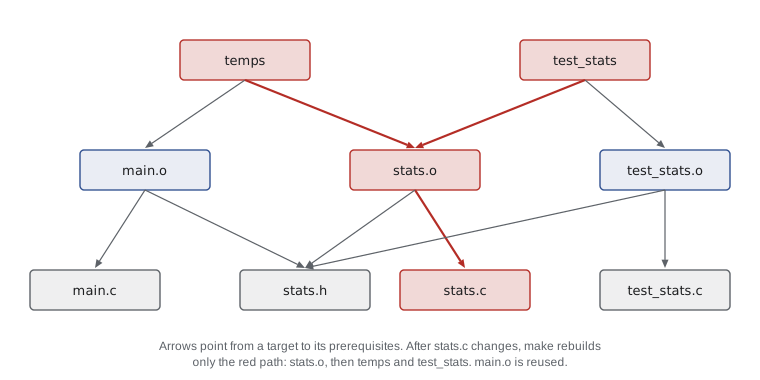
Typing gcc commands by hand stops being practical once a project has more than a couple of files. make reads a file called Makefile containing rules. Each rule names a target, the files it depends on (its prerequisites) and the commands that build it. make compares modification times: if the target is missing or older than any prerequisite, it runs the commands; otherwise it does nothing. Because rules can depend on other rules' targets, make works through the whole dependency graph and rebuilds exactly the parts affected by a change. Command lines in a rule must begin with a tab character, not spaces, a famous quirk that produces the error "missing separator".
CC      = gcc
CFLAGS  = -std=c17 -Wall -Wextra -Werror -g -fsanitize=address,undefined
LDFLAGS = -fsanitize=address,undefined
LDLIBS  = -lm

temps: main.o stats.o
	$(CC) $(LDFLAGS) -o $@ $^ $(LDLIBS)

test_stats: test_stats.o stats.o
	$(CC) $(LDFLAGS) -o $@ $^ $(LDLIBS)

%.o: %.c stats.h
	$(CC) $(CFLAGS) -c $<

.PHONY: test clean
test: test_stats
	./test_stats

clean:
	rm -f *.o temps test_stats
Variables such as CC and CFLAGS hold the compiler and options, so they can be changed in one place, or on the command line with make CFLAGS=-O2. Automatic variables are filled in by make for each rule: $@ is the target, $^ is all the prerequisites and $< is the first prerequisite. The pattern rule %.o: %.c stats.h says how to build any object file from the .c file of the same name, and that every object depends on stats.h too, so editing the header rebuilds everything that includes it. .PHONY marks targets such as test and clean that are names for actions rather than files. Larger projects generate header dependencies automatically with gcc -MMD, or use a build generator such as CMake or Meson, which writes the low-level build files for you.
make temps
echo "--- run:"
./temps
echo "--- make again with nothing changed:"
make temps
echo "--- after editing stats.c:"
sleep 1; touch stats.c
make tempsgcc -std=c17 -Wall -Wextra -Werror -g -fsanitize=address,undefined -c main.c gcc -std=c17 -Wall -Wextra -Werror -g -fsanitize=address,undefined -c stats.c gcc -fsanitize=address,undefined -o temps main.o stats.o -lm --- run: mean 15.70, warmest day 4 --- make again with nothing changed: make: 'temps' is up to date. --- after editing stats.c: gcc -std=c17 -Wall -Wextra -Werror -g -fsanitize=address,undefined -c stats.c gcc -fsanitize=address,undefined -o temps main.o stats.o -lm
The second make reports that temps is up to date and runs nothing. After stats.c changes (touch updates its modification time, as saving the file would), make recompiles only stats.o and relinks; main.o is reused. In a large project this saves minutes on every change, and because the Makefile records exactly how the project is built, anyone can build it with one command.
Debugging with gdb
A debugger lets you run a program under control: stop it at chosen lines, step through it one line at a time, print variables and expressions, and see the call stack. Compile with -g so the executable contains the mapping from machine code back to source lines and variable names, and with -O0 or -Og so the code follows the source. Start the debugger with gdb ./program, and use run (r) to start the program, optionally with arguments. The most important commands fit in a short table.
The next program has a classic off-by-one bug: the loop runs while i <= n instead of i < n, so it reads one element past the end of the array. Built without sanitizers it might print a plausible but wrong total, or the right one by luck, depending on what lies in memory after the array. Run with AddressSanitizer, it is caught immediately, and gdb can then confirm the cause by stopping at the loop and printing the index and the bound.
#include <stdio.h>
#include <string.h>

struct item { char name[16]; int qty; };

static int total_qty(const struct item *items, int n) {
    int total = 0;
    for (int i = 0; i <= n; i++) {        /* bug: should be i < n */
        total += items[i].qty;
    }
    return total;
}

int main(void) {
    struct item stock[3] = {{"bolts", 120}, {"nuts", 80}, {"washers", 200}};
    printf("total = %d\n", total_qty(stock, 3));
    return 0;
}=================================================================
==4242==ERROR: AddressSanitizer: stack-buffer-overflow on address 0x7f4b38e0006c at pc 0x56378ee3d3e1 bp 0x7fffc0ebd970 sp 0x7fffc0ebd960
READ of size 4 at 0x7f4b38e0006c thread T0
#0 0x56378ee3d3e0 in total_qty stock.c:9
#1 0x56378ee3d6a4 in main stock.c:16
#2 0x7f4b3b22a1c9 in __libc_start_call_main ../sysdeps/nptl/libc_start_call_main.h:58
#3 0x7f4b3b22a28a in __libc_start_main_impl ../csu/libc-start.c:360
...
Address 0x7f4b38e0006c is located in stack of thread T0 at offset 108 in frame
#0 0x56378ee3d457 in main stock.c:14
This frame has 1 object(s):
[32, 92) 'stock' (line 15) <== Memory access at offset 108 overflows this variable
(longjmp and C++ exceptions *are* supported)
SUMMARY: AddressSanitizer: stack-buffer-overflow stock.c:9 in total_qty
(shadow memory map omitted)gcc -std=c17 -Wall -Wextra -g -O0 stock.c -o stock
gdb -q -batch -ex "break 9 if i == n" -ex run -ex "print i" -ex "print n" \
-ex "print items[i]" -ex bt ./stockBreakpoint 1 at 0x1188: file stock.c, line 9.
Breakpoint 1, total_qty (items=0x7fffffff9a50, n=3) at stock.c:9
9 total += items[i].qty;
$1 = 3
$2 = 3
$3 = {name = "\377\177\000\000\200\233\377\377\377\177\000\000\000\334A\237", qty = -1974431992}
#0 total_qty (items=0x7fffffff9a50, n=3) at stock.c:9
#1 0x000055555555523c in main () at stock.c:16The conditional breakpoint stops only when i equals n, and printing items[i] shows that the loop is about to read an element that does not belong to the array: its contents are leftover bytes from the stack. The backtrace confirms the call came from main with n equal to 3. Changing <= to < fixes the bug. In an interactive session you would type the same commands at the (gdb) prompt; batch mode is used here so the whole session can be shown.
Debugging is most effective as a method rather than a hunt. Reproduce the bug reliably, with the smallest input that triggers it. Form a hypothesis about the cause, then test it with an experiment: a breakpoint, a print or a change. Use the tools that turn silent errors into loud ones first: compiler warnings, the sanitizers, Valgrind. When a program crashes, run it under gdb and type bt to see exactly where; you can also ask the system to save a core dump on a crash and examine it later with gdb program core. And when you find a bug, write a test that would have caught it, so it can never quietly return.
Unit testing in C
C has no built-in test framework, but a few lines of macro code give you most of what you need. A unit test calls a function with chosen inputs and checks the outputs, and a test program runs many such checks and reports failures with file and line numbers. The CHECK macro below uses three preprocessor features: #cond turns the condition into a string so the failure message shows the code, __FILE__ and __LINE__ give the location, and the do { ... } while (0) wrapper makes the macro behave like a single statement after an if. The program's exit status is non-zero if any check fails, so make, scripts and continuous integration systems can detect failure automatically.
#include <stdio.h>
#include <math.h>
#include "stats.h"

static int failures = 0, checks = 0;

#define CHECK(cond) do { \
        checks++; \
        if (!(cond)) { failures++; printf("FAIL %s:%d: %s\n", __FILE__, __LINE__, #cond); } \
    } while (0)

static int close_to(double a, double b) { return fabs(a - b) < 1e-9; }

int main(void) {
    double one[] = {4.0};
    double mixed[] = {-2.0, 5.0, 5.0, 1.0};
    double neg[] = {-7.5, -1.25, -3.0};

    CHECK(close_to(mean(one, 1), 4.0));
    CHECK(close_to(mean(mixed, 4), 2.25));
    CHECK(close_to(mean(NULL, 0), 0.0));          /* empty input */
    CHECK(argmax(one, 1) == 0);
    CHECK(argmax(mixed, 4) == 1);                 /* first of equal maxima */
    CHECK(argmax(neg, 3) == 1);                   /* all negative */

    printf("%d checks, %d failures\n", checks, failures);
    return failures != 0;
}
make test 2>&1gcc -std=c17 -Wall -Wextra -Werror -g -fsanitize=address,undefined -c test_stats.c gcc -std=c17 -Wall -Wextra -Werror -g -fsanitize=address,undefined -c stats.c gcc -fsanitize=address,undefined -o test_stats test_stats.o stats.o -lm ./test_stats 6 checks, 0 failures
Choose test cases systematically, as CMPUT-174 recommended: ordinary values, boundaries (one element, the first and last positions), special cases (empty input, all-negative values, ties) and invalid input where the function is supposed to handle it. Because the tests are built with the sanitizers, a test that triggers an out-of-bounds access fails even if the result happens to be right. Established frameworks such as Unity, Check, cmocka and GoogleTest add features like test discovery and fixtures, but the principle is the same.
The assert macro from assert.h is a related tool with a different purpose. assert(n > 0); checks a condition that must be true if the program is correct, such as a function's precondition, and aborts with the file, line and expression if it is false. Assertions document assumptions and catch programming errors early, but they are compiled out entirely when NDEBUG is defined, as release builds often do, so never use them to check user input or anything with side effects; those need real error handling, as lesson 10 described.
Static analysis and coverage
Static analyzers examine source code without running it and find bugs that compilers do not warn about: null dereferences on some paths, leaks on error paths, use after free. GCC has one built in, enabled with -fanalyzer, and Clang provides scan-build and clang-tidy; cppcheck is a popular standalone tool. They produce some false alarms, but a clean analyzer run is a useful extra check before submitting work. Coverage tools answer a different question: which lines did my tests actually execute? Compiling with --coverage and running the tests lets gcov report each line's execution count, revealing untested code such as error-handling branches.
gcc -std=c17 --coverage -O0 -c stats.c test_stats.c
gcc --coverage stats.o test_stats.o -o cov -lm
./cov
gcov -n stats.c6 checks, 0 failures File 'stats.c' Lines executed:100.00% of 10
Here the six checks executed all 10 executable lines of stats.c. On a real project the report usually shows that error-handling branches never ran, which tells you which tests to write next; gcov also writes a stats.c.gcov file listing each line with its execution count.
Worked problem
Planning tests for a function
You must test int clamp(int x, int lo, int hi), which returns lo if x < lo, hi if x > hi and x otherwise, and requires lo <= hi. Choose a compact set of checks and say what assert could be used for.
Show solution
- Ordinary values: clamp(5, 0, 10) == 5.
- Below and above the range: clamp(-3, 0, 10) == 0 and clamp(42, 0, 10) == 10.
- Boundaries, where off-by-one errors live: clamp(0, 0, 10) == 0, clamp(10, 0, 10) == 10, clamp(-1, 0, 10) == 0 and clamp(11, 0, 10) == 10.
- Special cases: a single-value range clamp(7, 3, 3) == 3, and extreme values clamp(INT_MIN, -5, 5) == -5 and clamp(INT_MAX, -5, 5) == 5, which would catch an implementation that computes x - lo and overflows.
- The precondition lo <= hi is a requirement on the caller, so it can be checked with assert(lo <= hi) inside clamp to catch programming errors during development.
Answer: About ten checks covering ordinary, outside, boundary, single-value and extreme cases, plus assert(lo <= hi) for the precondition.
Common mistakes
MistakeIndenting Makefile commands with spaces.
InsteadRecipe lines must start with a tab character.
MistakeForgetting to list headers as prerequisites, so changing a header does not trigger a rebuild.
InsteadAdd the header to the rule, or generate dependencies with gcc -MMD.
MistakeDebugging an optimized build without -g.
InsteadBuild with -g and -O0 or -Og to debug.
MistakeAdding printf calls at random instead of forming a hypothesis.
InsteadReproduce, hypothesize, test with breakpoints or prints, and use the sanitizers first.
MistakeUsing assert to validate user input.
InsteadAsserts vanish when NDEBUG is defined; handle input errors with real checks.
MistakeTesting only typical inputs.
InsteadTest boundaries, empty and single-element inputs, and extreme values, with the sanitizers on.
Summary and key terms
- make rebuilds targets whose prerequisites are newer, following the rules and dependency graph in a Makefile.
- Makefiles use variables, automatic variables ($@, $^, $<), pattern rules and .PHONY targets; recipes start with a tab.
- gdb stops programs at breakpoints, steps through lines, prints values and shows the call stack; build with -g -O0.
- Debug methodically: reproduce, hypothesize, experiment, and let the sanitizers find silent errors first.
- Unit tests in C can use a small CHECK macro and a non-zero exit status on failure, run with make test.
- assert checks programming assumptions and is removed under NDEBUG; it is not for input validation.
- Static analysis and coverage measurement complement warnings, sanitizers and tests.
- make
- A tool that rebuilds files according to rules and dependencies in a Makefile.
- Target
- A file or action that a Makefile rule produces.
- Prerequisite
- A file a target depends on; if it is newer, the target is rebuilt.
- Pattern rule
- A Makefile rule using % to describe how to build many similar files.
- Phony target
- A Makefile target that names an action, not a file.
- Debugger
- A tool for running a program under control and inspecting its state.
- Breakpoint
- A point at which the debugger stops the program.
- Unit test
- A test of one function or module in isolation.
- Assertion
- A check of a condition that must hold if the program is correct.
- Code coverage
- A measure of which lines or branches a set of tests executes.
Practice problems
Work each problem on paper first, then reveal the answer to check.
Write a Makefile rule that links calc from calc.o and parse.o.
Show answer
calc: calc.o parse.o, followed by a tab-indented line: $(CC) -o $@ $^
What do $@, $^ and $< mean?
Show answer
The target, all prerequisites, and the first prerequisite.
Why is clean declared .PHONY?
Show answer
It names an action; if a file called clean existed, make would otherwise think the target was up to date.
Which gdb command shows where a crashed program was?
Show answer
bt (backtrace).
How do you stop in a loop only on the iteration where i is 99?
Show answer
break FILE:LINE if i == 99
What is the difference between next and step in gdb?
Show answer
next runs the current line without entering called functions; step enters them.
Why should a test program return a non-zero exit status when a check fails?
Show answer
So make, scripts and continuous integration can detect the failure automatically.
What does #cond do inside a macro?
Show answer
It turns the macro argument into a string literal of its source text.
Give two reasons tests should be built with the sanitizers.
Show answer
They catch memory errors that do not change the result, and undefined behavior that might only show up on another system.
What does gcov tell you that tests alone do not?
Show answer
Which lines the tests actually executed, revealing untested code.
Lesson quiz · 5 questions
Score 60% or more to complete this lesson.
Create a free account to save your progress, take quizzes and earn a certificate.