
CMP-420 · Lesson 10 of 12 · 31 min
Operating system and network security
Application code always runs on top of an operating system and a network, and both can limit the damage when an application is compromised, or make it far worse. This lesson covers the protection mechanisms of modern operating systems (process isolation, privilege separation, sandboxing and containers), the safe way for programs to start other programs, and the main network defenses: segmentation, filtering and detection. The theme throughout is least privilege and containment: assume some component will eventually fail, and arrange the system so that the failure stays small and is noticed.
CISSP-113 covered network security architecture, firewalls, VPNs and zero trust for managers, and CMPUT-313 covered how network protocols work. This lesson concentrates on what developers and system administrators configure.
Isolation: the operating system's first job
An operating system kernel enforces isolation between processes. Each process gets its own virtual address space, so one process cannot read or write another's memory; the processor's privilege rings stop user programs from executing privileged instructions or touching hardware directly; and every request for a resource, such as opening a file, sending a packet or creating a process, goes through a system call that the kernel checks against the process's credentials. The kernel is the reference monitor from Lesson 7, which is why kernel bugs are so serious: a flaw there can break every other protection at once.
On top of this foundation sits privilege separation. Services should run as dedicated, unprivileged user accounts, never as root or Administrator, with access only to the files they need. Programs that need one privileged action, such as binding to port 443, can be granted just that Linux capability, or can start privileged, perform the action and then permanently drop privileges. Large programs can be split into a small privileged part and an unprivileged worker that handles untrusted input, the design used by OpenSSH and by web browsers, whose rendering processes run in a sandbox with almost no rights.
Starting other programs safely
Programs often run other programs: converting images, compressing files or calling command-line tools. The safe way is to pass the program name and its arguments as a list, so that the operating system starts the program directly and each argument arrives intact, whatever characters it contains. Building a single command string and handing it to a shell is risky, because the shell interprets spaces, semicolons, quotes and other metacharacters, so a file name or other piece of data could change what is executed. If a shell is truly needed, quote every untrusted piece with shlex.quote, and prefer libraries over external tools altogether.
import subprocess, tempfile, pathlib
d = pathlib.Path(tempfile.mkdtemp())
odd = "report; final (v2).txt"                  # a legitimate but awkward file name
(d / odd).write_text("hello\n")
# Safe: arguments are passed as a list, so no shell ever interprets the name
r = subprocess.run(["wc", "-c", odd], cwd=d, capture_output=True, text=True, check=True)
print("list form :", r.stdout.strip())
# If a shell is unavoidable, quote every untrusted piece with shlex.quote
import shlex
cmd = "wc -c " + shlex.quote(odd)
print("quoted cmd:", cmd)
r = subprocess.run(cmd, shell=True, cwd=d, capture_output=True, text=True, check=True)
print("shell form:", r.stdout.strip())list form : 6 report; final (v2).txt quoted cmd: wc -c 'report; final (v2).txt' shell form: 6 report; final (v2).txt
Limiting resources and sandboxing
A program that processes untrusted input should not be able to exhaust the machine. Unix resource limits cap CPU time, memory, open files and processes per process; Linux control groups (cgroups) cap them for groups of processes, which is how container platforms enforce quotas. The example runs three child jobs with a one-second CPU limit and a 256 MiB memory limit; the well-behaved job finishes, and the other two are stopped by the kernel.
import subprocess, resource, sys
# Run an untrusted job with hard limits on CPU time and memory, set in the child before it starts
def limited():
    resource.setrlimit(resource.RLIMIT_CPU, (1, 1))                  # 1 second of CPU
    resource.setrlimit(resource.RLIMIT_AS, (256 * 2**20, 256 * 2**20))  # 256 MiB address space
job_mem = "x = bytearray(1024 * 2**20)\nprint('allocated 1 GiB')"
job_cpu = "while True: pass"
job_ok = "print(sum(range(10**6)))"
for name, code in [("normal job", job_ok), ("memory hog", job_mem), ("busy loop", job_cpu)]:
    r = subprocess.run([sys.executable, "-c", code], preexec_fn=limited, capture_output=True, text=True)
    outcome = r.stdout.strip() if r.returncode == 0 else f"stopped (exit status {r.returncode})"
    if "MemoryError" in r.stderr: outcome = "stopped: MemoryError at the 256 MiB limit"
print(f"{name:<11} -> {outcome}")normal job -> 499999500000 memory hog -> stopped: MemoryError at the 256 MiB limit busy loop -> stopped (exit status -9)
Sandboxing goes further by restricting what a process may do at all. Linux seccomp filters limit which system calls a process may make; namespaces give it a private view of process IDs, mounts, the network and users; mandatory access control systems such as SELinux and AppArmor confine it to declared files and operations. Containers combine namespaces, cgroups, seccomp and a minimal file system image. They are lightweight and convenient, but because all containers on a host share one kernel, they isolate less strongly than virtual machines, which give each guest its own kernel on top of a hypervisor.
Containers done safely
Containers are easy to run insecurely. A hardened configuration runs processes as a non-root user inside the container, drops all Linux capabilities except those needed, keeps the root file system read-only, applies the runtime's default seccomp profile, never mounts the container engine's control socket or sensitive host directories, and avoids the privileged flag, which removes most isolation. Images should be built from minimal base images, scanned for known vulnerabilities, pinned by digest rather than a moving tag, and rebuilt regularly. Orchestrators such as Kubernetes add their own controls, including role-based access to the cluster API, network policies between pods and admission rules that refuse insecure configurations.
Network segmentation and filtering
Networks used to rely on a hard perimeter around a soft interior: once inside, an attacker could reach almost anything. Modern designs assume an attacker may already be inside and limit lateral movement. Segmentation divides the network into zones, such as a public web tier, an application tier and a database tier, with filtering between them so each zone accepts only the traffic it needs. Firewalls enforce these rules, either statelessly, packet by packet, or statefully, tracking connections so replies are allowed automatically. The essential rule is default deny: anything not explicitly allowed is blocked.
import ipaddress
# A stateless packet filter: first matching rule wins, default deny
RULES = [
    ("allow", "0.0.0.0/0",     443, "public HTTPS to the web tier"),
    ("allow", "10.20.0.0/16",   22, "SSH only from the admin network"),
    ("allow", "10.30.1.0/24", 5432, "database only from the app subnet"),
    ("deny",  "0.0.0.0/0",       0, "default deny (any port)"),
]
def decide(src, port):
    ip = ipaddress.ip_address(src)
    for action, net, p, why in RULES:
        if ip in ipaddress.ip_network(net) and (p == 0 or p == port):
            return action, why
for src, port in [("198.51.100.7", 443), ("198.51.100.7", 22), ("10.20.4.9", 22),
                  ("10.30.1.15", 5432), ("10.30.2.15", 5432), ("10.20.4.9", 3389)]:
    action, why = decide(src, port)
print(f"{src:<14} port {port:<5} -> {action.upper():<5} ({why})")198.51.100.7 port 443 -> ALLOW (public HTTPS to the web tier) 198.51.100.7 port 22 -> DENY (default deny (any port)) 10.20.4.9 port 22 -> ALLOW (SSH only from the admin network) 10.30.1.15 port 5432 -> ALLOW (database only from the app subnet) 10.30.2.15 port 5432 -> DENY (default deny (any port)) 10.20.4.9 port 3389 -> DENY (default deny (any port))
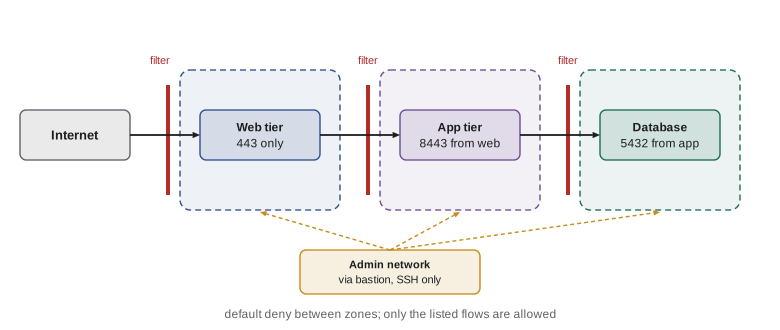
Zero trust architecture, described in NIST SP 800-207 and covered in CISSP-113, extends the idea to individual requests: no request is trusted because of where it comes from, every access is authenticated and authorized, and connections between services are encrypted and mutually authenticated, often with mutual TLS using the certificates from Lesson 6. Administrative access deserves special care: route it through a hardened bastion host or an identity-aware proxy, require multifactor authentication, and record sessions.
Detection and response
Prevention eventually fails, so systems must also detect attacks. Logs from operating systems, applications, firewalls and identity providers flow to a central system, often a security information and event management (SIEM) platform, where rules and analysts look for signs of trouble: bursts of failed logins, logins from impossible locations, new administrator accounts, unusual outbound connections or processes spawning shells. Endpoint detection and response (EDR) agents watch process behavior on hosts. Logs must be protected from tampering, retained long enough to investigate, and must not contain secrets.
from collections import defaultdict, deque
# Detecting bursts of failed logins per source with a sliding window (synthetic log)
log = [(t, "198.51.100.23", "FAIL") for t in range(0, 50, 5)] + \
      [(12, "203.0.113.5", "FAIL"), (40, "203.0.113.5", "OK"),
       (100, "192.0.2.44", "FAIL"), (400, "192.0.2.44", "FAIL")]
log.sort()
WINDOW, LIMIT = 60, 5
recent = defaultdict(deque)
for t, src, result in log:
    if result != "FAIL":
        continue
    q = recent[src]; q.append(t)
    while q and t - q[0] > WINDOW:
        q.popleft()
    if len(q) == LIMIT:
        print(f"t={t:>3}s ALERT {src}: {LIMIT} failures within {WINDOW}s -> throttle and notify")
print("sources seen:", sorted(recent))t= 20s ALERT 198.51.100.23: 5 failures within 60s -> throttle and notify sources seen: ['192.0.2.44', '198.51.100.23', '203.0.113.5']
Detection connects to legal duties. All 50 states have breach notification laws, public companies must disclose material cybersecurity incidents to the SEC within four business days of determining materiality, and sectors such as health care (HIPAA) have their own rules. CISA's final rule under CIRCIA, the incident reporting law for critical infrastructure, had not yet been published as of October 2026. Good logging is what makes timely, accurate reports possible.
Worked examples
Worked problem
Hardening a file-conversion service
A web service converts uploaded documents to PDF by calling an external converter. It runs as root in a container with a shell command built from the uploaded file name. List the changes.
Show solution
- Never use the uploaded name: save the upload under a server-generated random name, and call the converter with an argument list rather than a shell string.
- Run the service as an unprivileged user in the container, drop all capabilities, keep the root file system read-only and apply a seccomp profile.
- Apply CPU, memory and time limits to each conversion, and run conversions in a separate worker process or sandbox so a converter bug cannot reach the web tier.
- Restrict the worker's network egress to nothing, and log conversions and failures.
Answer: Server-generated names, argument lists, non-root sandboxed workers with resource limits, no egress, and logging.
Worked problem
Writing firewall rules
A clinic's booking system has a web server, an application server and a database. Staff administer servers from the 10.20.0.0/16 network. Write the essential rules.
Show solution
- Internet to web server: allow TCP 443 only (and 80 only to redirect to HTTPS).
- Web server to application server: allow only the application port; application server to database: allow only TCP 5432.
- Administration: allow SSH only from 10.20.0.0/16 to a bastion host, and from the bastion to the servers.
- End every rule set with default deny, log denied traffic, and also restrict outbound traffic from the database to nothing.
Answer: Allow only the specific flows between tiers and from the admin network via a bastion, with default deny in both directions.
Worked problem
Containers or virtual machines?
A university lets students submit code that a grading service compiles and runs. Should submissions run in containers or virtual machines?
Show solution
- Student code is untrusted and may try to escape its environment, so the isolation boundary matters more than start-up speed.
- Plain containers share the host kernel; a kernel bug could let code escape.
- Use lightweight virtual machines (or a sandboxed container runtime that adds a separate kernel layer), with no network access, strict CPU and memory limits and a time limit per run.
Answer: Run untrusted code in VMs or VM-backed sandboxes without network access and with strict resource limits.
Common mistakes
MistakeRunning a service as root is fine inside a container.
InsteadUse a non-root user, drop capabilities and avoid privileged mode; container root can still be dangerous.
MistakeBuilding a shell command from user data is safe if you strip semicolons.
InsteadPass arguments as a list to the program; never let a shell interpret untrusted data.
MistakeContainers isolate as strongly as virtual machines.
InsteadContainers share the host kernel; use VMs or sandboxed runtimes for untrusted code.
MistakeA strong perimeter firewall is enough.
InsteadSegment internally with default-deny rules and authenticate every request, assuming an attacker may be inside.
MistakeLogging everything, including passwords and tokens, helps investigations.
InsteadLog security events with context but never secrets, and protect logs from tampering.
Summary and key terms
- The kernel isolates processes through address spaces, privilege rings and checked system calls.
- Run services as unprivileged users with minimal capabilities, and split privileged and unprivileged parts.
- Start programs with argument lists, not shell strings; quote with shlex if a shell is unavoidable.
- Resource limits, cgroups, namespaces, seccomp and MAC policies contain compromised processes.
- Containers share a kernel; harden them and use VMs for untrusted workloads.
- Segment networks with default-deny rules and route administration through bastions; zero trust authenticates every request.
- Centralized logging and detection rules find what prevention misses and support legal reporting.
- Process isolation
- Separation of processes so each has its own memory and resources.
- Privilege separation
- Splitting a program so only a small part runs with elevated privileges.
- Linux capabilities
- Fine-grained pieces of root privilege that can be granted individually.
- seccomp
- A Linux mechanism that restricts which system calls a process may make.
- Namespace
- A Linux feature giving a process its own view of a system resource.
- cgroup
- A Linux control group that limits and accounts for resource use.
- Segmentation
- Dividing a network into zones with filtering between them.
- Default deny
- Blocking everything not explicitly allowed.
- Bastion host
- A hardened server through which administrative access is funnelled.
- SIEM
- Security information and event management: central collection and analysis of security logs.
Practice problems
Work each problem on paper first, then reveal the answer to check.
What two hardware features let the kernel isolate processes?
Show answer
Virtual memory (separate address spaces) and processor privilege levels.
Why should services not run as root?
Show answer
A compromise would give the attacker full control; least privilege limits the damage.
What is the safe way to call an external program with user-supplied data?
Show answer
Pass the program and arguments as a list, without a shell.
Which limit stopped the memory hog in the example?
Show answer
RLIMIT_AS, the 256 MiB address-space limit.
What does seccomp restrict?
Show answer
The system calls a process may make.
Why do containers isolate less strongly than virtual machines?
Show answer
All containers on a host share one kernel.
What does default deny mean in a firewall?
Show answer
Traffic not explicitly allowed by a rule is blocked.
Why route administration through a bastion host?
Show answer
It concentrates, hardens and records administrative access.
Name two events a detection system should alert on.
Show answer
Any two of bursts of failed logins, new admin accounts, impossible travel, unusual outbound connections or shells spawned by services.
Why must logs never contain passwords or full tokens?
Show answer
Anyone reading the logs could reuse them, and logs are often widely accessible.
Lesson quiz · 5 questions
Score 60% or more to complete this lesson.
Create a free account to save your progress, take quizzes and earn a certificate.